

Seed Speech TTS 3
- Node name
- BytePlus Seed Speech TTS 3
- Node ID
BytePlusSeedTTS3- Find it
- Double-click the canvas and search for “Seed Speech TTS 3”, or browse
BytePlus ModelArk/Speech - Keys needed
- Seed Speech API key
- Runs when
- Its output is used by another node, such as Save Image or Save Video. It is not an output node.
What it does
Section titled “What it does”Turn your text into speech with the fixed dola-seed-tts-3.0 model and its own preset voices or an authorized compatible custom voice. This is a separate node from Seed Speech TTS, which keeps the TTS 1/2 and ICL models.
You use the same Seed Speech API key in Settings > BytePlus, and each synthesis request bills your BytePlus account. Connect audio to Preview Audio to listen or Save Audio to keep the result; the node saves nothing itself.
On the canvas
Section titled “On the canvas”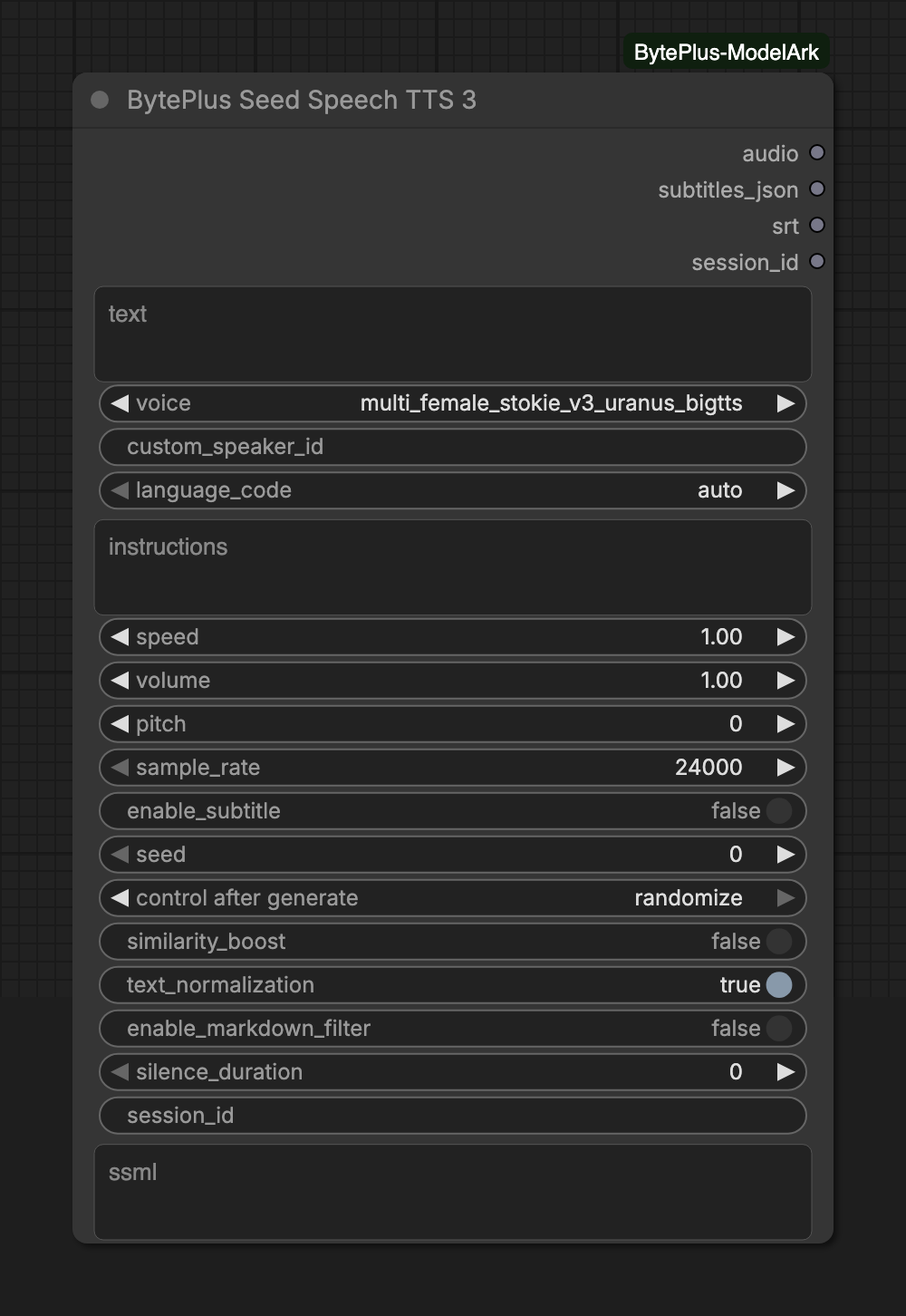
Inputs
Section titled “Inputs”| Input | Type | Default | What it does |
|---|---|---|---|
text | text | Up to 10000 characters. Leave empty when using ssml. | |
voice | choice | multi_female_stokie_v3_uranus_bigtts | A Seed TTS 3 preset voice. TTS 1/2 voices belong in the older TTS node. |
custom_speaker_id | text | Overrides voice with an authorized TTS 3-compatible voice ID. Older cloned voices may need upgrading in Seed Speech. | |
language_code | choice | auto | Output language or dialect. Explicit selection is recommended; auto detects the text language. |
instructions | text | Delivery instructions, one per line, for compatible voices. For example: Warm and natural. | |
speed | number | 1 | |
volume | number | 1 | |
pitch | integer | 0 | |
sample_rate | choice | 24000 | PCM sample rate in Hz. Use Save Audio to choose the saved file format. |
enable_subtitle | on/off | off | Return word timings for supported languages. With auto, unsupported detected languages cause an API error. |
seed | integer | 0 | Local rerun control only; not sent to the API. |
Advanced inputs (6)
| Input | Type | Default | What it does |
|---|---|---|---|
similarity_boostoptional | on/off | off | Enable similarity boost for compatible cloned voices. |
text_normalizationoptional | on/off | on | Normalize numbers, dates and similar text before synthesis. |
enable_markdown_filteroptional | on/off | off | Parse Markdown in the input text. |
silence_durationoptional | integer | 0 | Silence appended after the final sentence, in milliseconds. |
session_idoptional | text | Reuse one session ID for sequential requests in the same conversation. Leave empty for independent speech. | |
ssmloptional | text | Complete SSML instead of text, never both. Supported tags depend on the service version. |
Notes on inputs
Section titled “Notes on inputs”- Text or SSML: enter up to 10,000 characters in
text, or leave it empty and supply completessmlin advanced inputs. Provide exactly one, never both. Supported SSML tags depend on the service version. - Voice: choose from this node’s TTS 3 presets.
custom_speaker_idoverridesvoicewhen filled; use an authorized TTS 3-compatible ID enabled for your account. Browse the official TTS 3 voice list. - Delivery: put one instruction per line in
instructions, such as “Warm and natural”. Each non-empty line becomes a native instruction, not spoken text or the older node’scontext_text; support depends on the voice. - Speech controls:
speedandvolumeare multipliers from 0.5 to 2.0, with 1.0 unchanged, not the older node’sspeech_rateandloudness_ratepercentages.pitchtakes whole numbers from -12 to 12, with 0 unchanged. - Language and subtitles: prefer an explicit
language_codefor your text.enable_subtitlerequests word timings only for supported languages; withauto, an unsupported detected language can cause an API error. Check Supported Languages. - Conversation: leave
session_idempty for independent speech. For a continuing conversation, pass the returnedsession_idinto the next TTS 3 node’s input and run requests sequentially. Use a different session for each independent conversation.
Outputs
Section titled “Outputs”| Output | Type | What it holds |
|---|---|---|
audio | AUDIO | |
subtitles_json | text | |
srt | text | |
session_id | text |
Notes on outputs
Section titled “Notes on outputs”- The service streams newline-delimited JSON (JSONL), but this node accumulates the full response before returning ComfyUI
AUDIO. It does not play audio chunks as they arrive and returns no partial audio from an invalid or incomplete stream. subtitles_jsoncontainsrawalignments with word timings and normalizedsegments.srtuses those segment timings, not a separate cue for every word. Without returned timings, both lists are empty andsrtis empty.session_idcomes from the service and lets you link the next request to the conversation. It is not a task ID or a way to recover failed audio.
Limits and tips
Section titled “Limits and tips”- The node always requests PCM at 8000, 16000, 22050, 24000, 32000, 44100 or 48000 Hz (8, 16, 22.05, 24, 32, 44.1 or 48 kHz). Choose the saved file format with Save Audio.
- Seed Voice Clone still trains voices for
seed-icl-2.0. Its output is not automatically TTS 3-compatible: older voices may need upgrading and enabling in Seed Speech before you use them here. Use only voices you are authorized to use. - Advanced
similarity_boostis for compatible cloned voices.text_normalizationhandles numbers and dates,enable_markdown_filterparses Markdown, andsilence_durationadds silence after the final sentence only. pronunciation_dictionaryis not exposed because its dictionary-reference schema is still pending in the official API documentation.- The
seedinput controls local reruns only and is not sent to the API. Changing it can trigger another billed synthesis request; it does not make speech deterministic. - Submissions are never automatically retried. Before manually rerunning a failed request, remember that the first request may already have been billed.
- Interrupting stops local waiting only. The node sends no remote cancellation request, so accepted work may continue and be billed.
See the official TTS 3 HTTP streaming API for the service contract. The node exposes the controls above, not every API field.
Common errors
Section titled “Common errors”| Message | What to do |
|---|---|
No Seed Speech API key is set. |
Save your Seed Speech key in Settings > BytePlus. A ModelArk key does not substitute for it. See API keys. |
Provide exactly one of text or ssml; text accepts up to 10000 characters. |
Fill one input and clear the other. Split longer plain text into separate requests. |
This language does not support subtitle timestamps. |
Turn off enable_subtitle or choose a supported language_code. |
Seed TTS 3 returned an invalid or incomplete stream; no partial audio was returned. |
Check your connection and the service status before choosing whether to submit again. A failed response does not guarantee that no billing occurred. |
Seed TTS 3 failed (HTTP |
Read the reported code, message and parameter. Check your Seed Speech key and TTS 3 model/voice access; a custom voice may need upgrading. Keep the request and log IDs for support. |
Used in templates
Section titled “Used in templates”No template uses this node yet.