

Seed Voice Clone
- Template
- Seed Voice Clone, in the ComfyUI template browser under BytePlus
- Workflow file
- Seed Voice Clone.json
- BytePlus nodes
- Seed Voice Clone, Seed Speech TTS
- Keys needed
- Seed Speech API key
- Also uses
- Load Audio, Preview Audio (built into ComfyUI)
What it makes
Section titled “What it makes”Two audio clips. Seed Voice Clone trains a voice from your reference clip and returns a demo clip that says “Hello! This is a preview of my cloned voice.” Seed Speech TTS then speaks “Now I can say anything in my own voice.” with the cloned voice, using model seed-icl-2.0. The voice is identified by a speaker ID that the clone node passes to the TTS node.
The workflow
Section titled “The workflow”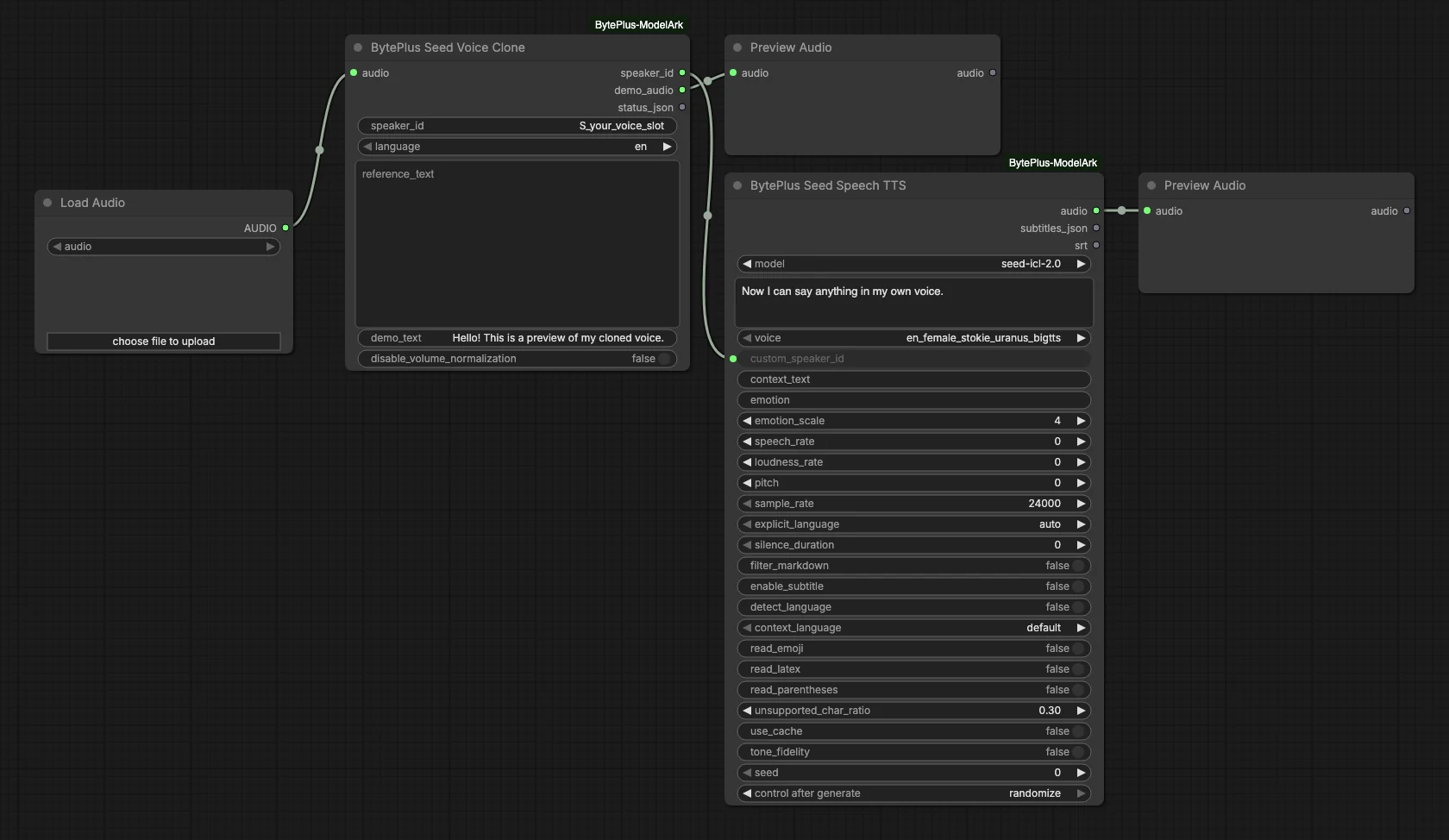
- Load Audio supplies the reference clip. The template ships with no file chosen.
- Seed Voice Clone trains the voice into your voice slot, with
languageen, and waits until it is ready. Itsdemo_audiogoes to a Preview Audio. - Seed Speech TTS receives the
speaker_idascustom_speaker_idand speaks the new sentence withseed-icl-2.0. - The second Preview Audio plays the result.
Run it
Section titled “Run it”- Add your Seed Speech API key in Settings → BytePlus if you have not yet (API keys). This is a separate key from the ModelArk key.
- Open the template browser and choose Seed Voice Clone under BytePlus.
- In Load Audio, choose a clip of 10 to 15 seconds of clear speech, up to 10 MB.
- In Seed Voice Clone, replace the placeholder in
speaker_idwith your voice slot ID (starts withS_, bought in the Seed Speech console) or your own postpaid custom voice ID. - Set
languageto the language spoken in the clip. Cross-language cloning is not supported, so write the TTS text in the same language. - Press Run. The demo clip and the new sentence appear in the two Preview Audio nodes.
Settings worth changing
Section titled “Settings worth changing”speaker_id: the voice slot to train into. Each slot can be trained 15 times.reference_text: optional, the words spoken in the clip. Training fails if the audio differs too much from it.demo_text: optional text for the demo clip, 4 to 80 characters in the same language.text(TTS): the sentence to say in the cloned voice.tone_fidelity(TTS): stays as close as possible to the training audio’s voice, emotion and accent, for the same language only.
Example result
Section titled “Example result”Replace S_your_voice_slot with a valid voice slot from Seed Speech, then run the template to create your voice and hear the TTS result.
Time and cost
Section titled “Time and cost”Seed Voice Clone trains into a voice slot from the Seed Speech console. Every run with changed inputs trains the slot again, and a slot can be trained 15 times. According to the pack’s README, the first TTS call with the voice starts the slot’s billing. The TTS seed control is set to randomize, so every run speaks the sentence again; set it to fixed and ComfyUI reuses the cached result of an unchanged node.
Related
Section titled “Related”- Nodes: Seed Voice Clone, Seed Speech TTS
- Next step: Multilingual Dubbing transcribes, translates and speaks a clip with Seed Speech.