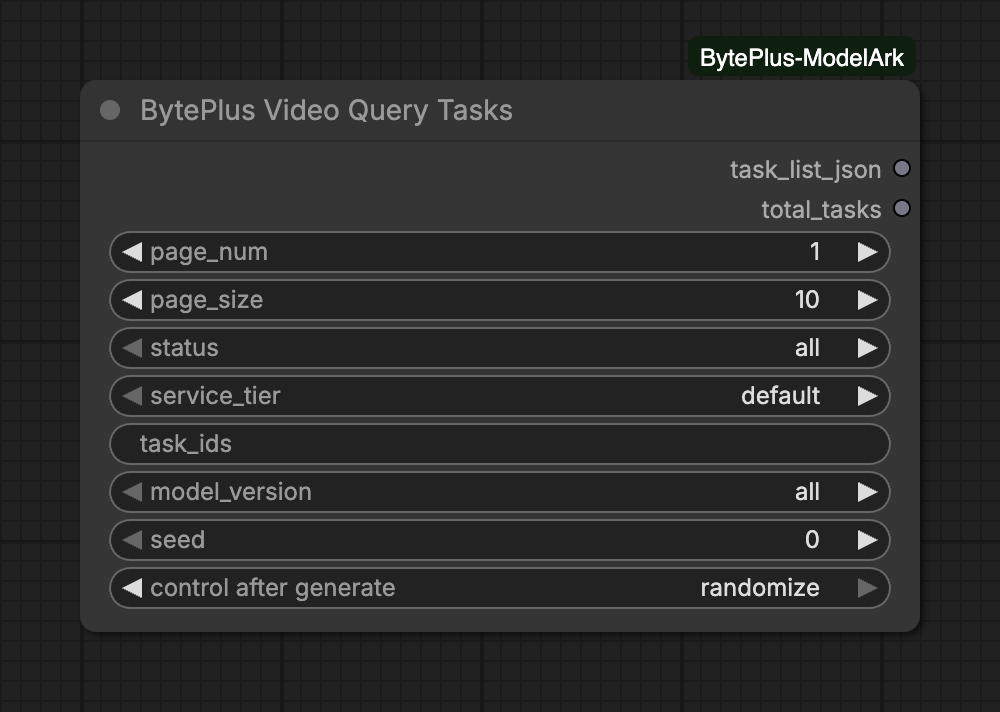
Lists the video generation tasks of your ModelArk account as JSON, newest first. Filter by status, model or task ID to check on a task that is still running, to see why one failed, or to find a task whose ID you lost.
It starts no generation, so it creates no new video. It is an output node: it runs on its own, with nothing connected to its outputs.
Task IDs: put one ID per line in task_ids to look up those tasks. Leave it empty to list by status and model_version.
Where to find a task ID: a single-video run prints a Task ID line in the ComfyUI console. A Seedance 2.5 Draft run also outputs draft_task_id. With non_blocking on, the video node returns the pending IDs in its response output.
Service tier: tasks are listed per tier. Set service_tier to flex to see tasks you started with enable_offline_inference.
Model:model_version uses model names such as dreamina-seedance-2-5, not the labels on the video nodes. It also lists the retired seedance-1-5-pro, so you can still find its old tasks.
Seed:seed has no effect on the result. It only makes ComfyUI run the node again when the value changes: with control after generate on randomize (the default) it changes after every run, so the list is fetched anew each time.
ModelArk keeps tasks for 7 days, so older tasks no longer appear.
Use page_num and page_size (each 1 to 500) to walk through a long list.
Looking up task IDs that all do not exist stops the node with a “No task found” error. If only some are missing, the node lists the ones it found and writes “Not found” with the missing IDs to the console.
A task that was still running when you interrupted a video node cannot be cancelled and is billed. Look it up here with the ID from the node’s message. See Interrupts and cancelling.
If a video node reports that a succeeded (and billed) task’s video could not be downloaded, the video stays available for 24 hours. Look the task up here, or in the ModelArk console, to get it.