

Sound Design
- Template
- Sound Design, in the ComfyUI template browser under BytePlus
- Workflow file
- Sound Design.json
- BytePlus nodes
- BytePlus LLM, Seed Audio 1.0
- Keys needed
- ModelArk API key, Seed Speech API key
- Also uses
- MarkdownNote, Preview as Text, Save Audio (Advanced), Text (Multiline) (built into ComfyUI)
What it makes
Section titled “What it makes”Two alternative audio takes of the same scene, such as a rainy harbour at night. It is for video makers and game designers who need atmosphere or effects but do not want to write technical sound prompts. The idea: a language model acts as the sound designer and turns a loose scene into a clear list of sounds with distance and mood, and Seed Audio renders it twice so you can pick the better take.
The workflow
Section titled “The workflow”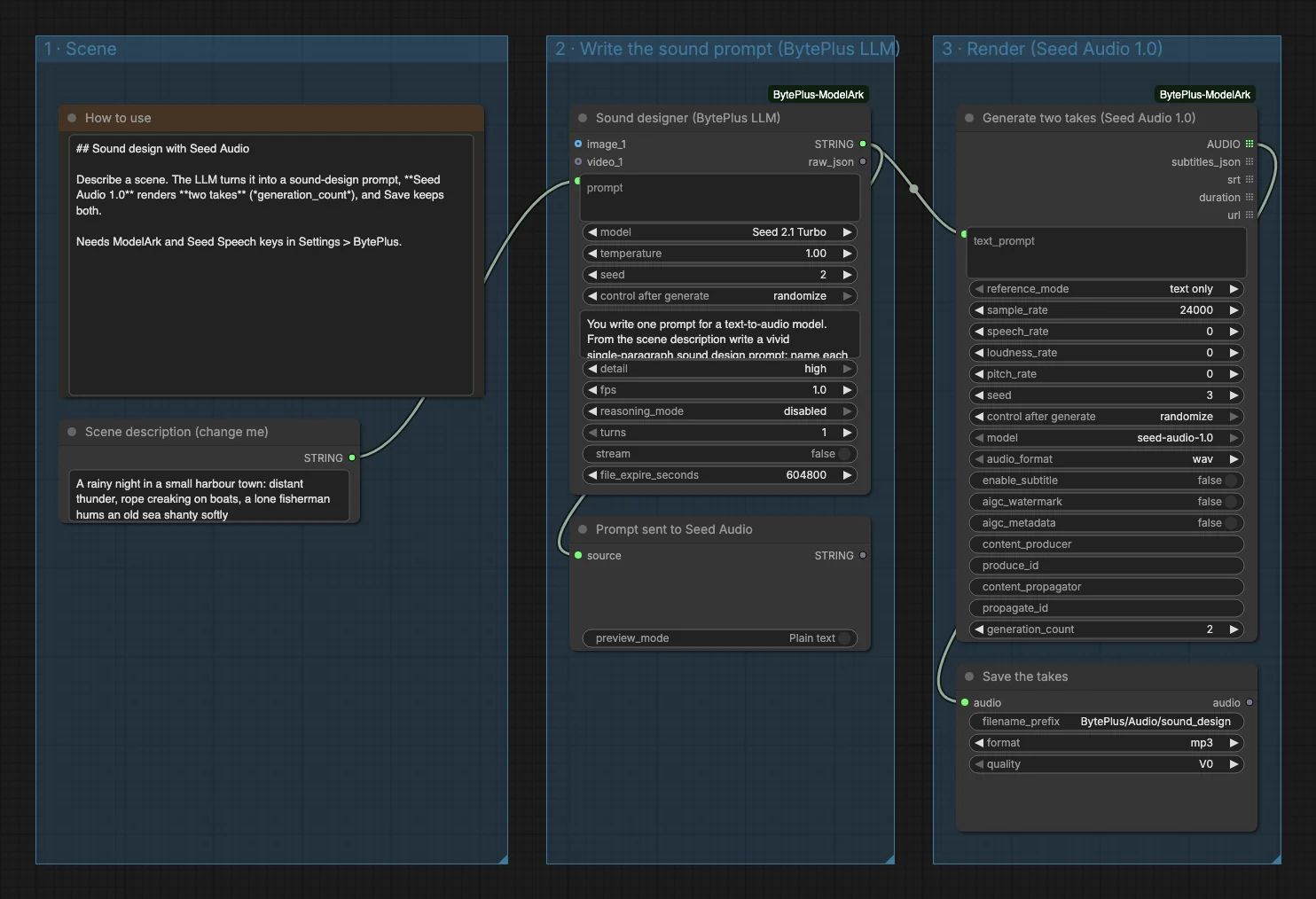
- A Scene description (change me) text node holds the idea. The template describes thunder, creaking ropes on boats and a fisherman humming a sea shanty.
- BytePlus LLM (Seed 2.1 Turbo, titled “Sound designer”) writes one sound-design paragraph of at most 60 words: each sound, its distance and its mood. A Preview as Text node shows the prompt.
- Seed Audio 1.0 turns the prompt into sound with
reference_modetext only, andgeneration_countset to 2 so you get two takes. - Save Audio (Advanced) (titled “Save the takes”) keeps both takes as MP3 files in
BytePlus/Audio/sound_design.
Run it
Section titled “Run it”- Add your ModelArk API key and your Seed Speech API key in Settings → BytePlus if you have not yet (API keys). The template needs both.
- Open the template browser and choose Sound Design under BytePlus.
- Replace the text in Scene description (change me) with your own scene.
- Press Run. Read the sound prompt first, then listen to both takes.
Settings worth changing
Section titled “Settings worth changing”- Scene description: name the place, the time and two or three sounds you must hear.
generation_count: each take is a separate request, run in parallel and billed on its own. More takes means more choice and more cost.- System prompt of the LLM: change the word limit or the style, for example “film foley” instead of ambience.
audio_formatandsample_rate: the node produces WAV at 24000 Hz here, and Save Audio (Advanced) converts to MP3 at quality V0. Change its format if you need a lossless file.reference_mode: switch from text only to audio reference (clone up to three voices), image reference (derive a voice from a character image) or preset voice (a built-in voice reads the prompt).
Example result
Section titled “Example result”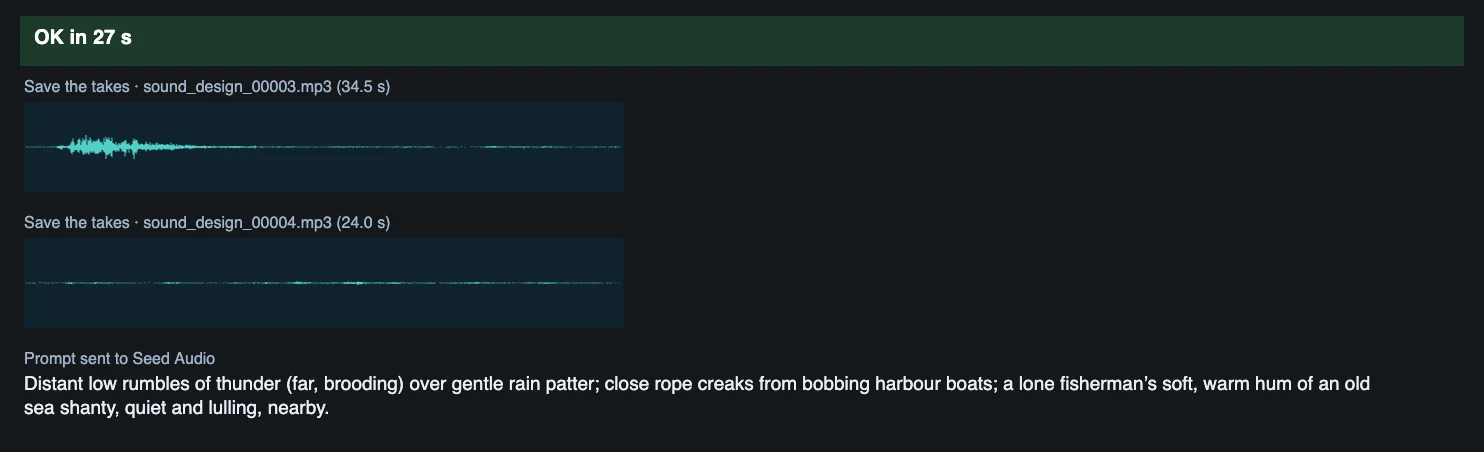
Time and cost
Section titled “Time and cost”The LLM bills on your ModelArk account; Seed Audio bills on your Seed Speech account, and each take is a separate request. The seed controls are set to randomize, so every run writes a new prompt and two new takes and bills again. Set a control to fixed and ComfyUI reuses the cached result of an unchanged node without billing. The two takes differ from each other (34.5 and 24.0 seconds in this example), so listen to both.
Related
Section titled “Related”- Nodes: BytePlus LLM, Seed Audio 1.0
- Next step: Seed Audio shows the audio node on its own, with references and subtitles.