

Image and Video References
- Template
- Image and Video References, in the ComfyUI template browser under BytePlus
- Workflow file
- Image and Video References.json
- BytePlus nodes
- Seedance 2.5 Reference to Video
- Keys needed
- ModelArk API key
- Also uses
- Load Image, Load Video, MarkdownNote, Save Video (built into ComfyUI)
What it makes
Section titled “What it makes”A new five-second video guided by two references. @Image 1 supplies the subject’s appearance and style; @Video 1 supplies camera movement and pacing. The prompt assigns a separate purpose to each reference so you can combine them deliberately.
The workflow
Section titled “The workflow”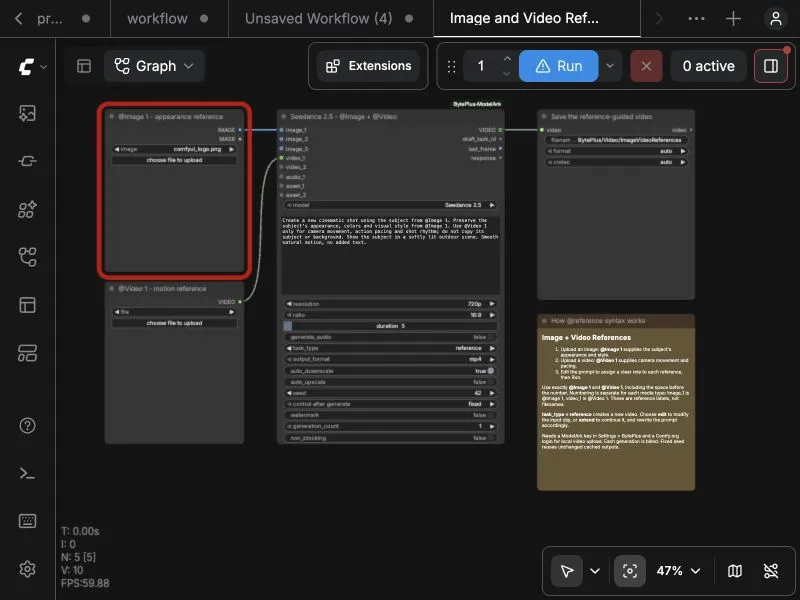
- Load Image, titled @Image 1 - appearance reference, connects to
image_1in Reference to Video. - Load Video, titled @Video 1 - motion reference, connects to
video_1in the same node. - Seedance 2.5 Reference to Video uses
task_typereferenceto create a new clip from both inputs. - Save Video displays and saves the output.
Run it
Section titled “Run it”- Add your ModelArk key in Settings → BytePlus (API keys). Log in to Comfy.org in ComfyUI so the node can upload a local reference video.
- Open Image and Video References in the template browser.
- Upload an image of the subject you want to show and a short video with the camera movement or pacing you want to follow.
- Edit the prompt to describe what each reference contributes, then press Run.
- Review the result in Save Video. Adjust the prompt or seed for another take.
Settings worth changing
Section titled “Settings worth changing”- Reference roles: specify whether each input contributes appearance, motion, setting or style. Describe what should be excluded too.
- Labels: use
@Image 1forimage_1and@Video 1forvideo_1, with a space before the number. Images and videos are numbered separately. The labels refer to connected media, not filenames. task_type:referencecreates a new clip. Useeditto change an existing video, orextendto continue it, and rewrite the prompt for that purpose.- Resolution and duration: the template starts at 720p and five seconds.
- Seed: starts at 42 with
fixed; change it for a new take. - Audio: generated audio is off. Enable it and describe the sound if needed.
Example result
Section titled “Example result”The shipped prompt separates subject appearance from camera motion:
Create a new cinematic shot using the subject from @Image 1. Preserve the subject’s appearance, colors and visual style from @Image 1. Use @Video 1 only for camera movement, action pacing and shot rhythm; do not copy its subject or background. Show the subject in a softly lit outdoor scene. Smooth natural motion, no added text.
For a video edit instead, set task_type to edit and use a prompt such as: Change the background of @Video 1 to the environment in @Image 1. Preserve the original subject, action and camera movement. A reference image does not fix the first or last frame; use First-Last-Frame to Video when you need those endpoints.
Time and cost
Section titled “Time and cost”Each generation bills one Seedance task on your ModelArk account. Generation time depends on the model, media and service load. Unchanged inputs with a fixed seed reuse ComfyUI’s cached output; changing the image, video, prompt or seed requests a new generation.
Related
Section titled “Related”- Reference to Video
- Reference media
- Image to Video - Seedance 2.5 and 2.0 animates an image as the first frame.
- Seedance Video Extension continues a video.
- BytePlus Seedance 2.5 guide