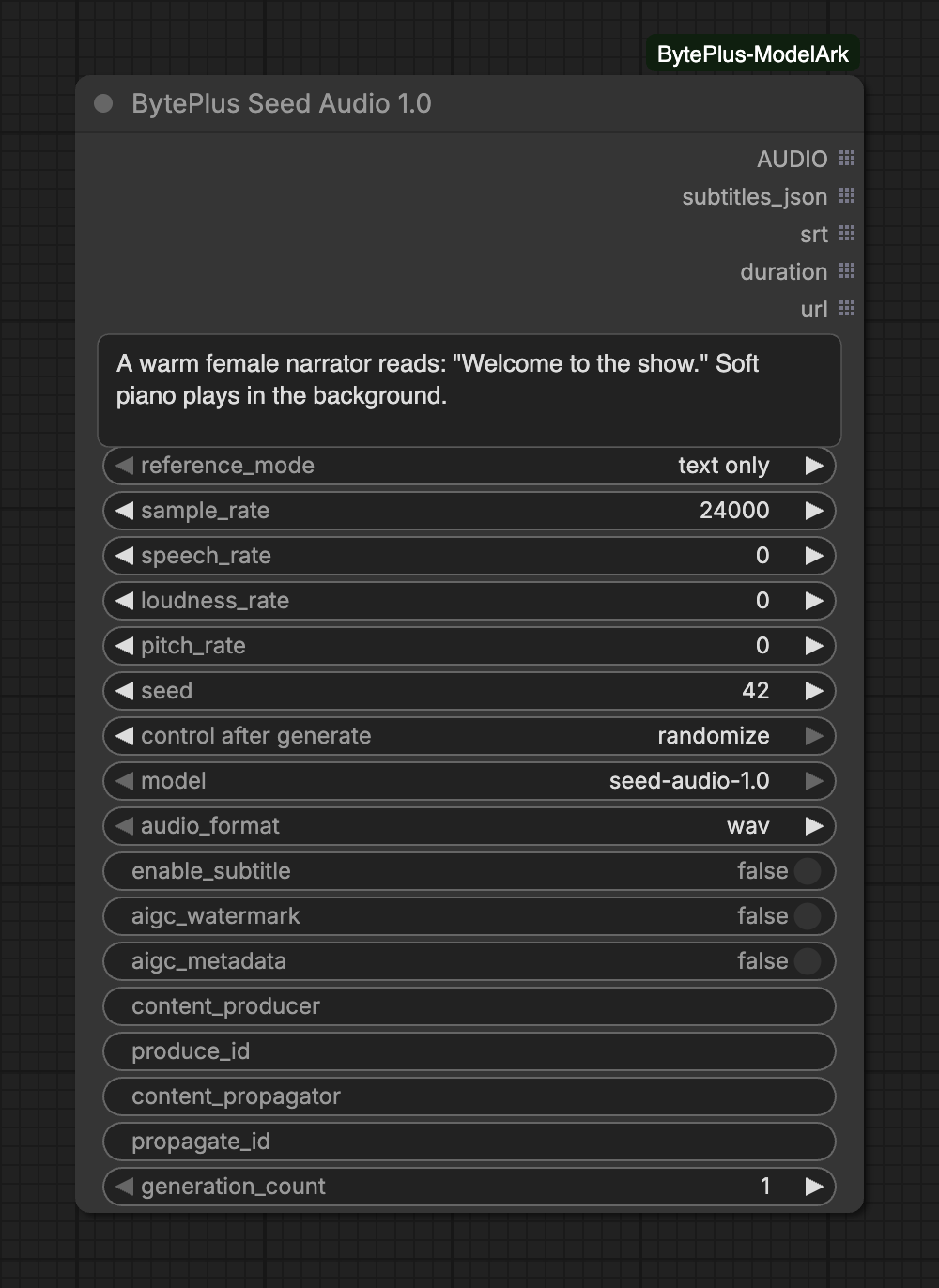
Creates audio from a single prompt: you describe the voice, the mood, the background music and the sound effects, and you write the lines to speak. The voice can come from the prompt alone, from up to three reference clips, from a character image or from a built-in preset voice.
The node needs your separate Seed Speech API key (Singapore region only), and every request it sends is billed. It does not save anything itself: connect Save Audio or Preview Audio to keep or hear the result.
Describe the voice(s), emotion, pacing, ambience, background music and sound effects, and include the lines to speak (name characters inline for dialogue). In 'audio reference' mode, refer to connected clips by order as @Audio1, @Audio2, @Audio3. A quoted line can start with a timestamp range that controls when and how long it is spoken, e.g. "[5.5s:8.0s] Wait for me!". Write the prompt in the same language as the lines to speak. Maximum 3000 characters.
Pitch shift in semitones (-12 to 12).Range: -12–12
seed
integer
42
Seed controls whether the node should re-run; results are non-deterministic regardless of seed.Range: 0–2147483647
modeloptional
choice
seed-audio-1.0
seed-audio-1.0: 20 languages (English, Chinese, Japanese, Korean, Mexican & Castilian Spanish, Indonesian, German, Brazilian Portuguese, French, Thai, Vietnamese, Malay, Filipino, Italian, Russian, Dutch, Polish, Turkish, Swedish) plus per-sentence timing control via "[5.5s:8.0s] ..." timestamps.Choices: seed-audio-1.0
reference_mode is required and decides which of the inputs below appear. How to condition the voice: 'text only' (describe everything in the prompt), 'audio reference' (clone up to 3 voices, tagged @Audio1-3), 'image reference' (derive a voice from one character image), or 'preset voice' (pick a built-in named voice that reads the prompt).
Reference clip for voice cloning, tagged @Audio1 in the prompt. Up to 30s.
reference_audio_2optional
AUDIO
Reference clip tagged @Audio2 in the prompt. Up to 30s.
reference_audio_3optional
AUDIO
Reference clip tagged @Audio3 in the prompt. Up to 30s.
Advanced inputs for audio reference
Input
Type
Default
What it does
ref_audio_1_sourceoptional
text
Instead of reference_audio_1: a TTS 2.0 or cloned speaker ID, or an audio URL (http(s)://). Tagged @Audio1 in the prompt.
ref_audio_2_sourceoptional
text
Instead of reference_audio_2: a TTS 2.0 or cloned speaker ID, or an audio URL (http(s)://). Tagged @Audio2 in the prompt.
ref_audio_3_sourceoptional
text
Instead of reference_audio_3: a TTS 2.0 or cloned speaker ID, or an audio URL (http(s)://). Tagged @Audio3 in the prompt.
Input
Type
Default
What it does
reference_imageoptional
IMAGE
A single character image; the model derives a voice from it. Cannot be combined with reference audio.
Advanced inputs for image reference
Input
Type
Default
What it does
ref_image_urloptional
text
Instead of reference_image: a character image URL (http(s)://).
Input
Type
Default
What it does
preset_voice
choice
Stokie (Female, American English)
A built-in TTS 2.0 voice that reads the prompt. No reference clip needed, and @AudioN tags are not used in this mode.Choices: Stokie (Female, American English), Dacey (Female, American English), Tim (Male, American English), Blair (Female, American English), Kevin (Male, American English), Jamie (Male, American English), Hayley (Female, American English), Skye (Female, American English), Adrian (Male, American English), Alex (Male, American English), Dylan (Male, American English), Ronald (Male, American English) … (177 in total)
Advanced inputs (9)
Input
Type
Default
What it does
audio_formatoptional
choice
wav
Format requested from the API (the output is decoded to AUDIO either way).Choices: wav, mp3, ogg_opus, pcm
enable_subtitleoptional
on/off
off
Return sentence and word timestamps (subtitles_json and srt outputs).
aigc_watermarkoptional
on/off
off
Add the audible AI-generated marker at the end of the audio.
aigc_metadataoptional
on/off
off
Implicit watermark: write AI-generation metadata into the audio header.
content_produceroptional
text
Implicit watermark: name or code of the synthesis provider.
produce_idoptional
text
Implicit watermark: content production ID.
content_propagatoroptional
text
Implicit watermark: name or code of the distributor.
propagate_idoptional
text
Implicit watermark: content distribution ID.
generation_countoptional
integer
1
Number of separate generations to run in parallel, each billed as its own request. The API has no seed or variation setting, so every run is a fresh take of the same prompt. All outputs are lists in the same order: the next node runs once per clip.Range: 1–16
Reference mode:text only uses the prompt alone. audio reference clones up to three voices, which you call @Audio1, @Audio2 and @Audio3 in the prompt. image reference derives a voice from one character image (reference_image, or an http(s) link in ref_image_url). preset voice reads the whole prompt in the voice you pick in preset_voice. Only audio reference uses @AudioN tags: the node rejects them in text only and image reference.
Audio references: each slot takes either a connected clip (up to 30 seconds) or a text source in ref_audio_N_source: a TTS 2.0 or cloned speaker ID, or an audio URL. Use one or the other per slot, and fill the slots in order without gaps. A cloned voice from Seed Voice Clone fits here.
Timing: start a quoted line with a time range, such as [5.5s:8.0s] Wait for me!, to control when and how long it is spoken.
Subtitles: turn on enable_subtitle to fill subtitles_json (the timing data the service returns, plus a normalized segments list) and srt (one entry per sentence).
Several takes: raise generation_count (1 to 16). The API has no seed, so every take is a fresh result of the same prompt. seed only makes ComfyUI run the node again.
All five outputs are lists with the same order, one entry per clip. A node connected to them runs once per clip.
duration is the length the service reports, in seconds. If the service gives none, the node measures the decoded audio.
url is the link Seed Speech returns for the clip. The link can omit the file extension. Seed Speech ASR can still read it: with audio_format on auto, the standard models detect the format from the file.
audio_format only changes what is requested from the API. The AUDIO output is always decoded audio.
Without enable_subtitle no subtitles are requested, so srt stays empty and subtitles_json has no segments.
The prompt holds at most 3000 characters. Write it in the same language as the lines to speak.
One clip is up to 2 minutes long. Seed Audio 1.0 supports 20 languages, listed in the tooltip of model.
Reference clips are limited to 30 seconds and 10 MB each. Of a reference image batch only the first image is used. It is scaled to between 160,000 and 4,194,304 pixels (2048 x 2048) and sent as JPEG, which must also stay within 10 MB.
Each take in a generation_count run is billed on its own and runs in parallel. A failed take is logged and skipped, and the node only fails when every take fails.
With enable_subtitle on, a clip can occasionally come back without subtitles. The node writes a message to the console and leaves that clip’s srt empty. Run it again to get them.
The advanced watermark inputs add an audible AI marker (aigc_watermark) or metadata in the audio header (aigc_metadata, with the optional provider and ID fields).
Interrupting a run stops the node’s wait and drops the takes still in progress. The node sends no cancel request, so a take that was already sent may still be billed.