

Seed Speech TTS
- Node name
- BytePlus Seed Speech TTS
- Node ID
BytePlusSeedTTS- Find it
- Double-click the canvas and search for “Seed Speech TTS”, or browse
BytePlus ModelArk/Speech - Keys needed
- Seed Speech API key
- Runs when
- Its output is used by another node, such as Save Image or Save Video. It is not an output node.
What it does
Section titled “What it does”Reads your text aloud with a Seed Speech voice and returns it as ComfyUI audio. Pick a voice from the voice list with seed-tts-2.0, or type a speaker ID in custom_speaker_id to use a TTS 1.0 speaker or a voice you cloned.
The node needs your separate Seed Speech API key (Singapore region only), and every run sends one billed request. It does not save anything itself: connect Save Audio or Preview Audio to keep or hear the result.
On the canvas
Section titled “On the canvas”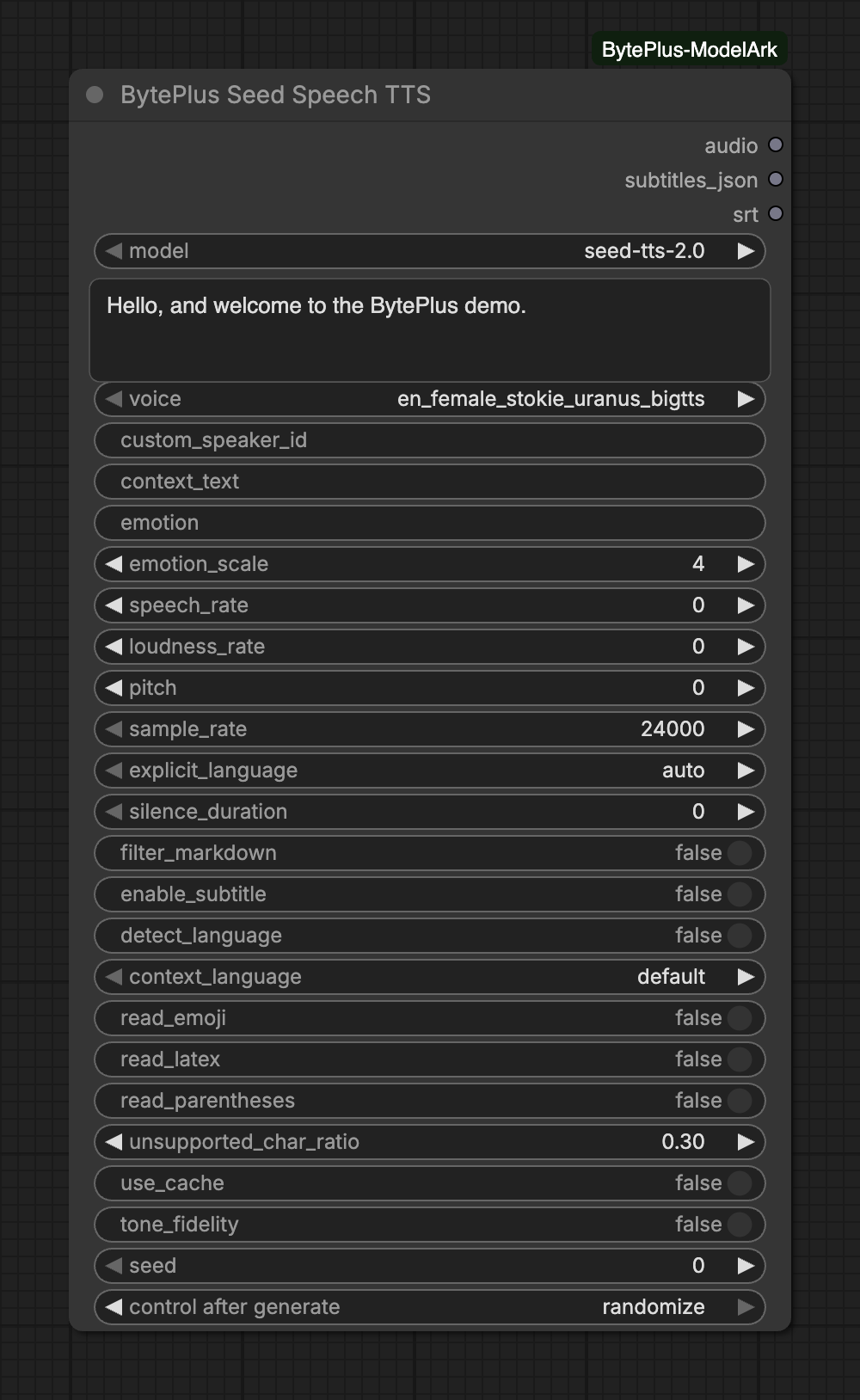
Inputs
Section titled “Inputs”| Input | Type | Default | What it does |
|---|---|---|---|
model | choice | seed-tts-2.0 | seed-tts-2.0 for the voice list; seed-icl-* for cloned voices (custom_speaker_id). |
text | text | ||
voice | choice | en_female_stokie_uranus_bigtts | TTS 2.0 voice. Each voice supports specific languages; see the Seed Speech voice list. |
custom_speaker_id | text | Overrides voice: a cloned voice (connect Seed Voice Clone's speaker_id, model seed-icl-2.0) or a TTS 1.0 speaker ID. | |
context_text | text | TTS 2.0 only: style instruction or preceding dialogue, e.g. 'Speak slowly, sounding heartbroken.' Not billed. | |
emotion | text | Emotion for voices that support it, e.g. happy, sad, angry. Empty = neutral. | |
emotion_scale | integer | 4 | |
speech_rate | integer | 0 | 100 = 2x speed, -50 = 0.5x. |
loudness_rate | integer | 0 | 100 = 2x volume, -50 = 0.5x. |
pitch | integer | 0 | Pitch shift in semitones. |
sample_rate | choice | 24000 | Hz. seed-tts-2.0 supports 24000, 16000 and 8000. |
explicit_language | choice | auto | Read only text in this language. auto handles mixed Chinese and English. |
silence_duration | integer | 0 | Silence added after the last sentence, in ms. |
filter_markdown | on/off | off | Strip Markdown syntax so **bold** is read as 'bold'. |
enable_subtitle | on/off | off | Return timestamps (Chinese and English): subtitles for 2.0 voices, word timestamps for 1.0 voices. |
seed | integer | 0 | Not sent to the API; change it to synthesize again. |
Advanced inputs (8)
| Input | Type | Default | What it does |
|---|---|---|---|
detect_language | on/off | off | Detect the text language automatically. |
context_language | choice | default | Reference language for Western European text: default English, id Indonesian, es Mexican Spanish, pt Brazilian Portuguese. |
read_emoji | on/off | off | Keep emoji in the text instead of filtering them out. |
read_latex | on/off | off | Read LaTeX formulas aloud (also enables filter_markdown). |
read_parentheses | on/off | off | Read text inside parentheses (filtered out by default). |
unsupported_char_ratio | number | 0.3 | Fail when more than this share of the text is in an unsupported language. |
use_cache | on/off | off | Reuse audio synthesized for identical text in the last hour (no timestamps from cache). |
tone_fidelity | on/off | off | seed-icl-2.0 only: stay as close as possible to the training audio's voice, emotion and accent (same language only). |
Notes on inputs
Section titled “Notes on inputs”- Models:
seed-tts-2.0uses thevoicelist.seed-tts-1.0,seed-icl-2.0andseed-icl-1.0have no entry in that list: they need a speaker ID incustom_speaker_id. Useseed-icl-2.0with thespeaker_idfrom Seed Voice Clone. custom_speaker_idwins: when it is filled,voiceis ignored. Thevoicelist always has a value, so you can leave it as it is.- Style:
context_text(TTS 2.0 only) takes an instruction such as “Speak slowly, sounding heartbroken.”emotionandemotion_scalework for voices that support emotions. An emptyemotionmeans neutral. - Subtitles: turn on
enable_subtitleto fillsubtitles_jsonandsrt. The 2.0 models (seed-tts-2.0,seed-icl-2.0) return subtitles, the 1.0 models word timestamps. - Language:
explicit_languagelimits reading to one language.autocopes with mixed Chinese and English. seed: it is not sent to the API. Change it to synthesize the same text again.
Outputs
Section titled “Outputs”| Output | Type | What it holds |
|---|---|---|
audio | AUDIO | |
subtitles_json | text | |
srt | text |
Notes on outputs
Section titled “Notes on outputs”audiois decoded from the raw PCM the API streams back, at thesample_rateyou chose.srtstays empty andsubtitles_jsonhas no segments unlessenable_subtitleis on and the service returns timestamps.
Limits and tips
Section titled “Limits and tips”seed-tts-2.0accepts only the sample rates 24000, 16000 and 8000. The node stops with an error for the others.context_textworks only withseed-tts-2.0, andtone_fidelityonly withseed-icl-2.0(same language as the training audio).- Timestamps are available for Chinese and English. Cached audio (
use_cache, identical text within the last hour) comes without timestamps. - A voice supports specific languages. If the service says the voice is not available, check that the model matches the voice: TTS 2.0 voices need
seed-tts-2.0, cloned voices needseed-icl-*. filter_markdownand the advancedread_emoji,read_latexandread_parenthesescontrol how Markdown, emoji, LaTeX and text in parentheses are read.unsupported_char_ratiomakes the request fail when too much of the text is in a language the voice cannot read.- Interrupting a run stops the node’s wait. The node sends no cancel request, so a request that was already sent may still be billed.
Common errors
Section titled “Common errors”| Message | What to do |
|---|---|
[BytePlus] No Seed Speech API key is set. Add it in Settings > BytePlus … |
Add the Seed Speech key in Settings → BytePlus. See API keys. |
[BytePlus] … needs custom_speaker_id: the voice list only holds TTS 2.0 voices. |
You picked seed-tts-1.0 or a seed-icl-* model. Fill custom_speaker_id, or switch to seed-tts-2.0. |
… The voice is not available for this key or model. Check the speaker ID … |
Check the speaker ID and that the model fits it. TTS 2.0 voices need seed-tts-2.0, cloned voices seed-icl-*. |
[BytePlus] seed-tts-2.0 supports the sample rates 24000, 16000 and 8000 Hz. |
Set sample_rate to 24000, 16000 or 8000. |
… The text is longer than the model accepts. |
Split the text into shorter parts and run the node once per part. |