

Consistent Character Shots
- Template
- Consistent Character Shots, in the ComfyUI template browser under BytePlus
- Workflow file
- Consistent Character Shots.json
- BytePlus nodes
- Seedream 4.5 & 5.0, Create Image Asset, Seedance 2.5 Reference to Video ×3
- Keys needed
- ModelArk API key, IAM access key and secret key
- Also uses
- Concatenate Video, Extract Text, MarkdownNote, Preview as Text, Save Video, Text (Multiline) (built into ComfyUI)
What it makes
Section titled “What it makes”A 15-second 16:9 sequence of three shots in which the same invented person walks into a cafe, reads a letter and says goodbye in the street. It is for storytellers who need one character to stay recognisable across clips. The idea: paint the character once, register the portrait in your private asset library, and give that asset to every Seedance shot as asset_1.
The workflow
Section titled “The workflow”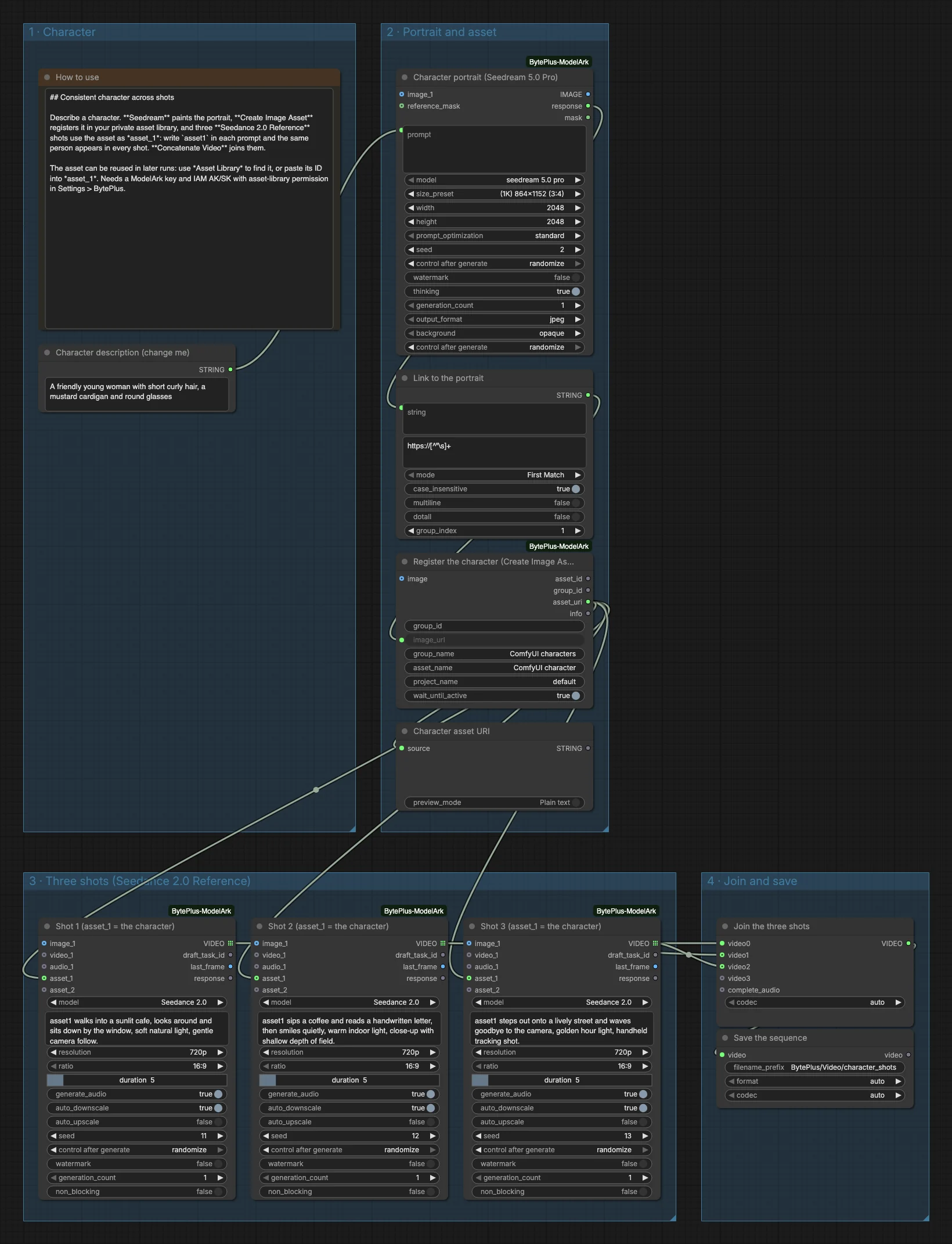
- A Character description (change me) text node holds the character. The template uses a young woman with short curly hair, a mustard cardigan and round glasses.
- Seedream 4.5 & 5.0 (Seedream 5.0 Pro, 3:4 at 1K) paints the portrait. An Extract Text node turns its
responseinto an image link. - Create Image Asset registers that link in your private asset library, in the group “ComfyUI characters”, and waits until the asset is active. A Preview as Text node shows the
asset://link it outputs. - Three Seedance 2.5 Reference to Video nodes (titled “Shot 1”, “Shot 2” and “Shot 3”), set to the model Seedance 2.0, each get that link as
asset_1. Each prompt starts withasset1, which the node replaces with the reference. All three make 5 seconds at 720p, 16:9, with audio. - Concatenate Video (titled “Join the three shots”) joins the shots in order, and Save Video writes the result to
BytePlus/Video/character_shots.
Run it
Section titled “Run it”- Add your ModelArk API key and the IAM access key and secret key in Settings → BytePlus if you have not yet (API keys). The IAM keys need asset-library permission, and your account also needs Dreamina Seedance Advanced Creation Rights.
- Open the template browser and choose Consistent Character Shots under BytePlus.
- Rewrite Character description (change me) and, if you like, the three shot prompts.
- Press Run. The portrait comes first, then the asset, then the three shots.
Settings worth changing
Section titled “Settings worth changing”- Character description: be specific about hair, clothes and accessories, because the portrait is the only reference every shot gets.
- Shot prompts: keep
asset1as the subject of each sentence and change the action, the place and the light. group_nameandasset_namein Create Image Asset: use one group per person, so that later runs can add more assets to it.durationandresolutionin each shot: 5 seconds at 720p by default.- A fourth shot: copy a shot node, connect the same asset link and join it in Concatenate Video.
Example result
Section titled “Example result”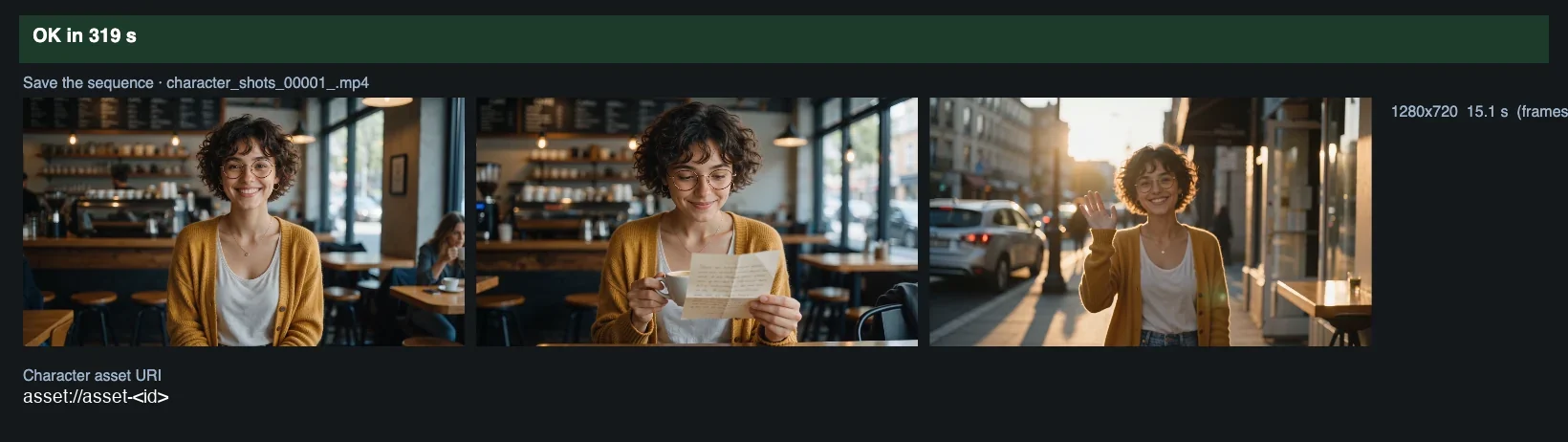
Time and cost
Section titled “Time and cost”Seedream and the three Seedance nodes bill on your ModelArk account, so three video generations are billed per run. The seed controls are set to randomize, so every run paints a new portrait and makes three new shots and bills again. Set a control to fixed and ComfyUI reuses the cached result of an unchanged node without billing. The asset can be reused in later workflows: look it up with Asset Library or paste its ID into asset_1. No Comfy.org login is needed because the portrait goes to the asset library as a link.
Related
Section titled “Related”- Nodes: Seedream 4.5 & 5.0, Create Image Asset, Seedance 2.5 Reference to Video
- Next step: Text to Image to Video is the simpler path when you do not need the same person across shots.