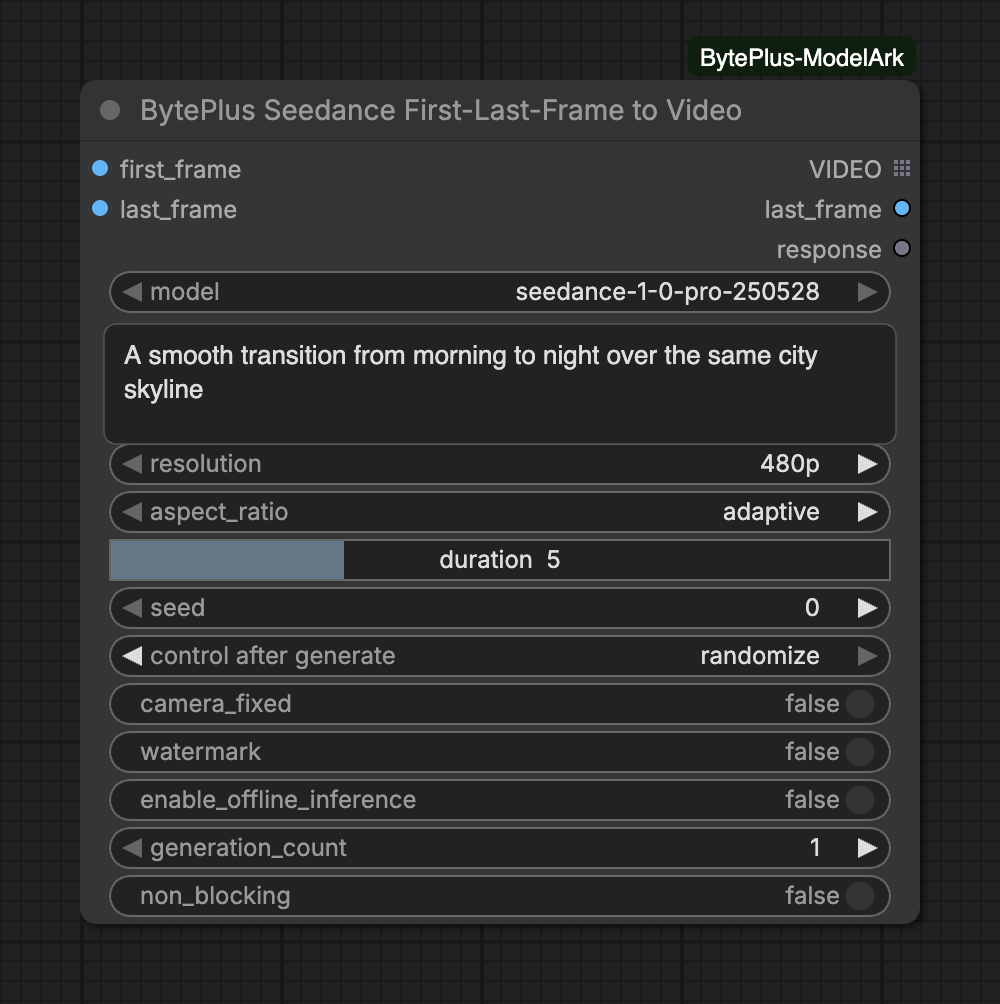
Creates a video that begins on first_frame and ends on last_frame, with Seedance 1.0 Pro on BytePlus ModelArk. The prompt describes how the scene gets from one image to the other.
The node bills for every video it generates and waits until the task finishes. It does not save anything itself: connect Save Video to keep the result. Seedance 1.0 is the older family; the newer Seedance 2.5 First-Last-Frame to Video node covers the same job with the 2.5 models.
Model: only seedance-1-0-pro-250528 (Pro) is offered. Pro Fast does not support a last frame.
Both frames are required. Connect an image to first_frame and one to last_frame.
Aspect ratio:adaptive leaves the choice of ratio to the model. Pick a fixed ratio to force one.
Settings go in the widgets: do not write flags such as --resolution, --ratio, --dur, --frames, --seed, --camerafixed or --watermark in the prompt. The node refuses a prompt that contains them.
Camera and price:camera_fixed adds an instruction to keep the camera still; BytePlus does not guarantee the effect. enable_offline_inference uses the flex tier: it costs less, but the result can take up to 48 hours.
Several videos in one run: raise generation_count. The runs go in parallel and generation N uses seed + N, so the videos differ.
VIDEO is a list output. With generation_count above 1, the next node runs once per video.
last_frame holds the final frame of every video as one image batch, in the same order.
With non_blocking on, the first run returns at once with the task IDs in response and no video, so nodes connected to VIDEO or last_frame are skipped. Run the node again to collect the finished video.
Each frame must be 300 to 6000 pixels on each side, with a width to height ratio from 0.4 to 2.5. The node checks both frames before it sends anything.
Frames are sent inline as base64. A single image cannot exceed 30 MB in that form, and the two together cannot exceed 64 MB.
Duration is 2 to 12 seconds. Resolution is 480p, 720p or 1080p.
Activate Seedance 1.0 Pro in the ModelArk console for the region you use.
The node keeps waiting until the task ends and shows its queued or running status under the node. With enable_offline_inference on, results can take up to 48 hours.
Interrupting cancels tasks that are still queued. A task that is already running cannot be cancelled: it finishes and is billed. The node shows the task IDs, and Video Query Tasks finds them again. See Interrupts and cancelling.
A failed request that may have billed is never sent again automatically. With generation_count above 1, every video is billed. See Billing and cost.