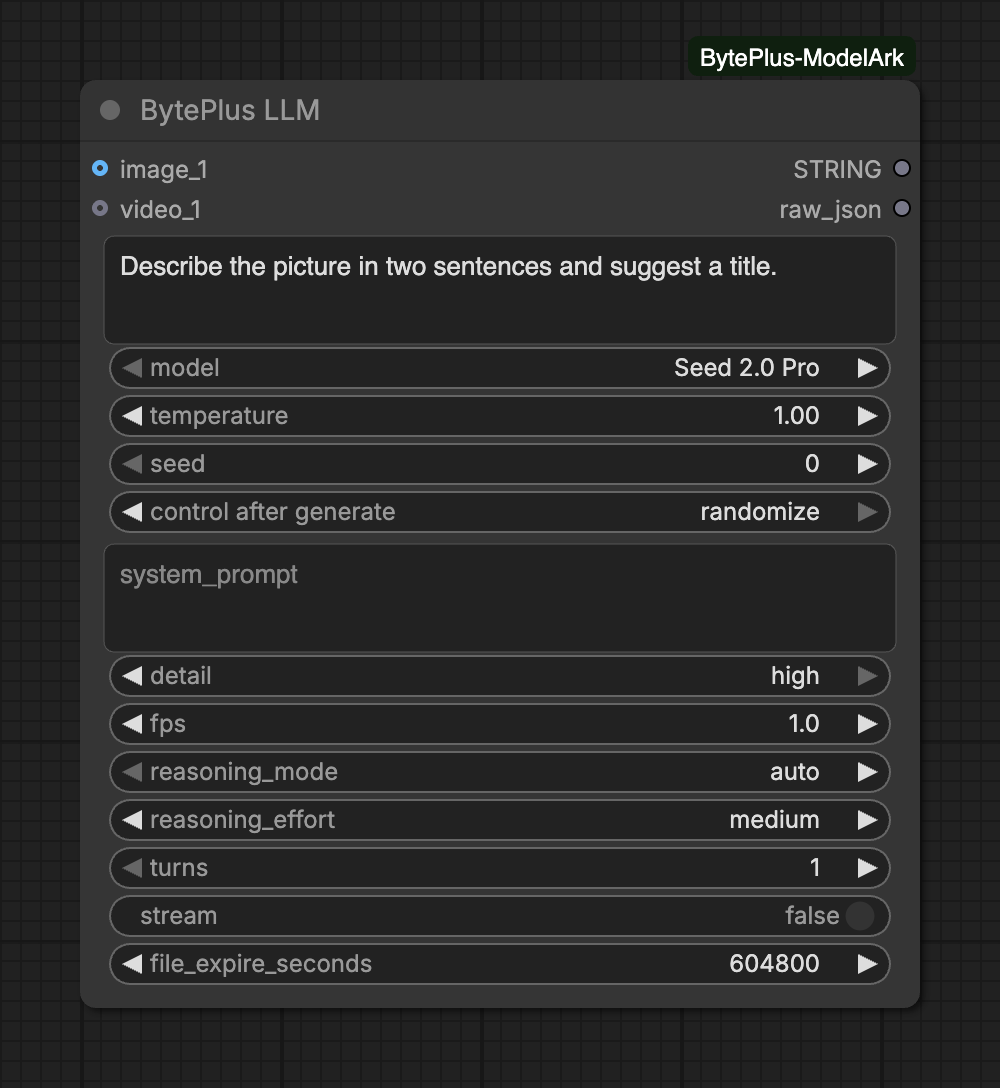
Sends a prompt to a language model on BytePlus ModelArk and returns the answer as text. Pick Seed 2.0 Pro, Lite or Mini, Seed 2.1 Turbo, DeepSeek V4.1 Flash or GLM 5.3 Flash, and add images and videos as context (Seed 2.0 Lite and Mini also take audio clips).
Use it to describe pictures, write or rewrite prompts for other nodes, or answer questions about a video. The node bills for the tokens it uses and runs only when another node uses one of its outputs.
Optional image(s) to use as context for the model. Up to 20 images.Slots: image_1 to image_20 (20)
videos
group of inputs of VIDEO
Optional video(s) to use as context for the model. Up to 4 videos.Slots: video_1 to video_4 (4)
Advanced inputs for Seed 2.0 Pro
Input
Type
Default
What it does
temperature
number
1
Controls randomness. 0.0 is deterministic, higher values are more random.Range: 0–2
Input
Type
Default
What it does
images
group of inputs of IMAGE
Optional image(s) to use as context for the model. Up to 20 images.Slots: image_1 to image_20 (20)
videos
group of inputs of VIDEO
Optional video(s) to use as context for the model. Up to 4 videos.Slots: video_1 to video_4 (4)
audios
group of inputs of AUDIO
Optional audio clip(s) to use as context for the model (speech, music, sounds). Up to 4 clips, 120 minutes in total.Slots: audio_1 to audio_4 (4)
Advanced inputs for Seed 2.0 Lite
Input
Type
Default
What it does
temperature
number
1
Controls randomness. 0.0 is deterministic, higher values are more random.Range: 0–2
Input
Type
Default
What it does
images
group of inputs of IMAGE
Optional image(s) to use as context for the model. Up to 20 images.Slots: image_1 to image_20 (20)
videos
group of inputs of VIDEO
Optional video(s) to use as context for the model. Up to 4 videos.Slots: video_1 to video_4 (4)
audios
group of inputs of AUDIO
Optional audio clip(s) to use as context for the model (speech, music, sounds). Up to 4 clips, 120 minutes in total.Slots: audio_1 to audio_4 (4)
Advanced inputs for Seed 2.0 Mini
Input
Type
Default
What it does
temperature
number
1
Controls randomness. 0.0 is deterministic, higher values are more random.Range: 0–2
Input
Type
Default
What it does
images
group of inputs of IMAGE
Optional image(s) to use as context for the model. Up to 20 images.Slots: image_1 to image_20 (20)
videos
group of inputs of VIDEO
Optional video(s) to use as context for the model. Up to 4 videos.Slots: video_1 to video_4 (4)
Advanced inputs for Seed 2.1 Turbo
Input
Type
Default
What it does
temperature
number
1
Controls randomness. 0.0 is deterministic, higher values are more random.Range: 0–2
Input
Type
Default
What it does
images
group of inputs of IMAGE
Optional image(s) to use as context for the model. Up to 20 images.Slots: image_1 to image_20 (20)
videos
group of inputs of VIDEO
Optional video(s) to use as context for the model. Up to 4 videos.Slots: video_1 to video_4 (4)
Advanced inputs for DeepSeek V4.1 Flash
Input
Type
Default
What it does
temperature
number
1
Controls randomness. 0.0 is deterministic, higher values are more random.Range: 0–2
Input
Type
Default
What it does
images
group of inputs of IMAGE
Optional image(s) to use as context for the model. Up to 20 images.Slots: image_1 to image_20 (20)
videos
group of inputs of VIDEO
Optional video(s) to use as context for the model. Up to 4 videos.Slots: video_1 to video_4 (4)
Advanced inputs for GLM 5.3 Flash
Input
Type
Default
What it does
temperature
number
1
Controls randomness. 0.0 is deterministic, higher values are more random.Range: 0–2
Advanced inputs (8)
Input
Type
Default
What it does
system_promptoptional
text
Foundational instructions that dictate the model's behavior.
detailoptional
choice
high
Image detail level sent with each image.Choices: low, high
fpsoptional
number
1
Frames per second sampled from each video.Range: 0.2–5
reasoning_modeoptional
choice
auto
Deep thinking (thinking.type). auto sends nothing: the model default (enabled) applies.Choices: auto, enabled, disabled
reasoning_effortoptional
choice
medium
Chain-of-thought length (reasoning.effort). max thinks the longest (and costs the most); models that do not tell two levels apart treat them alike. Not sent when reasoning_mode is disabled.Choices: minimal, low, medium, high, max
turnsoptional
integer
1
1: every run starts a new conversation (the response is not stored). 2 or more: the length of a conversation. Each run continues this node's last conversation (with the same model) with the new prompt until it has this many turns; the next run starts a new one. Images, videos and audio from the first turn stay in the conversation.Range: 1–10
streamoptional
on/off
off
Stream the answer to the console while it is generated.
file_expire_secondsoptional
integer
604800
How long uploaded images, videos and audio are kept in Ark Files (1 to 30 days).Range: 86400–2592000
Media slots:image_1, video_1 and so on appear as you connect them, up to 20 images and 4 videos.
Audio: only Seed 2.0 Lite and Mini show audio_1 to audio_4. The other models cannot hear audio, so the node does not offer the input for them.
Thinking:reasoning_mode set to auto sends nothing, and the model uses its own default. reasoning_effort goes from minimal to max; max thinks the longest and costs the most. It is not sent when reasoning_mode is disabled.
Several turns: with turns at 1, every run starts a new conversation and nothing is stored. With 2 or more, turns is the length of a conversation: each run continues this node’s last conversation with the new prompt until it has that many turns, and the next run starts a new one. Only the first turn sends media, which then stays in the conversation: media you connect later is not sent. Changing the model, the key or the region starts a new conversation.
System prompt:system_prompt is sent again on every turn.
Streaming: turn on stream to watch the answer appear in the console. The STRING output still arrives complete at the end.
Up to 20 images and 4 videos per request. Every image of a connected batch counts toward the 20.
Audio is limited to 4 clips and 120 minutes in total, and only on Seed 2.0 Lite and Mini.
Images, videos and audio are uploaded to Ark Files and kept for file_expire_seconds (1 to 30 days). Uploads are reused when the content has not changed. This node needs no Comfy.org login.
fps sets how many frames per second the model samples from each video.
seed only decides whether ComfyUI runs the node again. The answers are not deterministic, even with the same seed.
Activate each model in the ModelArk console for the region you use.
Interrupting a run stops the node’s wait. The node sends no cancel request, so a request that was already sent may still be billed.