

Character Sheet
- Template
- Character Sheet, in the ComfyUI template browser under BytePlus
- Workflow file
- Character Sheet.json
- BytePlus nodes
- Seedream 4.5 & 5.0
- Keys needed
- ModelArk API key
- Also uses
- Format Text, MarkdownNote, Preview as Text, Save Image, Text (Multiline) (built into ComfyUI)
What it makes
Section titled “What it makes”One image with three panels of the same person: a full-body back view, a full-body front view and a face close-up. The background is plain gray and the light is neutral, so the sheet records who the character is and not a mood. It is for anyone who needs a clean character reference before making shots. You describe the character once. The fixed sheet rules are already written into the prompt.
The workflow
Section titled “The workflow”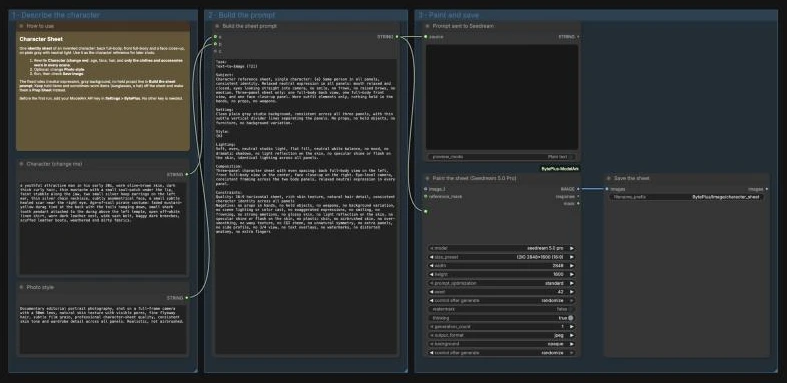
- Character (change me) holds the person: age, face, hair, and the clothes and accessories worn in every scene. The template describes a pirate in his early 30s.
- Photo style holds the look of the photograph. It asks for documentary portrait photography with natural skin texture.
- Build the sheet prompt (Format Text, a ComfyUI core node) puts both texts into a fixed prompt. The fixed part asks for three panels, a relaxed neutral expression in every panel, a plain gray background, even studio light and no held objects. You can read the result in Prompt sent to Seedream.
- Seedream 4.5 & 5.0 runs
seedream 5.0 proat(2K) 2848x1600 (16:9)and paints the sheet. - Save Image writes it to
BytePlus/Image/character_sheet.
Run it
Section titled “Run it”- Add your ModelArk API key in Settings → BytePlus if you have not yet (API keys). This template needs no other key.
- Open the template browser and choose Character Sheet under BytePlus.
- Rewrite Character (change me). Keep to what the character wears in every scene.
- Press Run. Check that the three panels show the same person. If the front panel also shows a clear face, use Character Sheet Cleanup.
Settings worth changing
Section titled “Settings worth changing”- Character (change me): describe two to four stable facial traits, the hair, and the outfit. Leave out anything the character holds, and leave out items worn only in some scenes, such as sunglasses. Make those a Prop Sheet.
- Photo style: change the look, for example to a stylized or illustrated finish. The fixed prompt still asks for a gray background and neutral light.
- The fixed prompt: edit the text in Build the sheet prompt to change the panels or the negatives. Keep
{a}and{b}, which are replaced by the two text boxes. size_preset(Seedream): the 16:9 size suits three panels in a row. A very different ratio changes how the panels are spaced.seed: set it tofixedto rerun the same sheet without billing again.
Example result
Section titled “Example result”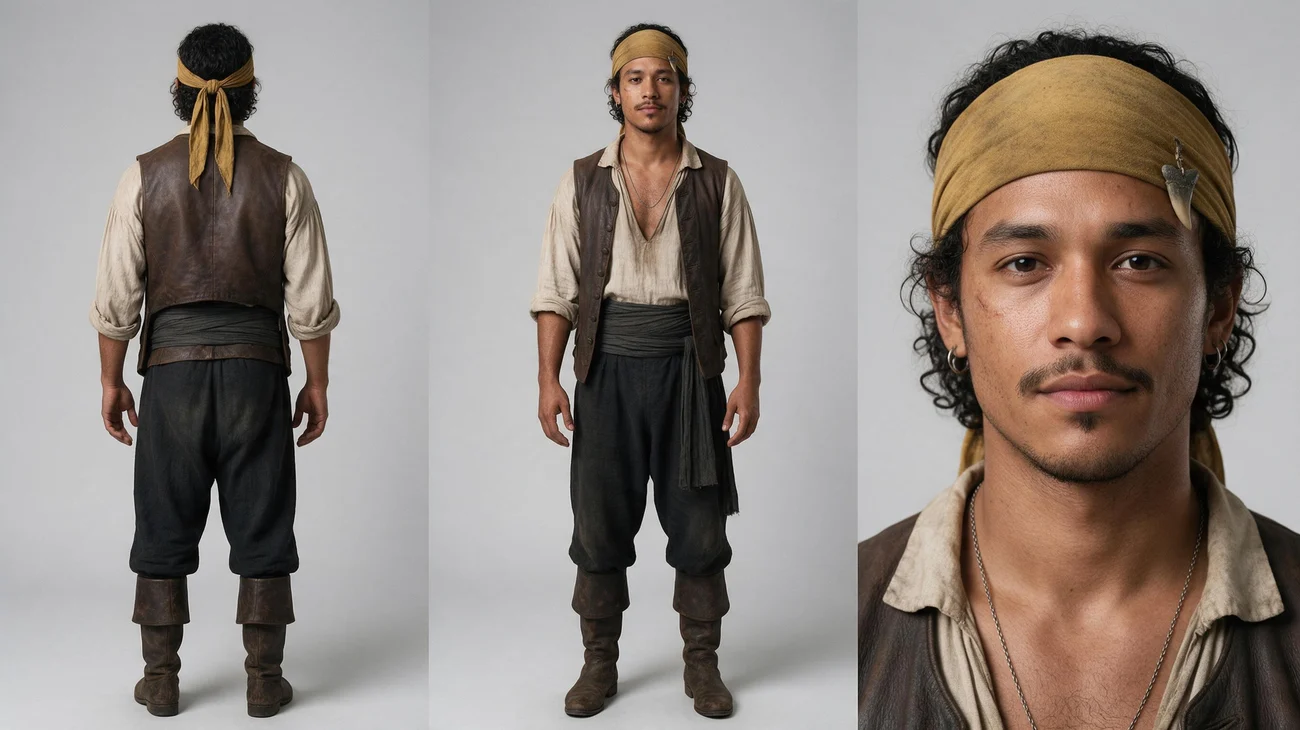
Back view on the left, front view in the middle and a face close-up on the right, all on the same gray background. Check it against the prompt before you use it as a reference. The front panel here also shows a readable face, so a sheet like this is a candidate for Character Sheet Cleanup.
Time and cost
Section titled “Time and cost”The template bills one Seedream image per run. The seed control is set to randomize, so every run paints a new sheet and bills again. Set it to fixed and ComfyUI reuses the cached result of an unchanged workflow without billing. Seedream 5.0 Pro has thinking on by default, which the node tooltip says can lengthen generation.
Related
Section titled “Related”- Node: Seedream 4.5 & 5.0
- Next step: Character Sheet Cleanup keeps one readable face on the sheet. Consistent Character Shots turns a character portrait into a series of shots.