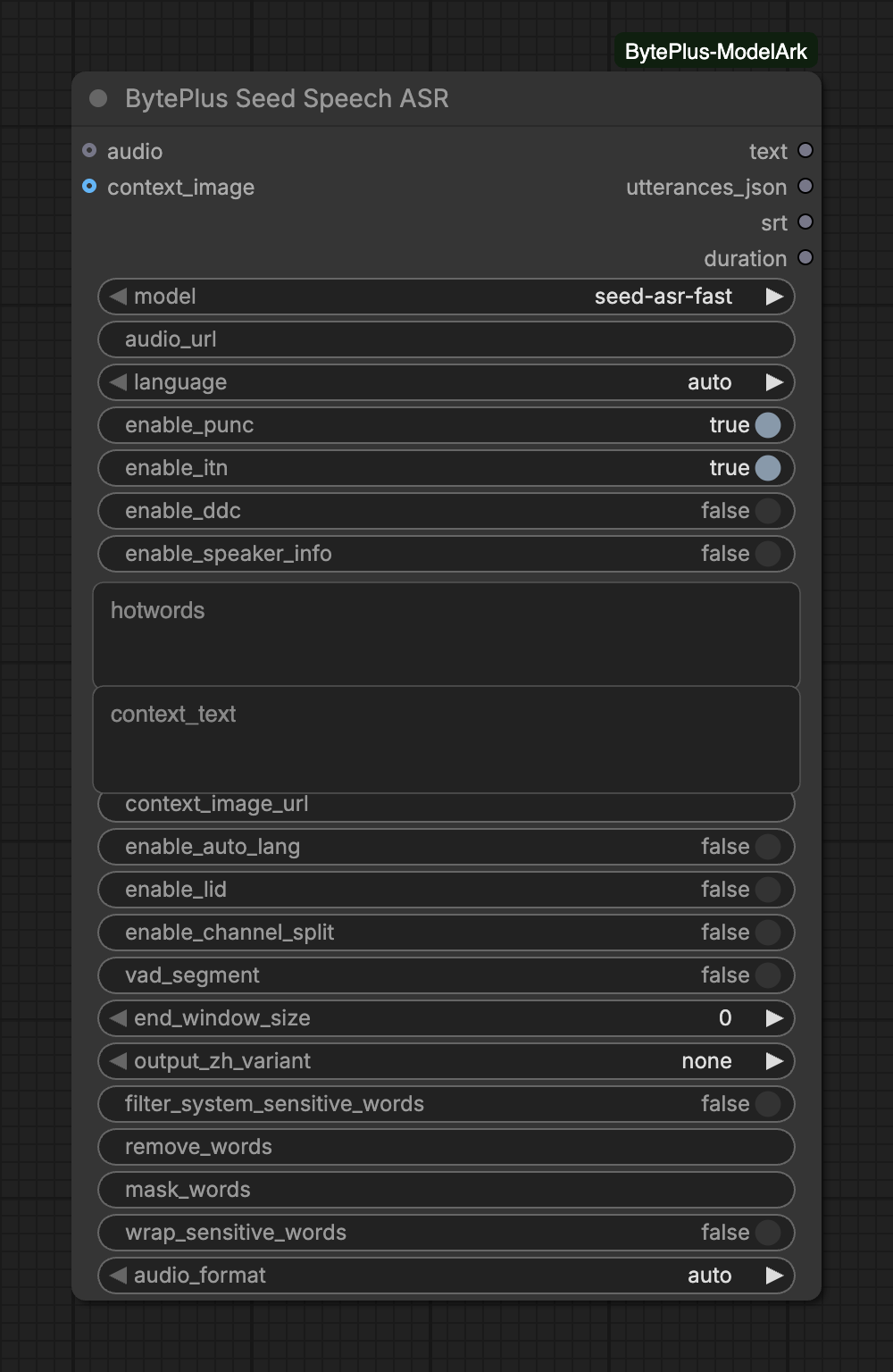
Turns spoken audio into text. You connect an audio clip, for example from Load Audio, or paste a public audio link, and you get the transcript, the timing of each utterance and ready-made SRT subtitles.
The node needs your separate Seed Speech API key (Singapore region only), bills every run and runs only when another node uses one of its outputs. seed-asr-fast answers in one request, while seed-asr-2.0 and seed-asr-1.0 submit a task and wait for it.
seed-asr-fast: one request, audio up to 2 h / 100 MB. seed-asr-2.0 / 1.0: submit and poll, up to 5 h, more languages; connected audio is uploaded to Comfy.org storage.Choices: seed-asr-fast, seed-asr-2.0, seed-asr-1.0
audio_url
text
Public http(s) audio URL. Use this or the audio input (e.g. Load Audio).
language
choice
auto
auto recognizes Chinese, English and Chinese dialects; pick a language for others. The last 16 languages need seed-asr-2.0 or 1.0.Choices: auto, en-US, zh-CN, yue-CN, ja-JP, ko-KR, id-ID, ms-MY, th-TH, vi-VN, fil-PH, hi-IN … (56 in total)
enable_punc
on/off
on
Add punctuation.
enable_itn
on/off
on
Write numbers in digits (inverse text normalization).
enable_ddc
on/off
off
Remove filler words and repetitions.
enable_speaker_info
on/off
off
Label speakers (best with 10 or fewer).
hotwords
text
Names or terms to favour, one per line or comma-separated (up to 5000). Chinese-English model only: language auto or zh-CN.
audiooptional
AUDIO
Audio to transcribe, e.g. from Load Audio.
context_imageoptional
IMAGE
ASR 2.0 visual context image (uploaded to Comfy.org storage, resized to fit 500 KB).
Advanced inputs (13)
Input
Type
Default
What it does
context_text
text
Dialogue history or scene description, one entry per line, newest first (up to 20 entries / 800 tokens). Prefix a line with 'user:' or 'bot:' to mark the speaker. Chinese-English model only.
context_image_url
text
ASR 2.0 visual context: public JPEG/PNG URL (up to 500 KB). Or connect context_image.
enable_auto_lang
on/off
off
Detect the spoken language automatically (overrides language).
enable_lid
on/off
off
seed-asr-2.0 / 1.0: add a detected-language label (lid_lang) to each utterance.
enable_channel_split
on/off
off
Recognize the left and right channels of stereo audio separately (channel_id 1 / 2).
vad_segment
on/off
off
Split sentences on silence (VAD) instead of meaning.
end_window_size
integer
0
Silence in ms that ends a sentence (300-5000; 0 = semantic segmentation).Range: 0–5000
output_zh_variant
choice
none
Convert Chinese output to Traditional Chinese: traditional, tw (Taiwan) or hk (Hong Kong).Choices: none, traditional, tw, hk
filter_system_sensitive_words
on/off
off
Mask words from the built-in sensitive word list with *.
remove_words
text
Words to delete from the transcript, comma-separated.
mask_words
text
Words to replace with * in the transcript, comma-separated.
wrap_sensitive_words
on/off
off
Wrap filtered words in backticks instead of hiding them silently.
audio_format
choice
auto
Container of audio_url. auto reads the file extension; the standard models read the file itself when the link has none. Set it if detection fails.Choices: auto, wav, mp3, ogg, m4a, aac, amr, spx, pcm, raw
Audio source: connect audio or fill audio_url, never both. audio_url must be a public http(s) link.
Fast or standard: with seed-asr-fast, a connected clip is sent inside the request. The standard models take audio only as a link, so the node first uploads a connected clip to Comfy.org storage. That needs a Comfy.org login in ComfyUI.
Language:auto recognizes Chinese, English and Chinese dialects. Choose a language for anything else. The last 16 languages in the list work only with seed-asr-2.0 and seed-asr-1.0.
Hotwords and context:hotwords and context_text work with the Chinese-English model only, so keep language on auto or zh-CN and enable_auto_lang off. context_image and context_image_url give a visual hint (an ASR 2.0 feature that seed-asr-1.0 refuses). A connected context_image is uploaded to Comfy.org storage, so it needs a Comfy.org login; a context_image_url is sent as it is.
audio_format: with auto the node reads the extension of the link. For a link without one, it looks at the first bytes of the file, in standard mode. Set the format yourself if that does not work.
Speakers and channels:enable_speaker_info and enable_channel_split add speaker or channel labels to srt. Channel split needs stereo audio.
seed-asr-fast takes audio up to 2 hours and 100 MB. A connected clip is converted to 16 kHz WAV before it is sent, and that WAV must stay within 100 MB.
seed-asr-2.0 and seed-asr-1.0 take audio up to 5 hours. The node checks the task every 2 seconds and waits for up to 12,600 seconds.
Uploads to Comfy.org storage are cached for 12 hours, so running the same clip again does not upload it again.
seed-asr-fast accepts raw, wav, mp3 and ogg audio from a link. Use seed-asr-2.0 for m4a, aac, amr, spx or pcm.
enable_lid (language labels) is for the standard models. end_window_size is 0 or between 300 and 5000 ms.
Interrupting a run stops the node’s wait. The node sends no cancel request, so a task that was already submitted may still be billed.