

2.5 Model Updates
- Template
- 2.5 Model Updates, in the ComfyUI template browser under BytePlus
- Workflow file
- 2.5 Model Updates.json
- BytePlus nodes
- Seedream 4.5 & 5.0, Seedance 2.5 Text to Video, BytePlus LLM
- Keys needed
- ModelArk API key
- Also uses
- Preview as Text, Save Image, Save Video (built into ComfyUI)
What it makes
Section titled “What it makes”Three separate results from one click: a 2K poster image, a 30 second video with sound, and a text storyboard. Each branch uses one of the newest models, so the template also shows whether your key can use all of them. The three branches do not depend on each other, so you can delete the ones you do not need.
The workflow
Section titled “The workflow”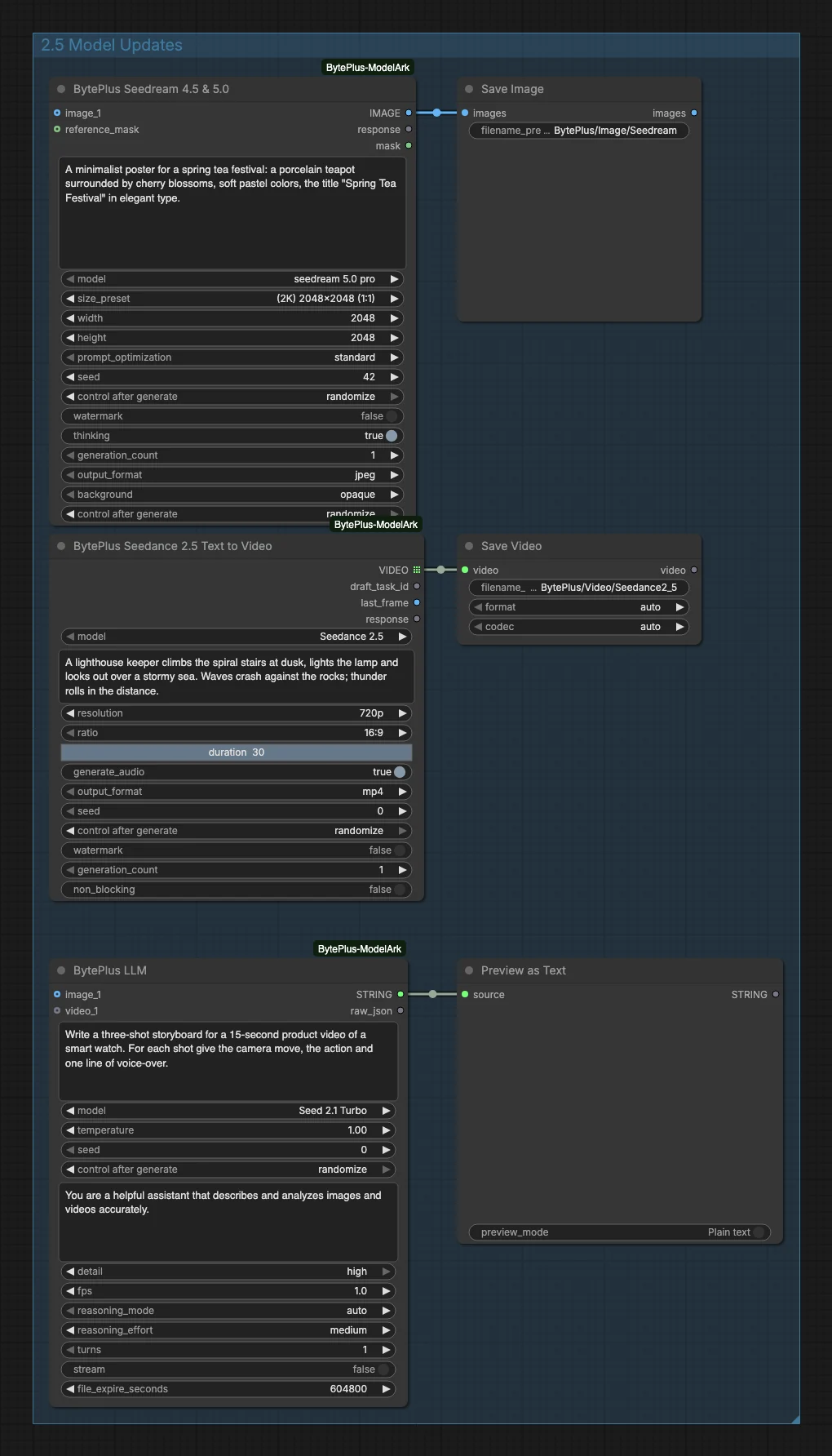
- Seedream 4.5 & 5.0 is set to
seedream 5.0 proat(2K) 2048x2048 (1:1). The prompt asks for a minimalist poster for a spring tea festival with the title “Spring Tea Festival”. No reference image is connected. Save Image keeps the result. - Seedance 2.5 Text to Video is set to the
Seedance 2.5model at720p,16:9,duration30 andgenerate_audioon. The prompt describes a lighthouse keeper climbing the stairs at dusk, lighting the lamp and looking out over a stormy sea. Save Video keeps the clip. - BytePlus LLM runs
Seed 2.1 Turboand is asked for a three-shot storyboard of a 15 second smart watch video, with the camera move, the action and one line of voice-over per shot. Preview as Text shows the answer.
Run it
Section titled “Run it”- Add your ModelArk API key in Settings → BytePlus if you have not yet (API keys). One key covers all three nodes.
- Open the template browser and choose 2.5 Model Updates under BytePlus.
- Press Run. The three results appear in Save Image, Save Video and Preview as Text as each node finishes.
Settings worth changing
Section titled “Settings worth changing”- Poster prompt: replace the tea festival text with your own. Put the exact title you want in quotes.
durationon the video node: the template asks for 30 seconds. Lower it for a shorter first try.resolutionon the video node:720pis the default here; the Seedance 2.5 model also offers480pand1080p.- Storyboard prompt: change the product or the number of shots. The model is
Seed 2.1 Turbo; the same node lists other Seed, DeepSeek and GLM models. - Unused branches: delete the Save or Preview node at the end of a row to skip that row. A BytePlus node whose output nothing uses does not run, so it does not bill.
Example result
Section titled “Example result”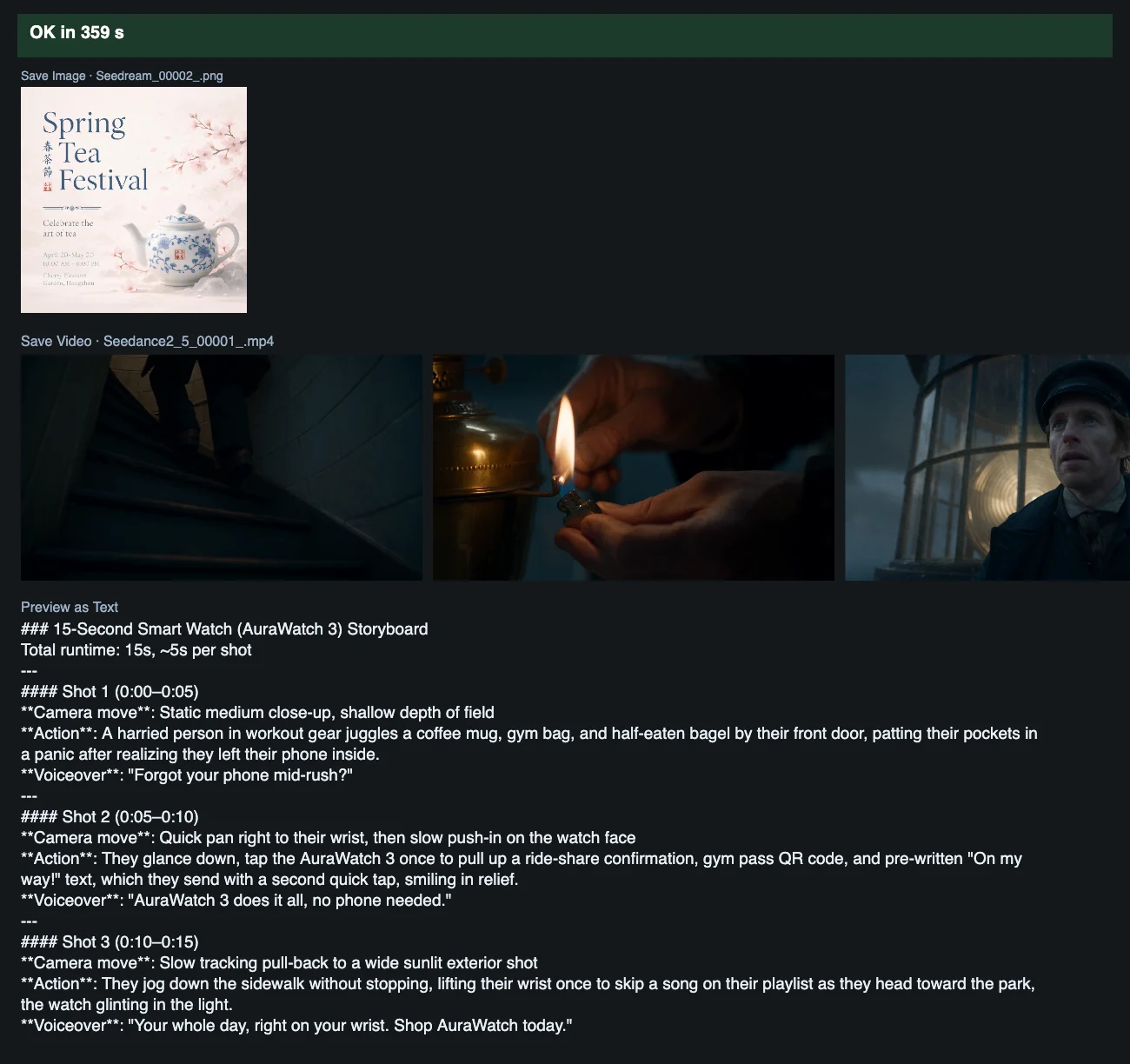
Time and cost
Section titled “Time and cost”Each node bills once per run: one image from Seedream, one video from Seedance and one request from the LLM node. The seed controls are set to randomize, so every run makes new results and bills again. Set a control to fixed and ComfyUI reuses the cached result of an unchanged node without billing.
Related
Section titled “Related”- Nodes: Seedream 4.5 & 5.0, Seedance 2.5 Text to Video, BytePlus LLM
- Next step: Seedance Video Extension continues a Seedance 2.5 clip to make a longer video.