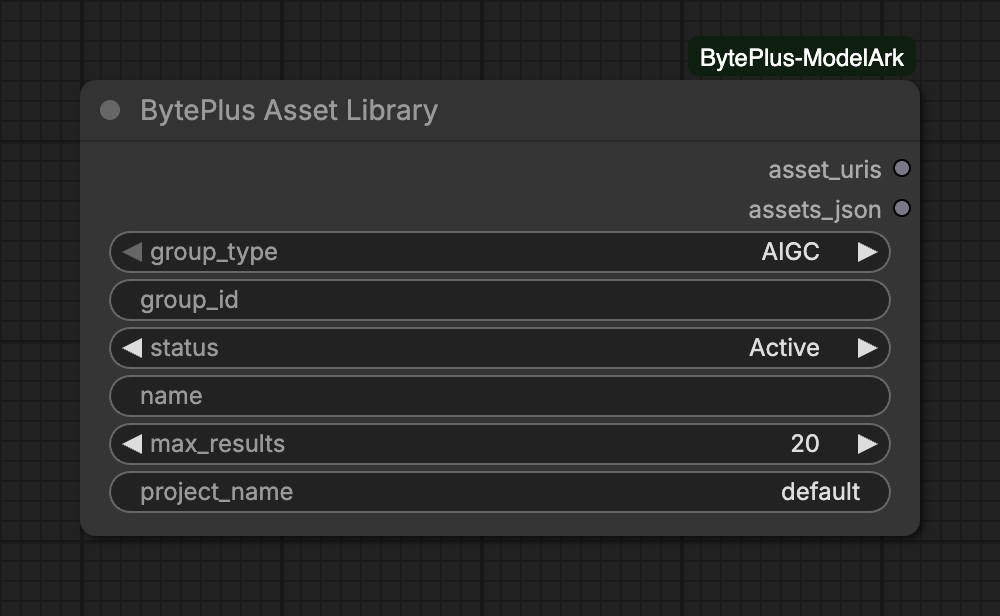
Lists the assets in your private asset library, which holds virtual portraits and verified real people for Seedance 2 and 2.5. Use it to find an asset you made earlier, or one created in the ModelArk console, and pass it to a Seedance node.
It needs the ModelArk API key and the IAM access key and secret key saved in Settings → BytePlus (see API keys), plus Dreamina Seedance Advanced Creation Rights. It only lists assets and creates nothing.
Group type:AIGC lists virtual portraits. LivenessFace lists verified real people.
Filters:group_id and name are optional and stay out of the request while empty. status defaults to Active, the status a Seedance reference needs. Choose all to also see Processing and Failed assets.
Results:max_results goes from 1 to 100. The node asks once and does not page, so narrow the filters if the asset you want is missing.
Project:project_name is the ModelArk project that holds the library, default unless you use another.
assets_json is a JSON list. Each entry has asset_id, asset_uri, name, group_id, asset_type, status and create_time.
An asset_N slot of Seedance 2.5 Reference to Video takes one asset only. To connect asset_uris to a slot, filter to one asset first, for example with name and max_results set to 1.
Using an asset in Seedance needs only the ModelArk key, except that an asset_N slot looks up the asset’s type and status with your IAM keys. With IAM keys saved, the two frame inputs check the asset the same way; without them the ID is sent as it is.
A checked asset must be Active, so a Processing or Failed asset is refused.