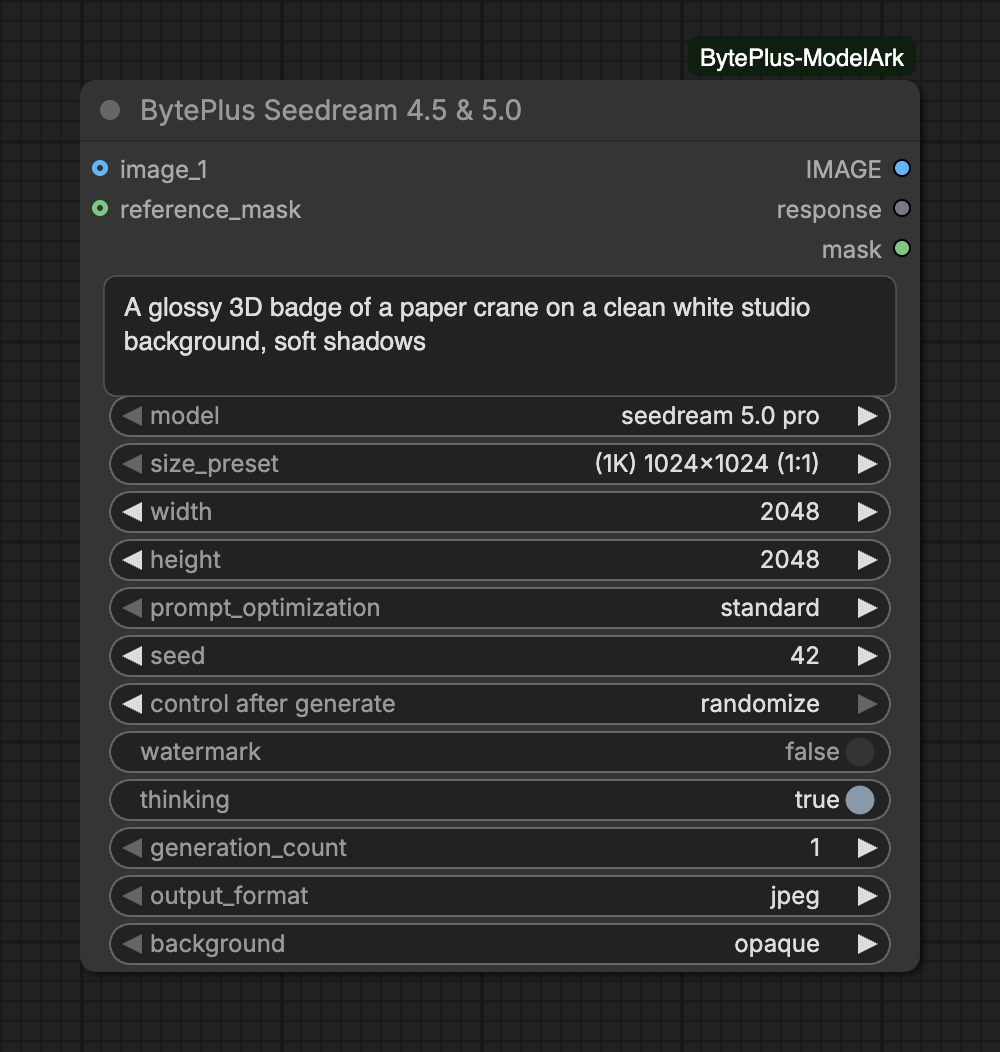
Creates images with BytePlus Seedream from a text prompt. Connect reference images to edit a picture, combine several, or keep a subject consistent: up to 10 on Seedream 5.0 Pro and Flash, and up to 14 on 5.0 Lite, 4.5 and 4.0. Each model option shows its own inputs, so pick the model first.
The node bills for every image it generates. It does not save anything itself: connect Save Image to keep the result.
Pick a recommended size. Select Custom to use the width and height below.Choices: (1K) 1024x1024 (1:1), (1K) 864x1152 (3:4), (1K) 1152x864 (4:3), (1K) 1312x736 (16:9), (1K) 736x1312 (9:16), (1K) 832x1248 (2:3), (1K) 1248x832 (3:2), (1K) 1568x672 (21:9), (1.5K) 1536x1536 (1:1), (1.5K) 1344x1792 (3:4), (1.5K) 1792x1344 (4:3), (1.5K) 2048x1152 (16:9) … (28 in total)
width
integer
2048
Custom width for image. Value is working only if `size_preset` is set to `Custom`Range: 240–8600
height
integer
2048
Custom height for image. Value is working only if `size_preset` is set to `Custom`Range: 240–8600
images
group of inputs of IMAGE
Optional reference image(s) for image-to-image or multi-reference generation. Up to 10 images.Slots: image_1 to image_10 (10)
seed
integer
42
Seed to use for generation.Range: 0–2147483647
reference_maskoptional
MASK
Alpha of the reference image for a transparent background (connect the MASK output of Load Image).
Advanced inputs for seedream 5.0 pro
Input
Type
Default
What it does
prompt_optimization
choice
standard
Prompt-optimization mode when reference images are provided: 'standard' gives higher quality, 'fast' shorter generation time.Choices: standard, fast
watermark
on/off
off
Whether to add an "AI generated" watermark to the image.
thinking
on/off
on
Enable the model's prompt-optimization reasoning ('thinking') for better adherence. Can substantially increase generation time — notably on Seedream 5.0 Pro. Can only be disabled for text-to-image (not when reference images are provided).
generation_count
integer
1
Number of separate generations to run in parallel. With several, generation N uses seed + N so the results differ.Range: 1–16
output_format
choice
jpeg
File format of the generated image. A transparent background needs png.Choices: jpeg, png
background
choice
opaque
transparent: edit one reference image that has an alpha channel (connect its mask to reference_mask) and return a PNG with transparency, also as the mask output. Needs output_format png.Choices: opaque, transparent
Input
Type
Default
What it does
size_preset
choice
Pick a recommended size. Select Custom to use the width and height below.Choices: (1K) 1024x1024 (1:1), (1K) 864x1152 (3:4), (1K) 1152x864 (4:3), (1K) 1424x800 (16:9), (1K) 800x1424 (9:16), (1K) 832x1248 (2:3), (1K) 1248x832 (3:2), (1K) 1568x672 (21:9), (1.5K) 1536x1536 (1:1), (1.5K) 1344x1792 (3:4), (1.5K) 1792x1344 (4:3), (1.5K) 2048x1152 (16:9) … (28 in total)
width
integer
2048
Custom width for image. Value is working only if `size_preset` is set to `Custom`Range: 240–8600
height
integer
2048
Custom height for image. Value is working only if `size_preset` is set to `Custom`Range: 240–8600
images
group of inputs of IMAGE
Optional reference image(s) for image-to-image or multi-reference generation. Up to 10 images.Slots: image_1 to image_10 (10)
seed
integer
42
Seed to use for generation.Range: 0–2147483647
reference_maskoptional
MASK
Alpha of the reference image for a transparent background (connect the MASK output of Load Image).
Advanced inputs for seedream 5.0 flash
Input
Type
Default
What it does
watermark
on/off
off
Whether to add an "AI generated" watermark to the image.
generation_count
integer
1
Number of separate generations to run in parallel. With several, generation N uses seed + N so the results differ.Range: 1–16
output_format
choice
jpeg
File format of the generated image. A transparent background needs png.Choices: jpeg, png
background
choice
opaque
transparent: edit one reference image that has an alpha channel (connect its mask to reference_mask) and return a PNG with transparency, also as the mask output. Needs output_format png.Choices: opaque, transparent
Input
Type
Default
What it does
size_preset
choice
Pick a recommended size. Select Custom to use the width and height below.Choices: (2K) 2048x2048 (1:1), (2K) 1728x2304 (3:4), (2K) 2304x1728 (4:3), (2K) 2848x1600 (16:9), (2K) 1600x2848 (9:16), (2K) 1664x2496 (2:3), (2K) 2496x1664 (3:2), (2K) 3136x1344 (21:9), (3K) 3072x3072 (1:1), (3K) 2592x3456 (3:4), (3K) 3456x2592 (4:3), (3K) 4096x2304 (16:9) … (28 in total)
width
integer
2048
Custom width for image. Value is working only if `size_preset` is set to `Custom`Range: 480–16384
height
integer
2048
Custom height for image. Value is working only if `size_preset` is set to `Custom`Range: 480–16384
max_images
integer
1
Maximum number of images to generate. With 1, exactly one image is produced. With >1, the model generates between 1 and max_images related images (e.g., story scenes, character variations). Total images (input + generated) cannot exceed 15.Range: 1–15
images
group of inputs of IMAGE
Optional reference image(s) for image-to-image or multi-reference generation. Up to 14 images.Slots: image_1 to image_14 (14)
seed
integer
42
Seed to use for generation.Range: 0–2147483647
Advanced inputs for seedream 5.0 lite
Input
Type
Default
What it does
fail_on_partial
on/off
off
If enabled, abort execution if any requested images are missing or return an error.
watermark
on/off
off
Whether to add an "AI generated" watermark to the image.
thinking
on/off
on
Enable the model's prompt-optimization reasoning ('thinking') for better adherence. Can substantially increase generation time — notably on Seedream 5.0 Pro. Can only be disabled for text-to-image (not when reference images are provided).
generation_count
integer
1
Number of separate generations to run in parallel. With several, generation N uses seed + N so the results differ.Range: 1–16
Input
Type
Default
What it does
size_preset
choice
Pick a recommended size. Select Custom to use the width and height below.Choices: (2K) 2048x2048 (1:1), (2K) 1728x2304 (3:4), (2K) 2304x1728 (4:3), (2K) 2848x1600 (16:9), (2K) 1600x2848 (9:16), (2K) 1664x2496 (2:3), (2K) 2496x1664 (3:2), (2K) 3136x1344 (21:9), (4K) 4096x4096 (1:1), (4K) 3520x4704 (3:4), (4K) 4704x3520 (4:3), (4K) 5504x3040 (16:9) … (19 in total)
width
integer
2048
Custom width for image. Value is working only if `size_preset` is set to `Custom`Range: 480–16384
height
integer
2048
Custom height for image. Value is working only if `size_preset` is set to `Custom`Range: 480–16384
max_images
integer
1
Maximum number of images to generate. With 1, exactly one image is produced. With >1, the model generates between 1 and max_images related images (e.g., story scenes, character variations). Total images (input + generated) cannot exceed 15.Range: 1–15
images
group of inputs of IMAGE
Optional reference image(s) for image-to-image or multi-reference generation. Up to 14 images.Slots: image_1 to image_14 (14)
seed
integer
42
Seed to use for generation.Range: 0–2147483647
Advanced inputs for seedream-4-5-251128
Input
Type
Default
What it does
fail_on_partial
on/off
off
If enabled, abort execution if any requested images are missing or return an error.
watermark
on/off
off
Whether to add an "AI generated" watermark to the image.
thinking
on/off
on
Enable the model's prompt-optimization reasoning ('thinking') for better adherence. Can substantially increase generation time — notably on Seedream 5.0 Pro. Can only be disabled for text-to-image (not when reference images are provided).
generation_count
integer
1
Number of separate generations to run in parallel. With several, generation N uses seed + N so the results differ.Range: 1–16
Input
Type
Default
What it does
size_preset
choice
Pick a recommended size. Select Custom to use the width and height below.Choices: (1K) 1024x1024 (1:1), (1K) 864x1152 (3:4), (1K) 1152x864 (4:3), (1K) 1312x736 (16:9), (1K) 736x1312 (9:16), (1K) 832x1248 (2:3), (1K) 1248x832 (3:2), (1K) 1568x672 (21:9), (2K) 2048x2048 (1:1), (2K) 1728x2304 (3:4), (2K) 2304x1728 (4:3), (2K) 2848x1600 (16:9) … (28 in total)
width
integer
2048
Custom width for image. Value is working only if `size_preset` is set to `Custom`Range: 240–16384
height
integer
2048
Custom height for image. Value is working only if `size_preset` is set to `Custom`Range: 240–16384
max_images
integer
1
Maximum number of images to generate. With 1, exactly one image is produced. With >1, the model generates between 1 and max_images related images (e.g., story scenes, character variations). Total images (input + generated) cannot exceed 15.Range: 1–15
images
group of inputs of IMAGE
Optional reference image(s) for image-to-image or multi-reference generation. Up to 14 images.Slots: image_1 to image_14 (14)
seed
integer
42
Seed to use for generation.Range: 0–2147483647
Advanced inputs for seedream-4-0-250828
Input
Type
Default
What it does
fail_on_partial
on/off
off
If enabled, abort execution if any requested images are missing or return an error.
watermark
on/off
off
Whether to add an "AI generated" watermark to the image.
thinking
on/off
on
Enable the model's prompt-optimization reasoning ('thinking') for better adherence. Can substantially increase generation time — notably on Seedream 5.0 Pro. Can only be disabled for text-to-image (not when reference images are provided).
generation_count
integer
1
Number of separate generations to run in parallel. With several, generation N uses seed + N so the results differ.Range: 1–16
Size:size_preset lists ready-made sizes for 1:1, 3:4, 4:3, 16:9, 9:16, 2:3, 3:2 and 21:9. The entries ending in “(adaptive)” send only a resolution level and let the model choose the ratio. Choose Custom to use width and height. The size limits are under Limits and tips.
Reference images: connect them to the images slots (image_1, image_2, …) in order. With reference images the model edits or combines them following the prompt.
Related image sets (5.0 Lite, 4.5 and 4.0): set max_images above 1 to let one request return between 1 and max_images related images, for example story scenes or character variations. Reference images plus max_images cannot exceed 15. With fail_on_partial on, the run aborts if any requested image is missing or returns an error.
Transparent background (5.0 Pro and Flash): connect exactly one reference image, set output_format to png, set background to transparent, and connect the MASK of Load Image to reference_mask.
Several images in one run: raise generation_count. The runs go in parallel and generation N uses seed + N, so the pictures differ.
With generation_count or max_images above 1, IMAGE holds all pictures as one batch. A picture of a different size is resized to the size of the first one.
mask is fully opaque (all zeros) unless background is transparent. Then it holds the transparency of the result, with 1 meaning transparent, like Load Image.
Activate each Seedream model in the ModelArk console for the region you use. Seedream 5.0 Lite is not available in eu-west-1: the node stops before it sends anything.
The size is checked before anything is sent. The ratio must be between 1:16 and 16:1, and the total pixels must fit the model: 921,600 to 4,624,220 on 5.0 Pro and Flash, 3,686,400 to 16,777,216 on 5.0 Lite and 4.5, and 921,600 to 16,777,216 on 4.0.
On 5.0 Pro the 1.5K sizes are priced like 1K.
thinking is on by default (5.0 Flash has no such setting). It can substantially increase generation time, most on 5.0 Pro, and it can only be switched off when no reference image is connected.
For reference images of a character, a place or an object, the Production assets templates (Character Sheet, Location Sheet, Prop Sheet) fill a fixed prompt from a few text boxes and send it to this node.
A rejected result (“Generated image contains sensitive content”) can be a false alarm. Run again with another seed or reword the prompt.
If you interrupt the run, the node stops waiting. A request that was already sent may still be billed.
A failed request that may have billed is never sent again automatically. See Billing and cost.