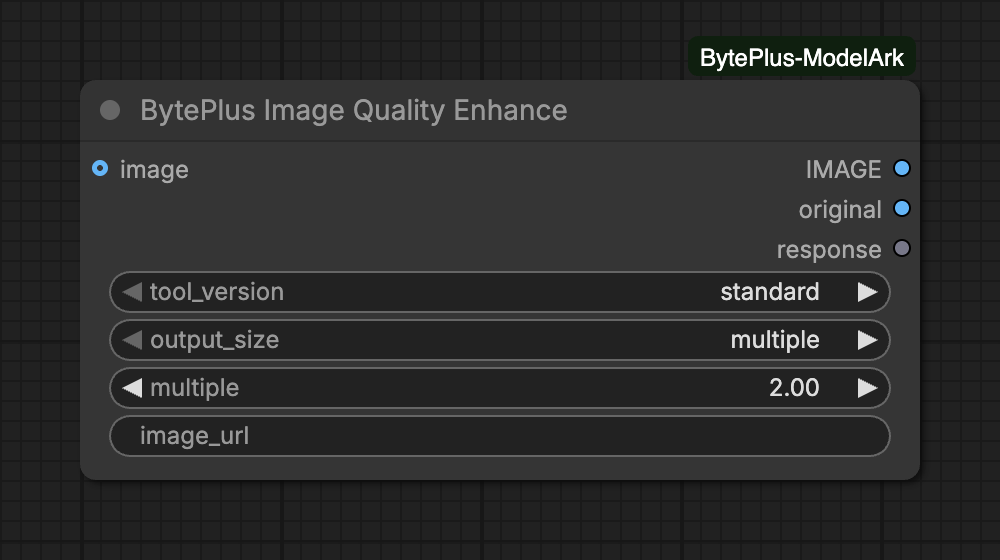
Upscales and cleans up images with BytePlus VOD AI MediaKit, for AIGC post-processing, old photos, OCR input and product images. Pick a tool_version, then scale by a factor or set a target size. It needs the separate AI MediaKit API key (Singapore region only, see API keys). The node bills for every image, with pricing that differs per version (see the tool_version tooltip), and saves nothing: connect Save Image to keep the result.
Image(s) to enhance; each image in a batch is enhanced separately. Uploaded to Comfy.org storage first (needs a Comfy.org login); or set image_url instead.
tool_version is required and decides which of the inputs below appear. 'standard' (up to 8x, PNG output): fast clean-up for thumbnails, UGC and OCR input. 'professional' (up to 30x): fine texture for AIGC fixes, product and portrait photos, old photos. 'max' (up to 30x): a generative model for the most detail on low-quality images. Pricing differs per version.
'generative_first' adds richer, natural texture: for compressed, blurry or old images. 'fidelity_first' keeps existing detail (faces, textures, text) as close to the original as possible: for portraits, product shots and screenshots.Choices: generative_first, fidelity_first
Input
Type
Default
What it does
generative_enhance_mode
choice
generative_first
'generative_first' adds richer, natural texture: for compressed, blurry or old images. 'fidelity_first' keeps existing detail (faces, textures, text) as close to the original as possible: for portraits, product shots and screenshots.Choices: generative_first, fidelity_first
enable_correct_color
on/off
on
Keep the colours close to the original. Turn off if the result looks over-sharpened.
output_size is required and decides which of the inputs below appear. Scale by a factor, or set a target width and/or height.
Scale factor for width and height: 1-8 for standard, 1-30 for professional and max.Range: 1–30
Input
Type
Default
What it does
target_width
integer
1920
Output width in px; 0 follows target_height and the aspect ratio. Standard: from the original width to 6144 px (at most 8x); professional and max: 64-10240 px.Range: 0–10240
target_height
integer
0
Output height in px; 0 follows target_width and the aspect ratio. With both set, the image fits inside the box at its own aspect ratio.Range: 0–10240
Advanced inputs (1)
Input
Type
Default
What it does
image_urloptional
text
Public http(s) link to the image (png, jpg, jpeg or webp, up to 10 MB), instead of connecting an image. Nothing is uploaded to Comfy.org.
Source: use image or image_url, not both. A connected image is uploaded to Comfy.org storage first (Comfy.org login needed), as PNG, or as JPEG if the PNG is over 10 MB. image_url is a public http(s) link (png, jpg, jpeg or webp, up to 10 MB) and is sent as it is.
Batches: each image in a batch is enhanced on its own, up to 3 at a time. If one image fails, the node fails and cancels the others.
Versions:professional and max add generative_enhance_mode. max also has enable_correct_color.
Output size:multiple scales width and height by the same factor. target size takes target_width, target_height or both. With both set, the image fits inside that box at its own aspect ratio.
Checked before upload for a connected image, standard takes 16 to 1440 px on the short side and 16 to 2160 px on the long side, with an output of at most 6144 px per side and at most 8x.
professional takes a short side of at least 256 px and a long side of at most 2048 px, with an output long side of at most 10240 px and at most 30x.
max takes a short side of at least 64 px, a long side of at most 6240 px and a ratio up to 32:1, with an output long side of at most 10240 px and at most 30x. A max output above 8000 px can time out.
With image_url the source size is unknown, so only the multiple and target ranges are checked. For a connected image, a target size for standard must also be at least the original size.
The call is synchronous and waits up to 600 seconds for each image. Interrupting a run stops the node’s wait. The node sends no cancel request, so a request that was already sent may still be billed.
The node downloads each result right away, because MediaKit links expire after 24 hours. Only the Singapore region (ap-southeast-1) is available.