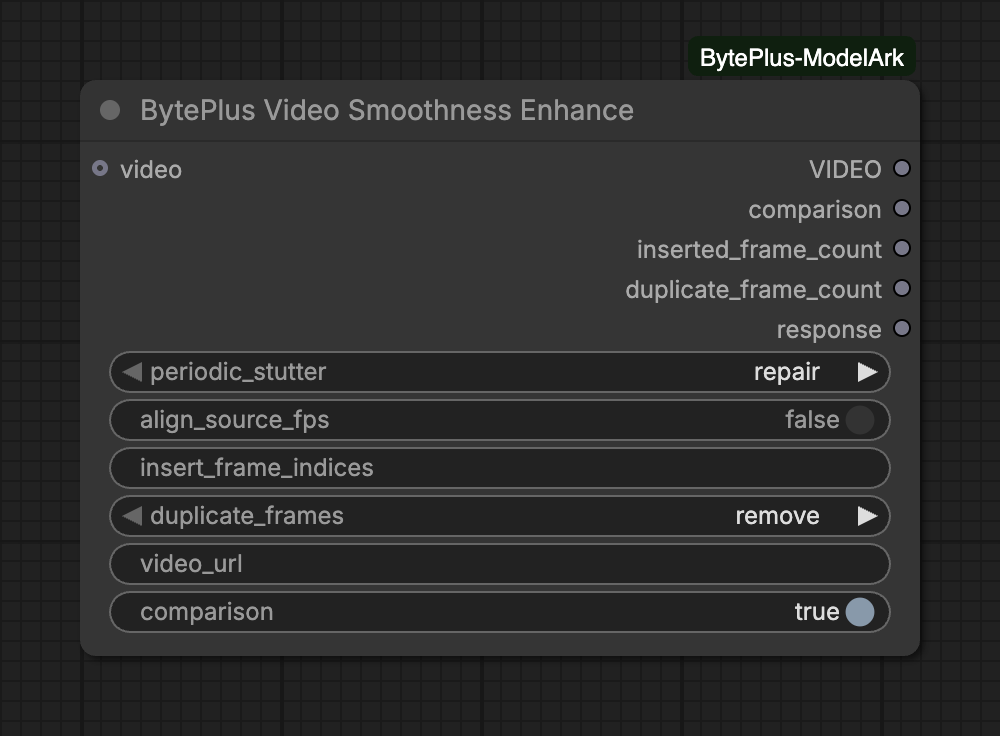
Finds places where the motion rhythm jumps (periodic stutter), generates in-between frames there, and removes consecutive identical frames. The picture size stays the same, which suits Seedance videos with occasional stutter, low frame rate clips and screen recordings. Connect a local video or set a public video_url; it needs the separate AI MediaKit API key (Singapore region only, see API keys). Every run bills (a run that returns no repaired video is billed as detection only), and the node saves nothing: connect Save Video to keep the result.
Consecutive identical frames. 'remove' drops them; 'detect only' counts them. Runs after the stutter repair, on its result.Choices: remove, detect only
videooptional
VIDEO
Video to repair: up to 4K, and up to 35 s while a repair is on (detect only has no length limit). Uploaded to Comfy.org storage first (needs a Comfy.org login); or set video_url instead.
periodic_stutter is required and decides which of the inputs below appear. Periodic stutter: sudden jumps in the motion rhythm. 'repair' generates in-between frames; 'detect only' counts them without changing the video.
Keep the source frame rate, frame count and duration: for each inserted frame, a low-motion frame is removed. Off gives the best repair; the frame rate may rise.
insert_frame_indices
text
Extra stutter points the detector may miss: zero-based frame numbers, comma-separated. 80 inserts a frame between frames 80 and 81. These are always inserted, even when MediaKit's quality check skips the automatic repair.
No extra inputs for this option.
Advanced inputs (2)
Input
Type
Default
What it does
video_urloptional
text
Public http(s) link to the source video (mp4, avi or mov), instead of connecting a video. Nothing is uploaded to Comfy.org.
comparisonoptional
on/off
on
Also build a side-by-side video: the source on the left, the repaired video on the right, in sync.
Source: use video or video_url, not both. A connected video is uploaded to Comfy.org storage first (Comfy.org login needed). A public http(s) link (mp4, avi or mov) is sent as it is.
Stutter repair: with periodic_stutter on repair, align_source_fps and insert_frame_indices appear. insert_frame_indices takes distinct zero-based frame numbers, comma-separated, for stutter points the detector misses.
Detect only: set a repair to detect only to count problems without changing the video. The duplicate step runs after the stutter repair, on its result.
Checks before upload: a connected video must be at most 4096x2160. While any repair is on it must also be at most 35 seconds long. With both set to detect only there is no length limit. A video_url source is not checked here, so MediaKit decides.
If MediaKit returns no repaired video, VIDEO is your source passed through. That happens with both steps on detect only, when nothing needed fixing, or when MediaKit’s quality check skipped the repair. The node’s log message then says the task is billed as detection only. If the source came from video_url and cannot be downloaded again, VIDEO is blocked with the reason, while the frame counts and response still reach their nodes.
In that case there is no comparison, and nodes using comparison are skipped.
inserted_frame_count is what the detector found. The repair may still have been skipped, so do not read it as frames added.
The comparison puts the source on the left and the repaired video on the right, in sync on the repaired clip’s timeline. Each half has a short side of at most 1080 px.
If building the comparison fails, the repaired video is still returned and the failure is logged.
align_source_fps keeps the source frame rate, frame count and duration by removing a low-motion frame for each inserted one. Off gives the best repair, but the frame rate may rise.
insert_frame_indices frames are always inserted, even when MediaKit’s quality check skips the automatic repair.
Every execution sends a new task. Interrupting a run stops the node’s wait. The node sends no cancel request, so a submitted task may still finish and be billed.
MediaKit result links expire after 24 hours, so the node downloads the result right away. Only the Singapore region (ap-southeast-1) is available.