Skip to content

Hyper3D Gen2

Node name
BytePlus Hyper3D Gen2
Node ID
BytePlusHyper3D
Find it
Double-click the canvas and search for “Hyper3D Gen2”, or browse BytePlus ModelArk/3D
Keys needed
ModelArk API key
Runs when
Its output is used by another node, such as Save Image or Save Video. It is not an output node.

Builds a 3D model with Hyper3D Gen2 on ModelArk. Describe the object in prompt, connect up to five images of it in images, or use both. The node submits one task, waits for it, downloads the result and returns it as a 3D file. It needs only the ModelArk key and bills for every task. It saves nothing: connect Save 3D (Advanced) to view the model and keep a copy.

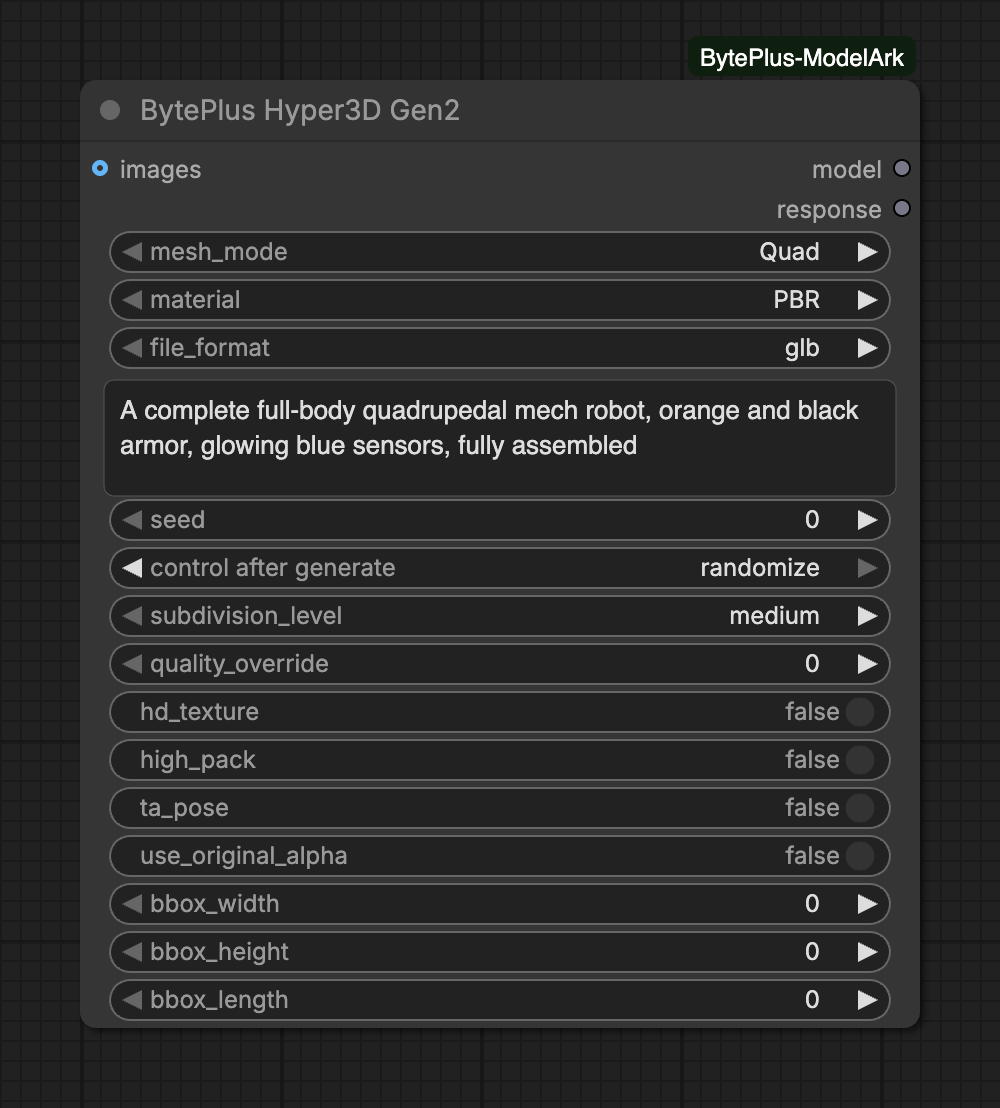
The Hyper3D Gen2 node with a prompt box, mesh and material choices and advanced polygon inputs
Default values: Quad mesh, PBR material, GLB file.
InputTypeDefaultWhat it does
mesh_modechoiceQuadQuad: clean quad topology for editing. Raw: triangles.Choices: Quad, Raw
materialchoicePBRPBR: physically based textures. Shaded: baked lighting. All: both. None: white model.Choices: PBR, Shaded, All, None
file_formatchoiceglbFormat of the 3D file. GLB is the default.Choices: glb, obj, fbx, usdz, stl
promptoptionaltextDescribe the model in English (up to 400 characters). Required when no image is connected.
imagesoptionalIMAGEUp to 5 reference images of one object (a batch). A clean, single-object picture on a plain background works best.
seedoptionalinteger0Seed for repeatable results (0-65535).Range: 0–65535
Advanced inputs (9)
InputTypeDefaultWhat it does
subdivision_leveloptionalchoicemediumPolygon count level. Ignored when quality_override is set.Choices: medium, high, low
quality_overrideoptionalinteger0Exact face count. 0 = use subdivision_level. Raw: 500-1,000,000. Quad: 1,000-200,000.Range: 0–1000000
hd_textureoptionalon/offoffGenerate higher resolution textures.
high_packoptionalon/offoffHighPack add-on: 4K textures.
ta_poseoptionalon/offoffForce a T-pose or A-pose for humanoid characters.
use_original_alphaoptionalon/offoffKeep the transparent areas of the input images (only used with images).
bbox_widthoptionalinteger0Bounding box width. Set width, height and length together; 0 = off.Range: 0–10000
bbox_heightoptionalinteger0Bounding box height. Set width, height and length together; 0 = off.Range: 0–10000
bbox_lengthoptionalinteger0Bounding box length. Set width, height and length together; 0 = off.Range: 0–10000
  • Prompt or images: at least one is required. The prompt is English text of up to 400 characters, and it cannot contain --option flags: use the node’s inputs instead.
  • Images: connect one image batch of up to five pictures of a single object. Clear, centered pictures on a plain background work best. Images with transparency are sent as PNG, other images as JPEG.
  • Polygons: subdivision_level picks a preset. quality_override sets an exact face count and replaces the preset: 500 to 1,000,000 for Raw, 1,000 to 200,000 for Quad.
  • Bounding box: bbox_width, bbox_height and bbox_length only apply when all three are set. Leave them at 0 to switch it off.
  • Seed: 0 to 65535.
OutputTypeWhat it holds
modelFILE_3DThe generated 3D model. Connect it to Save 3D Model to keep it, or to any 3D node.
responsetextTask ID and format of the result, as JSON.
  • model is the main model file from the result, in the format you chose.
  • response holds the task ID and the file format as JSON.
  • The model ID is hyper3d-gen2-260112. It uses the Seedance task endpoint, so generation runs as a background task that the node polls every few seconds.
  • The result link from BytePlus lives 24 hours. The node downloads it as soon as the task finishes. If the download fails, the error shows the task ID.
  • Interrupting a run deletes the pending task on ModelArk.
  • Paid task creation is never retried automatically, so a failed submit cannot bill twice.
  • The result link points straight to the model file. With obj the file has no material or texture file next to it; use glb to keep textures.
  • The default format is GLB. The file formats you can choose are listed in the file_format input.
Message What to do
[BytePlus] BytePlus Hyper3D needs a prompt or at least one image. Type a prompt or connect an image.
[BytePlus] The prompt is … characters long; Hyper3D accepts at most 400. Shorten the prompt.
[BytePlus] Remove the --… option from the prompt: use the node's inputs instead. Delete the flag from the prompt and set the matching input.
[BytePlus] The 3D task … failed: … Read the reason. Content filters can reject a prompt or image: change it and run again.
[BytePlus] The 3D result of task … could not be downloaded … Run again. The task ID in the message identifies the finished task.