

Seed Audio
- Template
- Seed Audio, in the ComfyUI template browser under BytePlus
- Workflow file
- Seed Audio.json
- BytePlus nodes
- Seed Audio 1.0
- Keys needed
- Seed Speech API key
- Also uses
- Preview Audio, Preview as Text (built into ComfyUI)
What it makes
Section titled “What it makes”One audio clip of about 16 seconds and its subtitles. The prompt describes a late-night radio host who welcomes listeners over soft rain and a distant jazz piano, and quotes the two lines to speak. Seed Audio 1.0 reads the lines in the preset voice Stokie (Female, American English) and, because subtitles are on, also returns an SRT text with a time range for each sentence.
The workflow
Section titled “The workflow”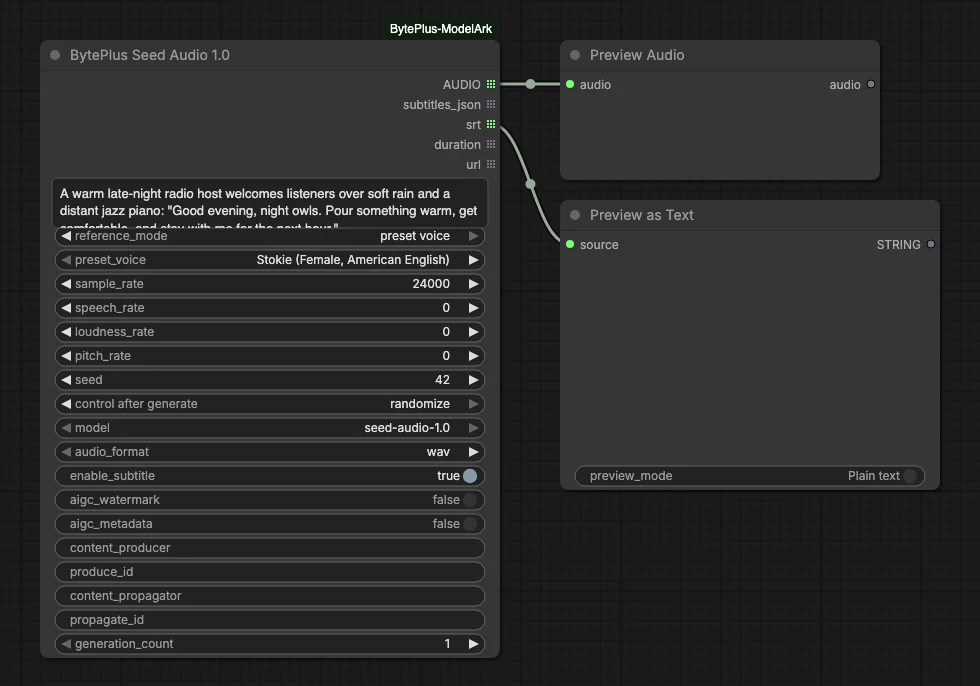
- Seed Audio 1.0 receives the prompt, uses
reference_mode= preset voice with the voice Stokie, and creates the audio.enable_subtitleis on in this template. - Preview Audio plays the
AUDIOoutput. - Preview as Text shows the
srtoutput.
Run it
Section titled “Run it”- Add your Seed Speech API key in Settings → BytePlus if you have not yet (API keys). This is a separate key from the ModelArk key.
- Open the template browser and choose Seed Audio under BytePlus.
- Press Run. The clip appears in Preview Audio and the subtitles in Preview as Text.
Settings worth changing
Section titled “Settings worth changing”text_prompt: describe the voice, the mood, the sounds around it and the lines to speak. Put the spoken lines in quotes.reference_mode: switch from preset voice to text only, audio reference (clone up to three voices from clips, tagged@Audio1to@Audio3in the prompt) or image reference.preset_voice: pick another built-in voice whilereference_modeis preset voice.speech_rate,loudness_rateandpitch_rate: 0 is normal. For speed and loudness, 100 means twice as fast or loud and -50 means half. Pitch moves by semitones from -12 to 12.generation_count: an advanced input. It runs several takes in parallel, each billed as its own request, and every output becomes a list.
Example result
Section titled “Example result”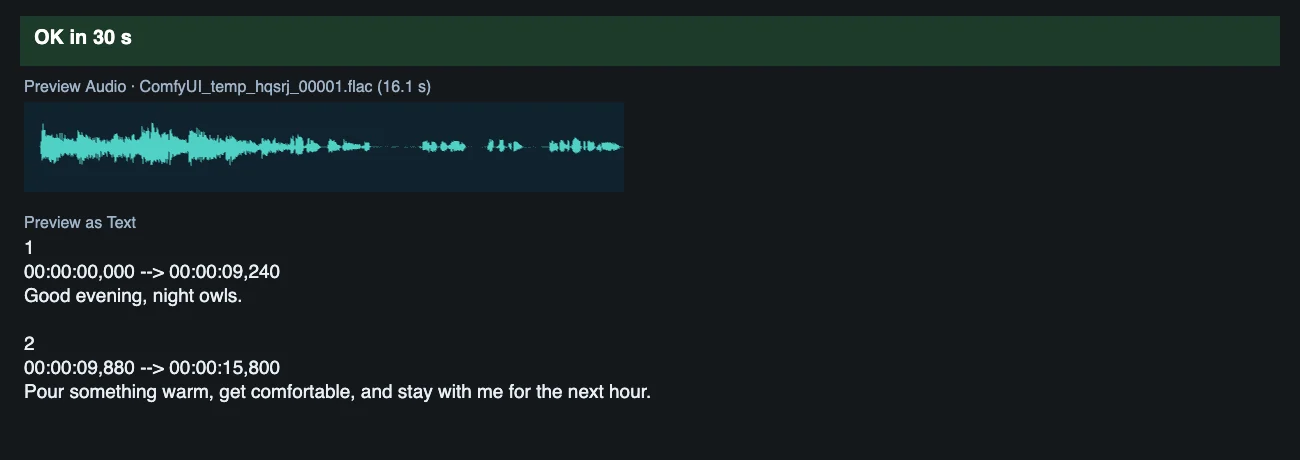
Time and cost
Section titled “Time and cost”The node sends one request per generation and bills it. The seed is not sent to the API and does not make results repeatable; it only decides whether ComfyUI runs the node again. Its control is set to randomize, so every run makes a new take and bills again. Set it to fixed and ComfyUI reuses the cached result of an unchanged workflow without billing.
Related
Section titled “Related”- Node: Seed Audio 1.0
- Next step: Sound Design lets the BytePlus LLM write the sound prompt and renders two takes.