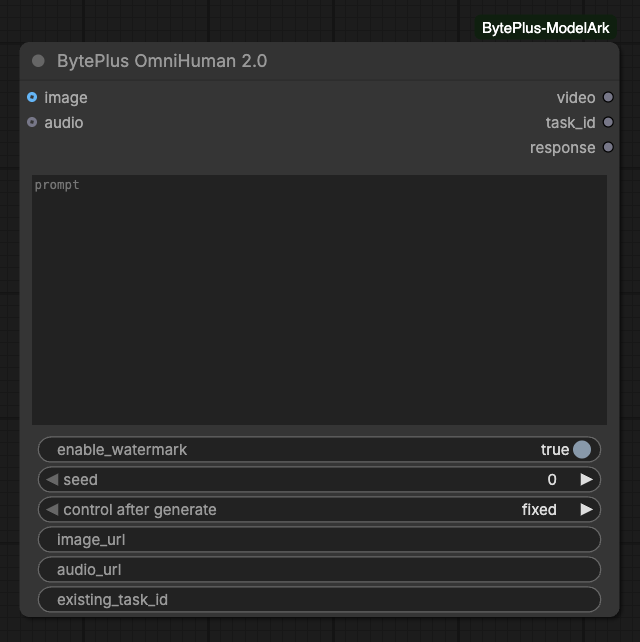
Generates an avatar video from one image and a speech clip using OmniHuman 2.0. You need a separate Vision AI API key in Settings > BytePlus. Work can be billed to your BytePlus account. Connect Save Video to keep the result.
Local rerun control only, not sent to OmniHuman. Keep fixed to resume an unresolved task.Range: 0–18446744073709552000
imageoptional
IMAGE
Exactly one image, or use image_url.
audiooptional
AUDIO
One 4-300 second speech clip (up to 5 minutes), or use audio_url. Video duration follows the audio; trim the audio first to change the length. Oversized WAVs are converted to mono at up to 24 kHz without truncation.
image_urloptional
text
Persistent public image URL, instead of a connected image.
audio_urloptional
text
Persistent public WAV/MP3 URL, instead of connected audio. Video duration follows this audio.
Advanced inputs (1)
Input
Type
Default
What it does
existing_task_idoptional
text
Recover this task without generation or uploads. Other generation inputs are ignored. Must match any unresolved task and its key.
Choose one source for each kind of media: a connected socket or its URL, never both. Connected media is uploaded to Comfy.org storage and needs a Comfy.org login.
Use an optional prompt for scene, movement and camera guidance. The service documents English, Chinese, Japanese, Korean, Mexican Spanish and Indonesian prompts.
The watermark defaults to enabled. The seed is a local rerun control, not a provider seed or a promise of deterministic results. Its control defaults to fixed.
Keep the seed fixed while recovering an unresolved task. The node saves the accepted ID and input hashes locally, so requeueing can resume after an interruption or restart.
existing_task_id collects an existing task without uploads or new generation. Other generation inputs are ignored in this mode. If this node already has unresolved work, use the same task ID and key; use a separate Task Result node for another task.
Connected images must be a single RGB/RGBA image, 300-6000 pixels on each side, with width/height from 0.4 to 2.5. The encoded PNG must be smaller than 30 MB.
Connected audio must be one mono or stereo clip lasting 4-300 seconds, including a full five-minute clip. If its WAV would exceed the 15 MB limit, the node downmixes it to mono and resamples to at most 24 kHz without truncating the duration. Audio that already fits keeps its channels and sample rate.
Video duration follows the input audio; there is no separate duration setting. Trim or regenerate the narration before submitting if you need a shorter or longer video.
For URL inputs, the service validates media. The official API lists JPEG, PNG, WebP, BMP, TIFF, GIF, HEIC and HEIF images, and WAV/MP3 audio.
Task lookup is available for about 12 hours. Returned video URLs are valid for one hour; collect and save promptly.
Interrupting stops local waiting, not remote generation. Use OmniHuman Cancel Task for an explicit cancellation request. Only queued tasks can be canceled.
If submission acceptance is unknown, check Vision AI before starting replacement work. Recover the accepted ID instead of resubmitting.
Use only images and voices you have permission to process. ModelArk, Seed Speech and MediaKit keys are not Vision AI keys.
The original node retains its recovery record until it collects the video successfully. Collection through a separate Task Result node does not clear that record. For a canceled, expired or intentionally abandoned task, stop local execution and verify the remote task’s state before removing its matching JSON file from user/byteplus/omnihuman_tasks/. Removing a record does not cancel remote work and permits another paid submission.