

Seedance Task Query
- Template
- Seedance Task Query, in the ComfyUI template browser under BytePlus
- Workflow file
- Seedance Task Query.json
- BytePlus nodes
- Video Query Tasks
- Keys needed
- ModelArk API key
- Also uses
- Extract Text, MarkdownNote, Preview as Text, Text (built into ComfyUI)
What it makes
Section titled “What it makes”No new video. This is a utility template. A Seedance task keeps running on BytePlus after you close ComfyUI, so you can come back to it later. Paste a task ID and the template shows how many tasks matched, the task status and the model that made it. Leave the ID empty and it lists your latest tasks instead.
The workflow
Section titled “The workflow”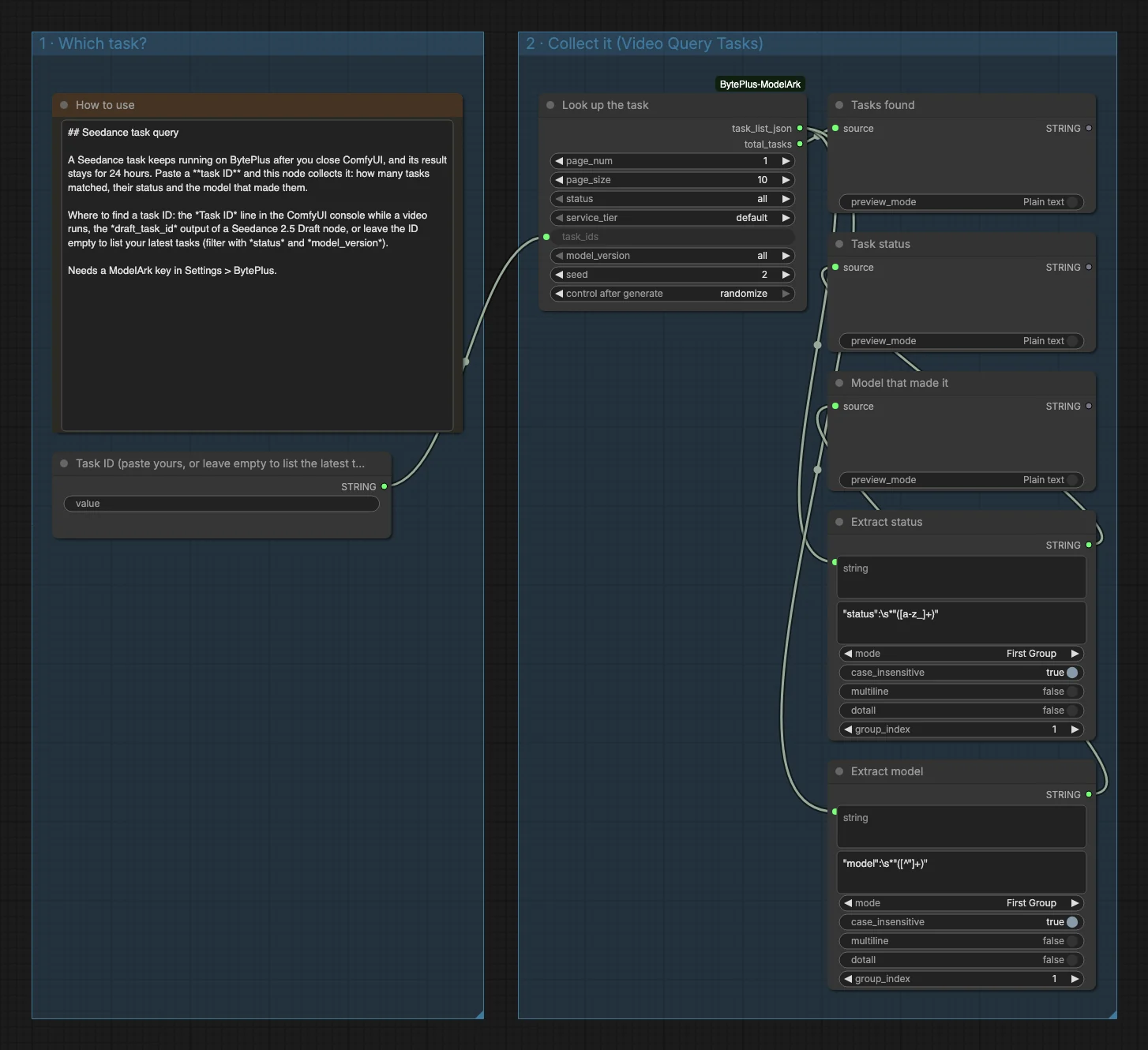
- Task ID is a string field. Its title says to paste your ID, or leave it empty to list the latest tasks. A note called How to use sits above it.
- Video Query Tasks (titled “Look up the task”) receives the ID as
task_idsand returns the task list as JSON together with the number of tasks found. The template uses its defaults:page_num1,page_size10,statusall,service_tierdefault andmodel_versionall. - Tasks found previews the count (
total_tasks). - Two Extract nodes use a regular expression to pull the first
statusand the firstmodelout of the JSON. Task status and Model that made it preview them.
Run it
Section titled “Run it”- Add your ModelArk API key in Settings → BytePlus if you have not yet (API keys).
- Open the template browser and choose Seedance Task Query under BytePlus.
- Find a task ID and paste it into the Task ID field. The ID is the Task ID line in the ComfyUI console while a Seedance video runs, or the
draft_task_idoutput of a Seedance 2.5 Draft run. It must be a real task ID from your own account, and ModelArk keeps a task for 7 days. An ID the account does not know is reported as not found. - Press Run. The three previews fill in within a moment.
Settings worth changing
Section titled “Settings worth changing”- Task ID: leave the field empty to list your latest tasks. The lookup accepts one ID per line, but the Task ID field is a single line, so swap it for a multiline text node to look up several tasks at once.
status: filter the list, for example torunningorfailed.model_version: show only tasks of one Seedance model, for exampledreamina-seedance-2-5.page_sizeandpage_num: page through a long list of tasks.
Example result
Section titled “Example result”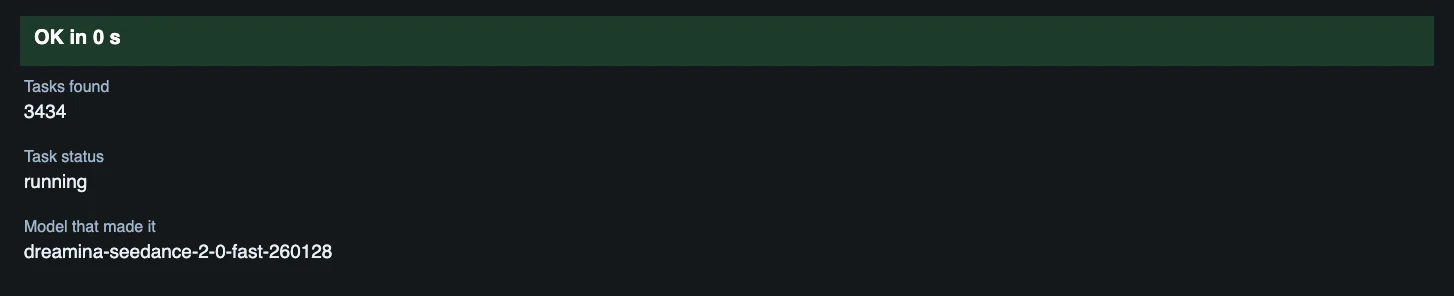
With an empty ID, the previews describe your task list: the count of tasks found, and the status and model of the first task in the list, which is the newest. With a task ID you see that one task instead.
Time and cost
Section titled “Time and cost”The template only reads task information and does not generate a video. The seed of the lookup node is set to randomize, so every run repeats the lookup instead of reusing ComfyUI’s cached result.
Related
Section titled “Related”- Node: Video Query Tasks
- Next step: Seedance Video Extension is a long job whose task IDs you may want to look up.