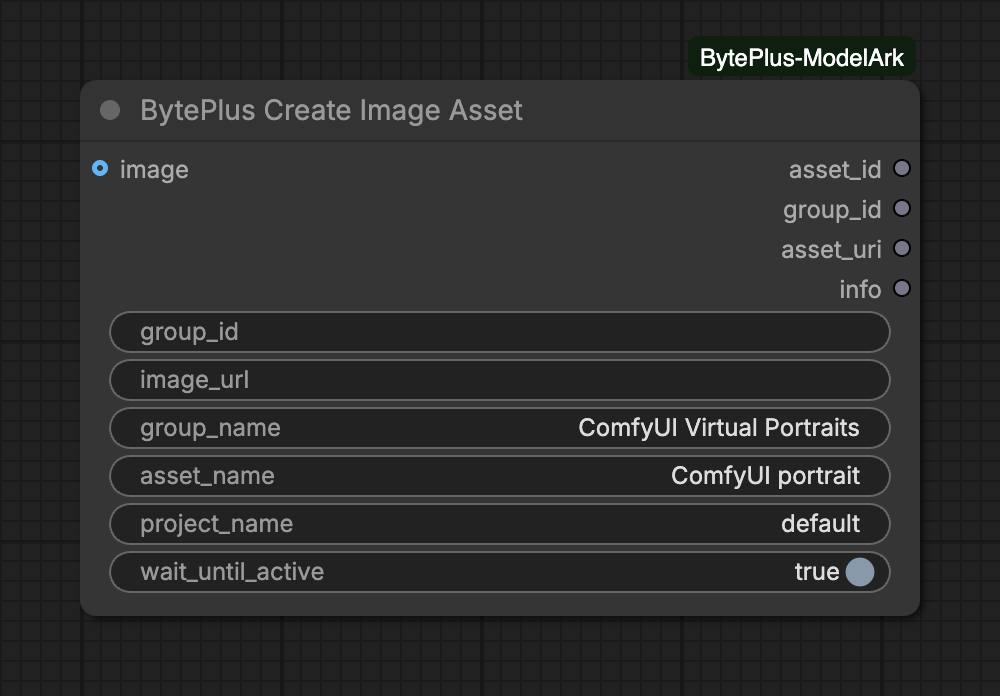
Registers an image in your private asset library and outputs its asset_id, group_id and an asset:// URI, so Seedance 2 and 2.5 can use it as a reference without sending the image again. It needs Dreamina Seedance Advanced Creation Rights, the ModelArk API key, and the IAM access key and secret key saved in Settings → BytePlus (see API keys). It generates nothing, and you should only use images you are authorized to use.
Reuse an existing asset group ID to add more assets of the same person: a virtual portrait (AIGC) group, or a verified real person's LivenessFace group. Leave empty to find or create the virtual portrait (AIGC) group named group_name. Real-person verification is a QR-code flow in the ModelArk console (BytePlus has no API for it), so unlike ComfyUI core's node this node does not start it: verify the person in the console, then paste the group ID here.
imageoptional
IMAGE
Image to register as a personal asset. Leave unconnected to use image_url instead.
Advanced inputs (5)
Input
Type
Default
What it does
image_url
text
Public HTTPS URL of the image, used instead of the image input: sent straight to CreateAsset without a Comfy.org upload.
group_name
text
ComfyUI Virtual Portraits
Used when group_id is empty: the virtual portrait (AIGC) group, matched by exact name and created if missing. Use one group per person.
asset_name
text
ComfyUI portrait
Name of the new asset.
project_name
text
default
ModelArk project that holds the asset library.
wait_until_active
on/off
on
Wait (up to 10 min) until the asset is Active and can be used in Seedance.
Image source: connect image, or set image_url to a public HTTPS link, not both. A connected image is uploaded to Comfy.org storage first (Comfy.org login needed), because the asset library only takes links. A link goes straight to the library.
Group: with a group_id, the asset is added to that group. This can be a virtual portrait (AIGC) group or a verified real person’s group. With an empty group_id, the node finds the AIGC group whose name is exactly group_name, or creates it. Use one group per person.
Real people: verification is a QR-code flow in the ModelArk console and the node cannot start it. Verify the person there, then paste the group ID into group_id.
Waiting: with wait_until_active on, the node waits until the asset is Active. Turn it off to get the IDs at once; the asset is then still Processing.
A connected image must be 300 to 6000 px on each side, with a width to height ratio above 0.4 and below 2.5. These are checked before any upload; an image_url is not checked here. Of a connected batch only the first image is registered.
The node is not an output node. Connect at least one of its outputs to another node, or it does not run.
Running the same connected image again reuses the asset created for it, as long as the group, project, account and asset_name are the same and the asset still exists. This memory is cleared when ComfyUI restarts. A link in image_url is never deduplicated.
The node waits up to 10 minutes for Active. After that it stops with an error, but the asset may still become Active: list it with Asset Library before you create it again.
Creating assets is rate limited by your rights tier: 3 requests per minute for Entry, 120 for Advanced and 300 for Premium.
Creation requests are not retried automatically, so a timeout cannot create a second asset.
Interrupting a run stops the node’s wait. An asset that was already created stays in your library.