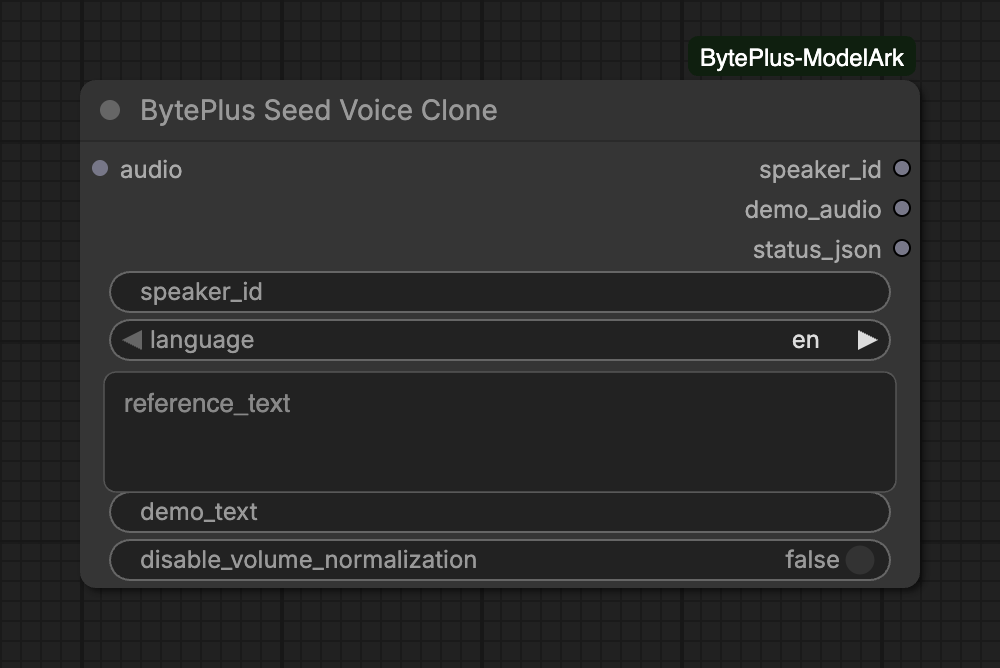
Trains a voice on a clip of someone speaking and outputs its speaker_id. You then give that ID to Seed Speech TTS with the model seed-icl-2.0, or use it as a reference source in Seed Audio 1.0.
The node needs your separate Seed Speech API key (Singapore region only) and a voice slot from the Seed Speech console.
Voice slot ID (S_...) bought in the Seed Speech console, or your own postpaid custom voice ID. Each slot can be trained 15 times; every run with changed inputs trains again.
language
choice
en
Language spoken in the reference clip. Cross-language cloning is not supported.Choices: en, zh, ja, es, id, pt, de, fr, ko, it, th, vi … (21 in total)
reference_text
text
Optional: the text read in the clip. Training fails if the audio differs too much.
demo_text
text
Optional: text for the demo clip (4-80 characters, same language).
audio
AUDIO
Reference voice clip, e.g. from Load Audio: 10-15 s of clear speech, up to 10 MB.
Advanced inputs (1)
Input
Type
Default
What it does
disable_volume_normalization
on/off
off
Keep the reference clip's loudness instead of normalizing it (closer similarity).
speaker_id: a voice slot ID that starts with S_, bought in the Seed Speech console, or your own postpaid custom voice ID. A custom ID has 8 to 256 letters, digits, - or _, starts with a letter, does not end with - or _, and avoids the reserved prefixes and suffixes of Seed Speech.
Reference clip: connect 10 to 15 seconds of clear speech to audio, for example from Load Audio. The clip is sent as WAV, which must stay within 10 MB.
language: the language spoken in the clip. Cloning across languages is not supported.
reference_text: optional. If you give the text that is read in the clip, training can fail when the audio differs too much from it.
demo_text: optional text of 4 to 80 characters for the demo clip, in the same language.
[BytePlus] speaker_id is empty: enter a voice slot ID (S_...) from the Seed Speech console, …
Enter a voice slot ID (S_...) from the Seed Speech console, or your own postpaid custom voice ID.
[BytePlus] '…' is not a valid custom voice ID: 8-256 letters, digits, - or _, …
Fix the ID: 8 to 256 letters, digits, - or _, starting with a letter, not ending with - or _, without reserved prefixes such as S_ or suffixes such as _bigtts.
… This voice slot has no training attempts left (15 per slot). Use another speaker ID.
The slot was trained 15 times. Use another speaker ID.
… The reference audio does not match reference_text.
Empty reference_text, or type exactly what is said in the clip.
… The reference audio is too noisy (SNR check failed).