Skip to content

Hitem3D 2.0

Node name
BytePlus Hitem3D 2.0
Node ID
BytePlusHitem3D
Find it
Double-click the canvas and search for “Hitem3D 2.0”, or browse BytePlus ModelArk/3D
Keys needed
ModelArk API key
Runs when
Its output is used by another node, such as Save Image or Save Video. It is not an output node.

Builds a 3D model with Hitem3D 2.0 on ModelArk from one to four pictures of one object: front, back, left and right. It submits one task, waits, downloads the result and returns it as a 3D file. It needs only the ModelArk key and bills for every task. It saves nothing: connect Save 3D (Advanced) to view the model and keep a copy.

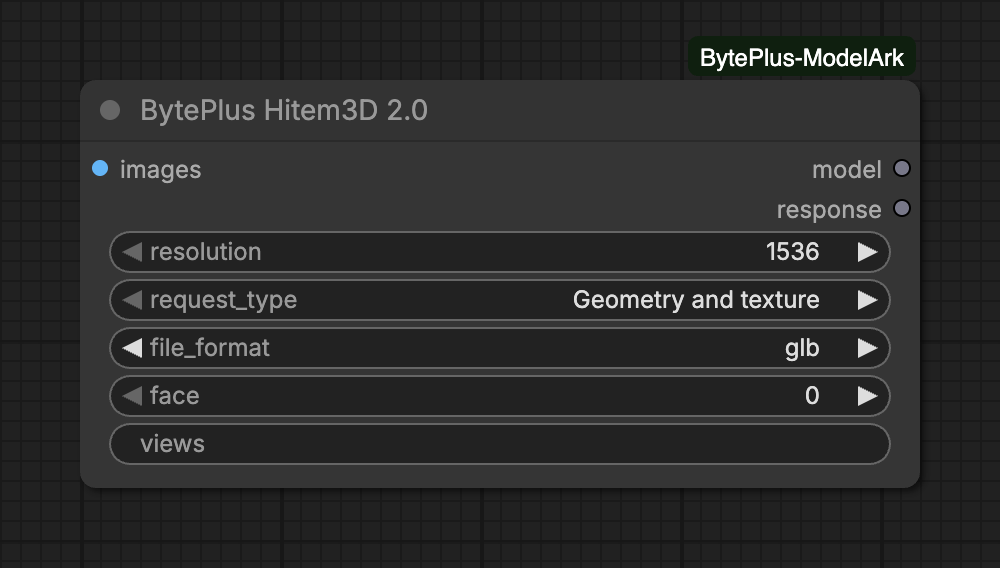
The Hitem3D 2.0 node with resolution, request type and file format choices
Default values: 1536 resolution, geometry and texture, GLB file.
InputTypeDefaultWhat it does
imagesIMAGE1 to 4 images of one object (a batch), in the order front, back, left, right. With several images, set views if they are not the first views.
resolutionchoice1536Model resolution: 1536 (default) or 1536pro.Choices: 1536, 1536pro
request_typechoiceGeometry and textureGeometry only returns an untextured model.Choices: Geometry and texture, Geometry only
file_formatchoiceglbFormat of the 3D file. GLB is the default.Choices: obj, glb, stl, fbx, usdz
Advanced inputs (2)
InputTypeDefaultWhat it does
faceoptionalinteger0Face count (100,000-2,000,000). 0 = the model's default.Range: 0–2000000
viewsoptionaltextWhich views the images are, as 4 digits for front, back, left, right: 1010 = front and left. One 1 per image. Empty = the first views in order.
  • Images: connect one image batch of 1 to 4 pictures. With one image, the node sends no view information.
  • Views: with two to four images the node sends which views you supply, as four digits for front, back, left, right. Leave views empty to use the first views in order (two images are front and back). Set 1010 for front and left. The number of 1 digits must equal the number of images.
  • Request type: Geometry only returns a model without texture.
  • Face count: face sets the number of faces, 100,000 to 2,000,000. Leave it at 0 for the model’s default.
OutputTypeWhat it holds
modelFILE_3DThe generated 3D model. Connect it to Save 3D Model to keep it, or to any 3D node.
responsetextTask ID and format of the result, as JSON.
  • model is the main model file from the result, in the format you chose.
  • response holds the task ID and the file format as JSON.
  • The model ID is hitem3d-2-0-251223. It uses the Seedance task endpoint, so generation runs as a background task that the node polls every few seconds.
  • The result link from BytePlus lives 24 hours. The node downloads it as soon as the task finishes. If the download fails, the error shows the task ID.
  • Hitem3D takes much longer than Hyper3D, and its GLB can be tens of megabytes. Keep the run going until the task finishes.
  • Interrupting a run deletes the pending task on ModelArk.
  • Paid task creation is never retried automatically, so a failed submit cannot bill twice.
  • This model takes images only. For a text prompt use Hyper3D Gen2, or make an image first with Seedream.
Message What to do
[BytePlus] BytePlus Hitem3D needs at least one image. Connect an image.
[BytePlus] BytePlus Hitem3D accepts at most 4 images, got … Connect at most four pictures.
[BytePlus] views must be 4 characters of 0 and 1 … Use four digits with one 1 per image, or clear the field.
[BytePlus] The 3D task … failed: … Read the reason. Content filters can reject an image: use another one.
[BytePlus] The 3D result of task … could not be downloaded … Run again. The task ID in the message identifies the finished task.