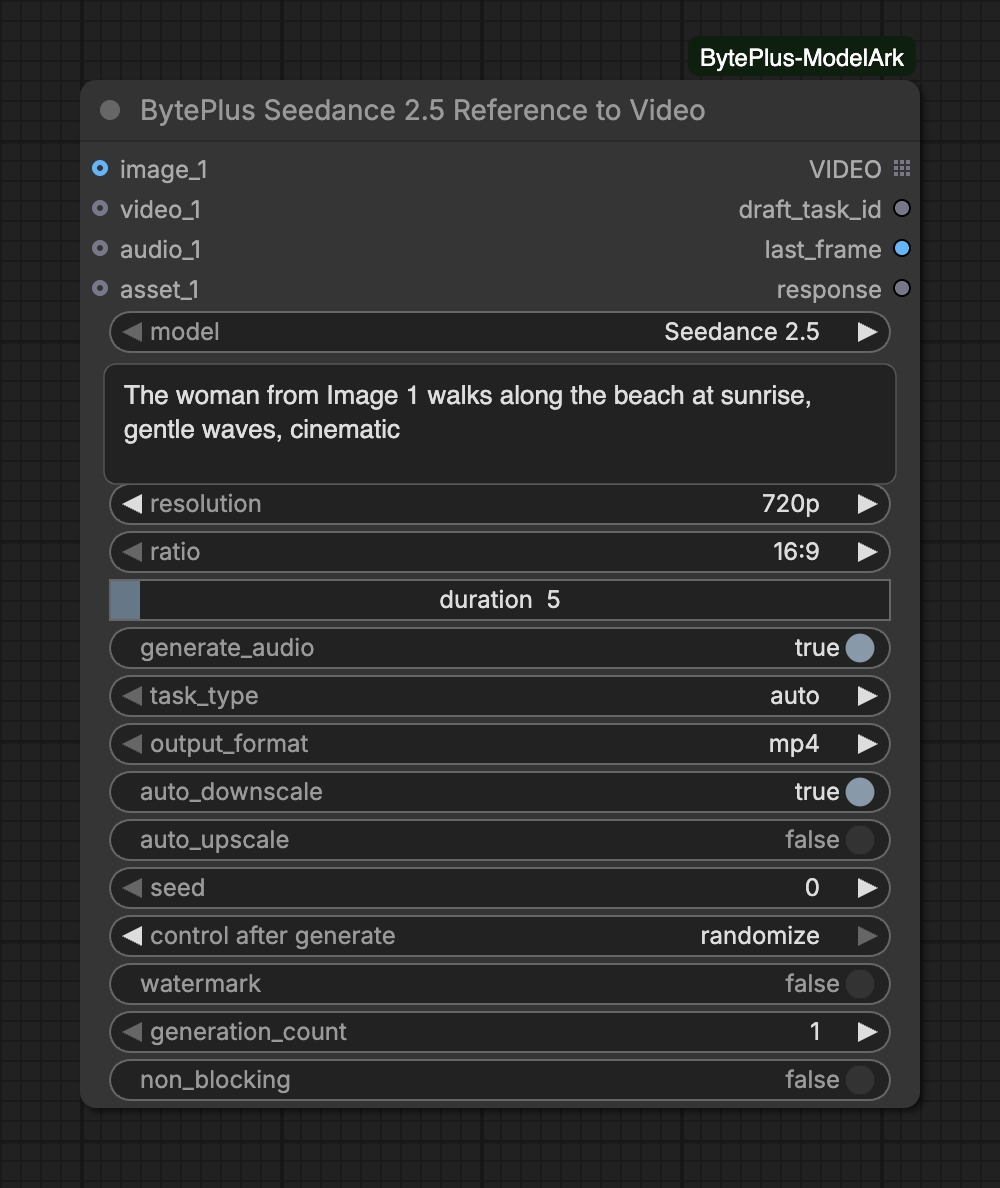
Creates a video with BytePlus Seedance guided by reference media: images, videos and audio, connected to the slots or passed as asset IDs and links. On the Seedance 2.5 options, task_type chooses what to do with them: make a new video (reference), change a clip you connected (edit) or continue it (extend). The prompt names the references by position, for example “the woman from Image 1”.
The node bills for every video it generates and waits until the task finishes. It does not save anything itself: connect Save Video to keep the result. Connected reference videos are uploaded to Comfy.org storage first, so you must be logged in to Comfy.org.
Seed controls whether the node should re-run; results are non-deterministic regardless of seed.Range: 0–2147483647
model is required and decides which of the inputs below appear. Seedance 2.5 for the newest model, videos up to 30 seconds and mp4/mov output; Seedance 2.5 Draft for a quick 480p preview whose draft_task_id renders the 1080p final in the BytePlus Seedance 2.5 Draft to Final Video node; Seedance 2.5 Premium for 4k output, and Seedance 2.5 Premium Draft for its 480p preview (rendered in 4k); Seedance 2.0 for maximum quality and 4k; Fast for speed optimization; Mini for the fastest, lowest-cost generation.
Text prompt for video generation. Put spoken lines in double quotes to steer the generated dialogue.
resolution
choice
720p
Resolution of the output video.Choices: 480p, 720p, 1080p
ratio
choice
16:9
Aspect ratio of the output video.Choices: 16:9, 4:3, 1:1, 3:4, 9:16, 21:9, adaptive
duration
integer
5
Duration of the output video in seconds (4-30).Range: 4–30
generate_audio
on/off
on
Enable audio generation for the output video.
task_type
choice
auto
What to do with the reference media. Every value except auto is validated when the task is submitted, so mismatched settings fail before generation starts. auto: the model infers the task from the prompt and inputs, and settings that conflict with its reading fail only after generation has started. reference: generate a new video guided by the reference images, videos, and audio. edit: change a connected reference video (add, remove, replace); the output keeps the source clip's own length and aspect ratio, and the duration and ratio widgets are ignored. extend: continue a connected reference video forward or backward; the prompt should say 'extend forward', 'extend backward', or 'continue', the aspect ratio follows the source clip, and the output contains only the newly generated segment of the duration you set, not the source clip.Choices: auto, reference, edit, extend
output_format
choice
mp4
Container format of the output video.Choices: mp4, mov
reference_images
group of inputs of IMAGE
Slots: image_1 to image_30 (30)
reference_videos
group of inputs of VIDEO
Slots: video_1 to video_10 (10)
reference_audios
group of inputs of AUDIO
Slots: audio_1 to audio_10 (10)
reference_assets
group of inputs of text
Asset IDs (or asset://<asset_id>) from your private asset library, or https:// links to image, video or audio files. Up to 50 references in total on Seedance 2.5 (30 images, 10 videos, 10 audio clips, counting connected inputs) and 15 on Seedance 2.0 (9 + 3 + 3). Refer to a slot in the prompt as assetN (for example asset1); it is rewritten to the matching Image / Video / Audio label.Slots: asset_1 to asset_50 (50)
auto_downscaleoptional
on/off
on
Automatically downscale reference videos that exceed the model's pixel budget for the selected resolution. Aspect ratio is preserved; videos already within limits are untouched.
Advanced inputs for Seedance 2.5
Input
Type
Default
What it does
auto_upscaleoptional
on/off
off
Automatically upscale reference videos that are below the model's minimum pixel count for the selected resolution. Aspect ratio is preserved; videos already meeting the minimum are untouched. Note: upscaling a low-resolution source does not add real detail and may produce lower-quality generations.
Input
Type
Default
What it does
prompt
text
Text prompt for video generation. Put spoken lines in double quotes to steer the generated dialogue.
resolution
choice
480p
Resolution of the output video.Choices: 480p
ratio
choice
16:9
Aspect ratio of the output video.Choices: 16:9, 4:3, 1:1, 3:4, 9:16, 21:9, adaptive
duration
integer
5
Duration of the output video in seconds (4-30).Range: 4–30
generate_audio
on/off
on
Enable audio generation for the output video.
task_type
choice
auto
What to do with the reference media. Every value except auto is validated when the task is submitted, so mismatched settings fail before generation starts. auto: the model infers the task from the prompt and inputs, and settings that conflict with its reading fail only after generation has started. reference: generate a new video guided by the reference images, videos, and audio. edit: change a connected reference video (add, remove, replace); the output keeps the source clip's own length and aspect ratio, and the duration and ratio widgets are ignored. extend: continue a connected reference video forward or backward; the prompt should say 'extend forward', 'extend backward', or 'continue', the aspect ratio follows the source clip, and the output contains only the newly generated segment of the duration you set, not the source clip.Choices: auto, reference, edit, extend
output_format
choice
mp4
Container format of the output video.Choices: mp4, mov
reference_images
group of inputs of IMAGE
Slots: image_1 to image_30 (30)
reference_videos
group of inputs of VIDEO
Slots: video_1 to video_10 (10)
reference_audios
group of inputs of AUDIO
Slots: audio_1 to audio_10 (10)
reference_assets
group of inputs of text
Asset IDs (or asset://<asset_id>) from your private asset library, or https:// links to image, video or audio files. Up to 50 references in total on Seedance 2.5 (30 images, 10 videos, 10 audio clips, counting connected inputs) and 15 on Seedance 2.0 (9 + 3 + 3). Refer to a slot in the prompt as assetN (for example asset1); it is rewritten to the matching Image / Video / Audio label.Slots: asset_1 to asset_50 (50)
auto_downscaleoptional
on/off
on
Automatically downscale reference videos that exceed the model's pixel budget for the selected resolution. Aspect ratio is preserved; videos already within limits are untouched.
Advanced inputs for Seedance 2.5 Draft
Input
Type
Default
What it does
auto_upscaleoptional
on/off
off
Automatically upscale reference videos that are below the model's minimum pixel count for the selected resolution. Aspect ratio is preserved; videos already meeting the minimum are untouched. Note: upscaling a low-resolution source does not add real detail and may produce lower-quality generations.
Input
Type
Default
What it does
prompt
text
Text prompt for video generation. Put spoken lines in double quotes to steer the generated dialogue.
resolution
choice
4k
Resolution of the output video.Choices: 4k
ratio
choice
16:9
Aspect ratio of the output video.Choices: 16:9, 4:3, 1:1, 3:4, 9:16, 21:9, adaptive
duration
integer
5
Duration of the output video in seconds (4-30).Range: 4–30
generate_audio
on/off
on
Enable audio generation for the output video.
task_type
choice
auto
What to do with the reference media. Every value except auto is validated when the task is submitted, so mismatched settings fail before generation starts. auto: the model infers the task from the prompt and inputs, and settings that conflict with its reading fail only after generation has started. reference: generate a new video guided by the reference images, videos, and audio. edit: change a connected reference video (add, remove, replace); the output keeps the source clip's own length and aspect ratio, and the duration and ratio widgets are ignored. extend: continue a connected reference video forward or backward; the prompt should say 'extend forward', 'extend backward', or 'continue', the aspect ratio follows the source clip, and the output contains only the newly generated segment of the duration you set, not the source clip.Choices: auto, reference, edit, extend
output_format
choice
mp4
Container format of the output video.Choices: mp4, mov
reference_images
group of inputs of IMAGE
Slots: image_1 to image_30 (30)
reference_videos
group of inputs of VIDEO
Slots: video_1 to video_10 (10)
reference_audios
group of inputs of AUDIO
Slots: audio_1 to audio_10 (10)
reference_assets
group of inputs of text
Asset IDs (or asset://<asset_id>) from your private asset library, or https:// links to image, video or audio files. Up to 50 references in total on Seedance 2.5 (30 images, 10 videos, 10 audio clips, counting connected inputs) and 15 on Seedance 2.0 (9 + 3 + 3). Refer to a slot in the prompt as assetN (for example asset1); it is rewritten to the matching Image / Video / Audio label.Slots: asset_1 to asset_50 (50)
auto_downscaleoptional
on/off
on
Automatically downscale reference videos that exceed the model's pixel budget for the selected resolution. Aspect ratio is preserved; videos already within limits are untouched.
Advanced inputs for Seedance 2.5 Premium
Input
Type
Default
What it does
auto_upscaleoptional
on/off
off
Automatically upscale reference videos that are below the model's minimum pixel count for the selected resolution. Aspect ratio is preserved; videos already meeting the minimum are untouched. Note: upscaling a low-resolution source does not add real detail and may produce lower-quality generations.
Input
Type
Default
What it does
prompt
text
Text prompt for video generation. Put spoken lines in double quotes to steer the generated dialogue.
resolution
choice
480p
Resolution of the output video.Choices: 480p
ratio
choice
16:9
Aspect ratio of the output video.Choices: 16:9, 4:3, 1:1, 3:4, 9:16, 21:9, adaptive
duration
integer
5
Duration of the output video in seconds (4-30).Range: 4–30
generate_audio
on/off
on
Enable audio generation for the output video.
task_type
choice
auto
What to do with the reference media. Every value except auto is validated when the task is submitted, so mismatched settings fail before generation starts. auto: the model infers the task from the prompt and inputs, and settings that conflict with its reading fail only after generation has started. reference: generate a new video guided by the reference images, videos, and audio. edit: change a connected reference video (add, remove, replace); the output keeps the source clip's own length and aspect ratio, and the duration and ratio widgets are ignored. extend: continue a connected reference video forward or backward; the prompt should say 'extend forward', 'extend backward', or 'continue', the aspect ratio follows the source clip, and the output contains only the newly generated segment of the duration you set, not the source clip.Choices: auto, reference, edit, extend
output_format
choice
mp4
Container format of the output video.Choices: mp4, mov
reference_images
group of inputs of IMAGE
Slots: image_1 to image_30 (30)
reference_videos
group of inputs of VIDEO
Slots: video_1 to video_10 (10)
reference_audios
group of inputs of AUDIO
Slots: audio_1 to audio_10 (10)
reference_assets
group of inputs of text
Asset IDs (or asset://<asset_id>) from your private asset library, or https:// links to image, video or audio files. Up to 50 references in total on Seedance 2.5 (30 images, 10 videos, 10 audio clips, counting connected inputs) and 15 on Seedance 2.0 (9 + 3 + 3). Refer to a slot in the prompt as assetN (for example asset1); it is rewritten to the matching Image / Video / Audio label.Slots: asset_1 to asset_50 (50)
auto_downscaleoptional
on/off
on
Automatically downscale reference videos that exceed the model's pixel budget for the selected resolution. Aspect ratio is preserved; videos already within limits are untouched.
Advanced inputs for Seedance 2.5 Premium Draft
Input
Type
Default
What it does
auto_upscaleoptional
on/off
off
Automatically upscale reference videos that are below the model's minimum pixel count for the selected resolution. Aspect ratio is preserved; videos already meeting the minimum are untouched. Note: upscaling a low-resolution source does not add real detail and may produce lower-quality generations.
Input
Type
Default
What it does
prompt
text
Text prompt for video generation.
resolution
choice
Resolution of the output video.Choices: 480p, 720p, 1080p, 4k
ratio
choice
adaptive
Aspect ratio of the output video.Choices: 16:9, 4:3, 1:1, 3:4, 9:16, 21:9, adaptive
duration
integer
7
Duration of the output video in seconds (4-15).Range: 4–15
generate_audio
on/off
on
Enable audio generation for the output video.
reference_images
group of inputs of IMAGE
Slots: image_1 to image_9 (9)
reference_videos
group of inputs of VIDEO
Slots: video_1 to video_3 (3)
reference_audios
group of inputs of AUDIO
Slots: audio_1 to audio_3 (3)
reference_assets
group of inputs of text
Asset IDs (or asset://<asset_id>) from your private asset library, or https:// links to image, video or audio files. Up to 50 references in total on Seedance 2.5 (30 images, 10 videos, 10 audio clips, counting connected inputs) and 15 on Seedance 2.0 (9 + 3 + 3). Refer to a slot in the prompt as assetN (for example asset1); it is rewritten to the matching Image / Video / Audio label.Slots: asset_1 to asset_15 (15)
auto_downscaleoptional
on/off
on
Automatically downscale reference videos that exceed the model's pixel budget for the selected resolution. Aspect ratio is preserved; videos already within limits are untouched.
Advanced inputs for Seedance 2.0
Input
Type
Default
What it does
auto_upscaleoptional
on/off
off
Automatically upscale reference videos that are below the model's minimum pixel count for the selected resolution. Aspect ratio is preserved; videos already meeting the minimum are untouched. Note: upscaling a low-resolution source does not add real detail and may produce lower-quality generations.
Input
Type
Default
What it does
prompt
text
Text prompt for video generation.
resolution
choice
Resolution of the output video.Choices: 480p, 720p
ratio
choice
adaptive
Aspect ratio of the output video.Choices: 16:9, 4:3, 1:1, 3:4, 9:16, 21:9, adaptive
duration
integer
7
Duration of the output video in seconds (4-15).Range: 4–15
generate_audio
on/off
on
Enable audio generation for the output video.
reference_images
group of inputs of IMAGE
Slots: image_1 to image_9 (9)
reference_videos
group of inputs of VIDEO
Slots: video_1 to video_3 (3)
reference_audios
group of inputs of AUDIO
Slots: audio_1 to audio_3 (3)
reference_assets
group of inputs of text
Asset IDs (or asset://<asset_id>) from your private asset library, or https:// links to image, video or audio files. Up to 50 references in total on Seedance 2.5 (30 images, 10 videos, 10 audio clips, counting connected inputs) and 15 on Seedance 2.0 (9 + 3 + 3). Refer to a slot in the prompt as assetN (for example asset1); it is rewritten to the matching Image / Video / Audio label.Slots: asset_1 to asset_15 (15)
auto_downscaleoptional
on/off
on
Automatically downscale reference videos that exceed the model's pixel budget for the selected resolution. Aspect ratio is preserved; videos already within limits are untouched.
Advanced inputs for Seedance 2.0 Fast
Input
Type
Default
What it does
auto_upscaleoptional
on/off
off
Automatically upscale reference videos that are below the model's minimum pixel count for the selected resolution. Aspect ratio is preserved; videos already meeting the minimum are untouched. Note: upscaling a low-resolution source does not add real detail and may produce lower-quality generations.
Input
Type
Default
What it does
prompt
text
Text prompt for video generation.
resolution
choice
Resolution of the output video.Choices: 480p, 720p
ratio
choice
adaptive
Aspect ratio of the output video.Choices: 16:9, 4:3, 1:1, 3:4, 9:16, 21:9, adaptive
duration
integer
7
Duration of the output video in seconds (4-15).Range: 4–15
generate_audio
on/off
on
Enable audio generation for the output video.
reference_images
group of inputs of IMAGE
Slots: image_1 to image_9 (9)
reference_videos
group of inputs of VIDEO
Slots: video_1 to video_3 (3)
reference_audios
group of inputs of AUDIO
Slots: audio_1 to audio_3 (3)
reference_assets
group of inputs of text
Asset IDs (or asset://<asset_id>) from your private asset library, or https:// links to image, video or audio files. Up to 50 references in total on Seedance 2.5 (30 images, 10 videos, 10 audio clips, counting connected inputs) and 15 on Seedance 2.0 (9 + 3 + 3). Refer to a slot in the prompt as assetN (for example asset1); it is rewritten to the matching Image / Video / Audio label.Slots: asset_1 to asset_15 (15)
auto_downscaleoptional
on/off
on
Automatically downscale reference videos that exceed the model's pixel budget for the selected resolution. Aspect ratio is preserved; videos already within limits are untouched.
Advanced inputs for Seedance 2.0 Mini
Input
Type
Default
What it does
auto_upscaleoptional
on/off
off
Automatically upscale reference videos that are below the model's minimum pixel count for the selected resolution. Aspect ratio is preserved; videos already meeting the minimum are untouched. Note: upscaling a low-resolution source does not add real detail and may produce lower-quality generations.
Advanced inputs (3)
Input
Type
Default
What it does
watermark
on/off
off
Whether to add a watermark to the video.
generation_count
integer
1
Number of separate generations to run in parallel. With several, generation N uses seed + N so the results differ.Range: 1–16
non_blocking
on/off
off
Submit the task and return at once; run the node again to collect the finished video.
Models: the options match Text to Video. The Draft options render a 480p preview for Draft to Final Video. task_type and output_format exist on the Seedance 2.5 options only.
task_type:reference makes a new video from the references. edit changes a connected reference video; the result keeps the source clip’s length and aspect ratio, and duration and ratio are ignored. extend continues a connected video; the prompt should say “extend forward”, “extend backward” or “continue”, and the result holds only the new segment, not the source clip.
auto is risky with a video: with a reference video connected, auto can be rejected after generation has started. Set reference, edit or extend instead. Every value except auto is validated when the task is submitted, so a mismatch fails before generation starts.
Slots:image_N, video_N, audio_N take connected media. asset_N takes an asset ID, asset://<asset_id> or an https link to an image, video or audio file. A link is recognized by its file extension, or else by the content type its host returns. Asset IDs are looked up in your asset library, which needs the IAM keys in Settings → BytePlus. See Create Image Asset, Asset Library and Reference media.
Naming in the prompt: connected media comes first, so image_1 is @Image 1 and video_1 is @Video 1. asset_N entries continue the count of their type. You can also write asset1, asset2 and so on; the node replaces them with the matching label.
Several videos: raise generation_count. The tasks run in parallel and generation N uses seed + N.
The generated video, or every video of a generation_count batch (the next node runs once per video).
draft_task_id
text
Task ID of a Seedance 2.5 Draft or Seedance 2.5 Premium Draft run. Connect it to the BytePlus Seedance 2.5 Draft to Final Video node to render the final (1080p, or 4k for Premium). Several drafts (generation_count above 1) give one ID per line.
last_frame
IMAGE
Last frame of each generated video, as one image batch in the same order as the videos.
With generation_count above 1, VIDEO is a list: the next node runs once per video, and last_frame holds their last frames as one batch in the same order.
draft_task_id is for the two Draft models. Send it to Draft to Final Video. Linking it while another model is selected stops the run.
With non_blocking on, the first run returns at once with the task IDs in response and no video, so nodes connected to VIDEO or last_frame are skipped. Run the node again to collect the finished video.
Up to 50 references in total on Seedance 2.5 (30 images, 10 videos, 10 audio clips) and 15 on Seedance 2.0 (9, 3 and 3). Connected media and asset_N entries count together.
You need at least one reference image or video, connected or as an asset. Audio alone is accepted on Seedance 2.5 only.
Reference videos go through Comfy.org storage: log in to your Comfy.org account in ComfyUI. This does not work with --disable-api-nodes. To skip the upload, pass a link or an asset ID in asset_N.
Each reference video needs 300 to 6000 px per side, 407,696 to 8,295,044 pixels in total, an aspect ratio of 0.4 to 2.5, 24 to 60 fps, at most 200 MB and at least 2 s. auto_downscale (on by default) shrinks oversize videos and auto_upscale enlarges small ones.
Total reference video length is at most 15.2 s on Seedance 2.0 and 30.2 s on 2.5. Audio has the same total limit, and each connected audio clip needs at least 2 s. An edit task on Seedance 2.5 needs a video of at least 4 s.
Connected images and audio are sent inside the request. A whole request may not exceed 64 MiB.
Interrupting cancels tasks that are still queued. A task that is already running cannot be cancelled: it finishes and is billed. The node shows the task IDs, and Video Query Tasks finds them again. See Interrupts and cancelling.
Only use media you are allowed to use. Input containing a real person can be refused by BytePlus.