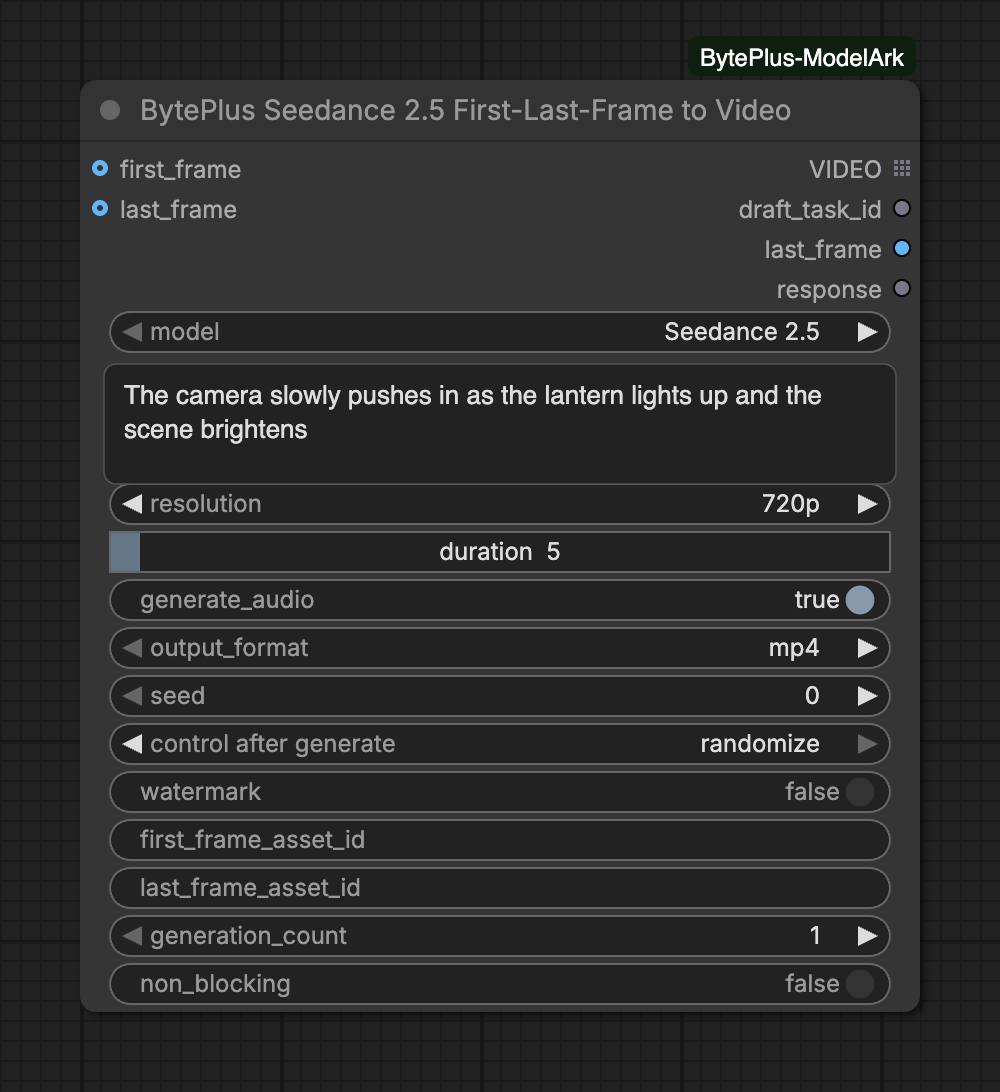
Creates a video with BytePlus Seedance that starts at a first frame image. Add a last frame and the video ends there. The prompt describes the motion in between. You need a first frame, either as an image or as an asset ID or link.
The node bills for every video it generates and waits until the task finishes. It does not save anything itself: connect Save Video to keep the result.
Seed controls whether the node should re-run; results are non-deterministic regardless of seed.Range: 0–2147483647
first_frameoptional
IMAGE
First frame image for the video.
last_frameoptional
IMAGE
Last frame image for the video.
first_frame_asset_idoptional
text
Seedance asset_id to use as the first frame. Mutually exclusive with the first_frame image input. Also accepts asset://<asset_id> or an https:// image link.
last_frame_asset_idoptional
text
Seedance asset_id to use as the last frame. Mutually exclusive with the last_frame image input. Also accepts asset://<asset_id> or an https:// image link.
model is required and decides which of the inputs below appear. Seedance 2.5 for the newest model, videos up to 30 seconds and mp4/mov output; Seedance 2.5 Draft for a quick 480p preview whose draft_task_id renders the 1080p final in the BytePlus Seedance 2.5 Draft to Final Video node; Seedance 2.5 Premium for 4k output, and Seedance 2.5 Premium Draft for its 480p preview (rendered in 4k); Seedance 2.0 for maximum quality and 4k; Fast for speed optimization; Mini for the fastest, lowest-cost generation.
Frames: use either first_frame or first_frame_asset_id, never both. The same rule applies to the last frame. The first frame is required, the last is optional.
Asset IDs and links: the *_asset_id fields take an asset ID, asset://<asset_id> or an https link to an image. With IAM keys saved in Settings → BytePlus, an asset ID is checked to be active and an image. Without them it is sent unchecked. A link is only checked against its file extension.
Aspect ratio: on Seedance 2.5 the video keeps the aspect of the first frame. On Seedance 2.0, 2.0 Fast and 2.0 Mini the ratio setting is back and defaults to adaptive. When you connect images (no asset IDs) on these models, the node crops them from the center and resizes them to the exact output size of the chosen resolution and ratio. With adaptive it uses the supported ratio closest to the first frame.
Models: the options match Text to Video: 2.5 (480p to 1080p, up to 30 s), 2.5 Premium (4k only), the two Draft options (480p only) and 2.0, 2.0 Fast and 2.0 Mini (up to 15 s).
Several videos: raise generation_count. The tasks run in parallel and generation N uses seed + N.
The generated video, or every video of a generation_count batch (the next node runs once per video).
draft_task_id
text
Task ID of a Seedance 2.5 Draft or Seedance 2.5 Premium Draft run. Connect it to the BytePlus Seedance 2.5 Draft to Final Video node to render the final (1080p, or 4k for Premium). Several drafts (generation_count above 1) give one ID per line.
last_frame
IMAGE
Last frame of each generated video, as one image batch in the same order as the videos.
The last_frame output is the last frame of each generated video. It is not the last_frame image you connected.
With generation_count above 1, VIDEO is a list: the next node runs once per video, and last_frame holds their last frames as one batch in the same order.
draft_task_id is for the two Draft models. Send it to Draft to Final Video. Linking it while another model is selected stops the run.
With non_blocking on, the first run returns at once with the task IDs in response and no video, so nodes connected to VIDEO or last_frame are skipped. Run the node again to collect the finished video.
Each connected frame needs at least 300 pixels on both sides and an aspect ratio between 0.4 and 2.5. On Seedance 2.5 a frame with a side above 6000 pixels is scaled down.
Connected frames are sent inside the request, so nothing is uploaded and no Comfy.org login is needed.
Interrupting cancels tasks that are still queued. A task that is already running cannot be cancelled: it finishes and is billed. The node shows the task IDs, and Video Query Tasks finds them again. See Interrupts and cancelling.
A draft can be rendered into the final video for 7 days after it was created. Set control after generate under seed to fixed so the draft is not generated again. See Draft mode.
With generation_count above 1, every video is billed. See Billing and cost.