

vCube Video Enhance
- Node name
- BytePlus vCube Video Enhance
- Node ID
BytePlusVideoEnhance- Find it
- Double-click the canvas and search for “vCube Video Enhance”, or browse
BytePlus ModelArk/MediaKit - Keys needed
- AI MediaKit API key
- Runs when
- Its output is used by another node, such as Save Image or Save Video. It is not an output node.
What it does
Section titled “What it does”Sends a video to BytePlus VOD AI MediaKit, which upscales it, removes compression artifacts and noise, and can raise the frame rate. It needs the separate AI MediaKit API key (Singapore region only, see API keys), not your ModelArk key.
Connect a local video or paste a public link in video_url. The node bills for every task it sends, and it does not save anything itself: connect Save Video to keep the result.
On the canvas
Section titled “On the canvas”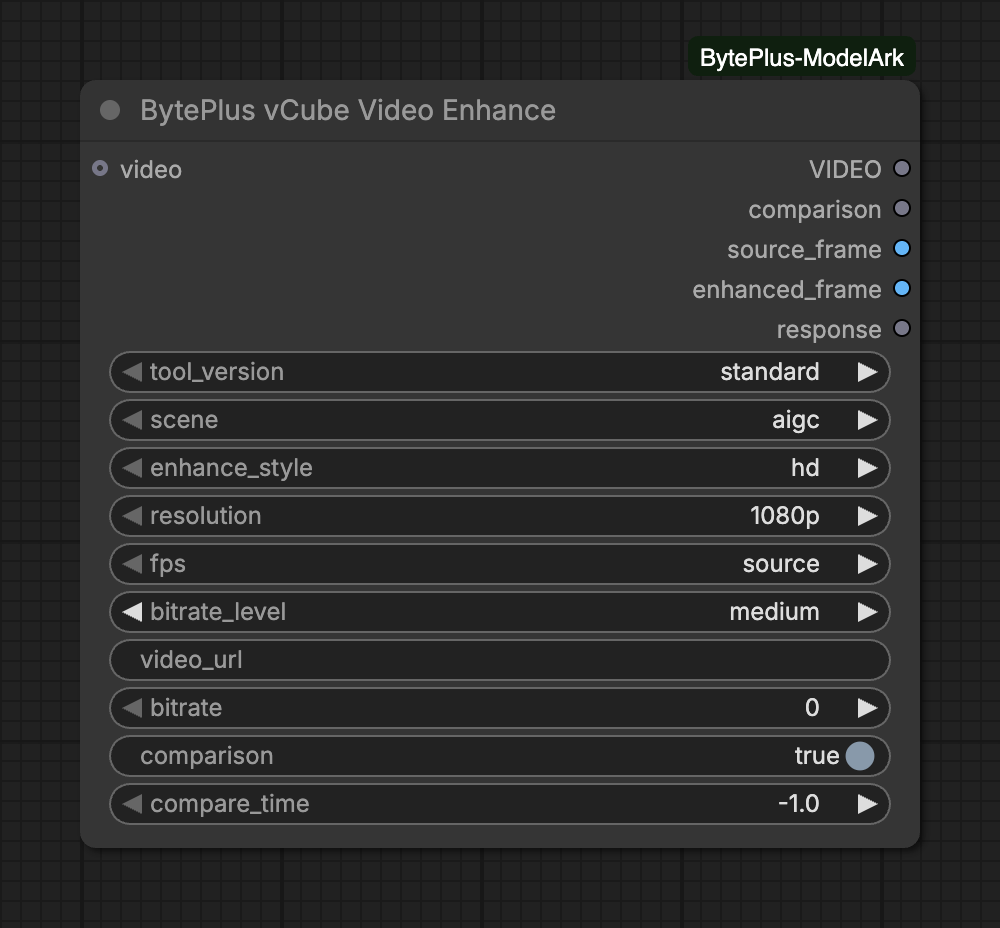
Inputs
Section titled “Inputs”| Input | Type | Default | What it does |
|---|---|---|---|
fps | choice | source | Output frame rate. A higher rate than the source enables AI frame interpolation; a lower one drops frames. 'source' keeps the source rate, up to 120 fps. Rates above 30 fps cost 2x, above 60 fps 4x. |
videooptional | VIDEO | Video to enhance. The source resolution must be at most 2560x1440 (2K); the output size is set by the resolution input. Uploaded to Comfy.org storage first (needs a Comfy.org login); or set video_url instead. |
tool_version is required and decides which of the inputs below appear. 'standard' balances speed and quality with 10+ enhancement algorithms. 'professional' uses 30+ algorithms for cinema-grade restoration, takes about 3x longer and costs 10x more.
| Input | Type | Default | What it does |
|---|---|---|---|
scene | choice | aigc | Preset tuned to the content: 'aigc' for AI-generated footage, 'common' for general video, 'ugc' for compressed phone clips, 'short_series' for drama with faces, 'old_film' for scratched or flickering archive footage. |
enhance_style | choice | hd | 'hd' applies a sharper enhancement; 'natural' reduces the strength for a softer, less sharpened look. |
| Input | Type | Default | What it does |
|---|---|---|---|
enhance_style | choice | hd | 'hd' applies a sharper enhancement; 'natural' reduces the strength for a softer, less sharpened look. |
resolution is required and decides which of the inputs below appear. Output resolution. The short side is set to the chosen level and the long side follows the source aspect ratio. 'source' keeps the source size, 'custom' sets the short side in pixels. Sources wider or taller than about 2.2:1 are billed one resolution tier higher.
No extra inputs for this option.
No extra inputs for this option.
No extra inputs for this option.
No extra inputs for this option.
No extra inputs for this option.
No extra inputs for this option.
| Input | Type | Default | What it does |
|---|---|---|---|
short_side | integer | 1080 | Short side of the output in pixels; the long side follows the source aspect ratio. |
Advanced inputs (5)
| Input | Type | Default | What it does |
|---|---|---|---|
bitrate_level | choice | medium | Target bitrate of the delivered file, scaled to the output resolution and frame rate. |
video_urloptional | text | Public http(s) link to the source video, instead of connecting a video. Nothing is uploaded to Comfy.org. | |
bitrateoptional | integer | 0 | Exact target bitrate in kbps (10-150000); 0 uses bitrate_level. |
comparisonoptional | on/off | on | Also build a before/after comparison video (a divider sweeps across the frame) and a matching frame pair for the Compare Images node. |
compare_timeoptional | number | -1 | Time in seconds of the source_frame / enhanced_frame pair; -1 takes the middle. |
Notes on inputs
Section titled “Notes on inputs”- Source: use
videoorvideo_url, not both. A connected video is uploaded to Comfy.org storage first, so you need a Comfy.org login. Avideo_urllink must be public http(s); it is sent as it is and nothing is uploaded. - Checks before upload: a connected video must be at most 600 seconds long and at most 2560x1440. A
video_urlsource is not checked here, so MediaKit decides. - Tool version:
standardhas ascenepreset and anenhance_style.professionalonly hasenhance_style. - Resolution: pick a preset (
1080p,720p,2k,4k,8k),sourceorcustom.customshowsshort_side(128 to 4320 px). - Bitrate:
bitrate_levelsets the target. Abitrateabove 0 (10 to 150000 kbps) replaces it.
Outputs
Section titled “Outputs”| Output | Type | What it holds |
|---|---|---|
VIDEO | VIDEO | |
comparison | VIDEO | Before (left) and after (right) with a sweeping divider. Nodes using it are skipped when comparison is off. |
source_frame | IMAGE | A source frame scaled to the enhanced size; connect it and enhanced_frame to Compare Images for a slider. |
enhanced_frame | IMAGE | The same moment from the enhanced video. |
response | text | The MediaKit task as JSON. |
Notes on outputs
Section titled “Notes on outputs”comparisonshows your source on the left and the enhanced video on the right, with a divider that sweeps across the frame. Its short side is at most 1080 px.source_frameandenhanced_frameare one matching frame at full enhanced size. Connect both to Compare Images for a slider (Nodes 2.0 only). Setcompare_timeto pick the moment; -1 takes the middle.- With
comparisonoff, or if building it fails, these three outputs are empty and nodes that use them are skipped. The enhancedVIDEOis still returned.
Limits and tips
Section titled “Limits and tips”- Every execution sends a new task, so it bills even with the same settings and the same video. ComfyUI’s own cache still skips the node when nothing changed. A submit that fails with a network error, a timeout, 429 or 5xx is retried with the same task token, so it does not create a second task.
- Billing rules from the tooltips: frame rates above 30 fps cost 2x and above 60 fps 4x, sources wider or taller than about 2.2:1 are billed one resolution tier higher, and
professionaltakes about 3x longer and costs 10x more thanstandard. - The node polls every 10 seconds and has no time limit of its own, because
professionalruns can take a long time. Interrupting a run stops the node’s wait. The node sends no cancel request, so a submitted task may still finish and be billed. - MediaKit result links expire after 24 hours, so the node downloads the result as soon as the task finishes.
- Setting
fpstosourcekeeps the source rate. A higher rate adds AI frame interpolation, a lower one drops frames. - Only the Singapore region (
ap-southeast-1) is available for AI MediaKit.
Common errors
Section titled “Common errors”| Message | What to do |
|---|---|
[BytePlus] No AI MediaKit API key is set. Add it in Settings > BytePlus … |
Add the AI MediaKit key in Settings → BytePlus. ModelArk and Seed Speech keys do not work here. |
[BytePlus] Video resolution must be at most 2560x1440 (2K), got … Scale the video down before enhancing it. |
Scale the video down before enhancing it. |
[BytePlus] The video is …s long; vCube accepts at most 600s. |
Trim the video to 10 minutes or less. |
[BytePlus] Uploading the video to Comfy.org storage failed: … |
Log in to Comfy.org in ComfyUI, or set video_url to a public link. |
[BytePlus] AI MediaKit did not answer within …s. The request may still have been processed and billed; … |
Check the AI MediaKit console before you run it again. |