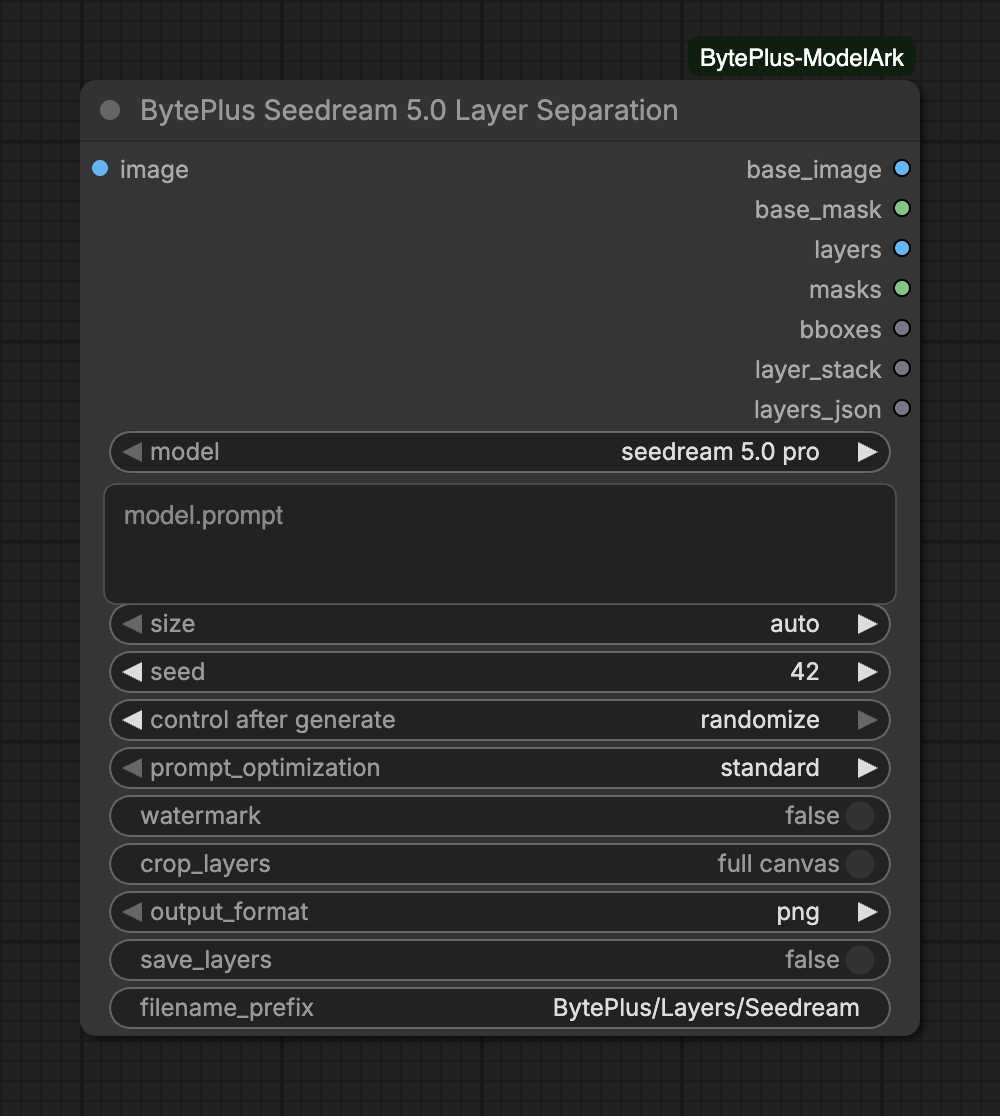
Takes one image and separates it into a base image (the background plate) plus up to 16 transparent layers. Each layer comes with its stacking order, bounding box, name and description. Leave the prompt empty to let the model find the main elements, or describe the elements you want to control the split.
The node bills for every run. It does not save anything itself unless you turn on save_layers: connect Save Image, or send layer_stack to Create Layered Image, to keep the result.
The image to separate. Exactly one image, at least 262,144 pixels (e.g. 512x512), aspect ratio between 1:16 and 16:1. Inputs larger than about 4MP are downscaled before upload.
prompt
text
How to separate the image. Leave empty to auto-detect and separate all major elements. Describe elements in natural language to control the separation, or target exact regions with <bbox>left top right bottom</bbox> tags (coordinates 0-999, relative to the image).
size
choice
auto
Output resolution level. 'auto' follows the input image size (clamped to the 1K-2K range).Choices: auto, 1K, 1.5K, 2K
seed
integer
42
Seed to use for generation.Range: 0–2147483647
crop_layers
on/off
off
Geometry of the layers/masks batch outputs (layer_stack is unaffected and always tight). Full canvas: each layer on a base-sized canvas at its bounding-box position - recompose directly with ImageCompositeMasked. Minimal size: each layer cropped to its bounding box (padded to the largest layer for batching) - much smaller tensors; rebuild placement with Layers From Bounding Boxes using the bboxes output.
Whether to add an "AI generated" watermark to the images.
output_format
choice
png
Format of the base image. Layers are always PNG.Choices: png, jpeg
save_layers
on/off
off
Also save the base image and the original layer PNGs to the output folder.
filename_prefix
text
BytePlus/Layers/Seedream
Output folder prefix for the files written when save_layers is on.
Input
Type
Default
What it does
image
IMAGE
The image to separate. Exactly one image, at least 262,144 pixels (e.g. 512x512), aspect ratio between 1:16 and 16:1. Inputs larger than about 4MP are downscaled before upload.
prompt
text
How to separate the image. Leave empty to auto-detect and separate all major elements. Describe elements in natural language to control the separation, or target exact regions with <bbox>left top right bottom</bbox> tags (coordinates 0-999, relative to the image).
size
choice
auto
Output resolution level. 'auto' follows the input image size (clamped to the 1K-2K range).Choices: auto, 1K, 1.5K, 2K
seed
integer
42
Seed to use for generation.Range: 0–2147483647
crop_layers
on/off
off
Geometry of the layers/masks batch outputs (layer_stack is unaffected and always tight). Full canvas: each layer on a base-sized canvas at its bounding-box position - recompose directly with ImageCompositeMasked. Minimal size: each layer cropped to its bounding box (padded to the largest layer for batching) - much smaller tensors; rebuild placement with Layers From Bounding Boxes using the bboxes output.
Advanced inputs for seedream 5.0 flash
Input
Type
Default
What it does
watermark
on/off
off
Whether to add an "AI generated" watermark to the images.
output_format
choice
png
Format of the base image. Layers are always PNG.Choices: png, jpeg
save_layers
on/off
off
Also save the base image and the original layer PNGs to the output folder.
filename_prefix
text
BytePlus/Layers/Seedream
Output folder prefix for the files written when save_layers is on.
Prompt: an empty prompt separates all major elements. To target one area, add a tag such as <bbox>left top right bottom</bbox>. The coordinates run from 0 to 999 and are relative to the image.
Model: 5.0 Pro adds prompt_optimization. standard gives higher quality, fast shortens generation time. 5.0 Flash has no such setting.
crop_layers:full canvas puts every layer on a canvas the size of the base image, ready for ImageCompositeMasked. minimal size crops each layer to its bounding box, which makes much smaller tensors. Rebuild the placement from the bboxes output with Layers From Bounding Boxes.
Saving files:save_layers writes the base image and the original layer PNGs to the ComfyUI output folder under filename_prefix. output_format sets the format of the base image; layers are always PNG. It is the only setting in the pack that writes files by itself.
The base image (background plate) the layers stack onto.
base_mask
MASK
Transparency of the base image (1 = transparent, LoadImage convention); currently always fully opaque.
layers
IMAGE
Transparent layers ordered bottom to top. Full canvas mode: placed on a black base-sized canvas at their bounding-box position. Minimal size mode: cropped to their bounding box, anchored top-left, padded to the largest layer.
masks
MASK
Per-layer transparency, index-aligned with the layers batch (1 = transparent, LoadImage convention). For ImageCompositeMasked-style compositing, add InvertMask first.
bboxes
BOUNDING_BOX
One placement box per layer, index-aligned with the layers batch (feed both, plus masks, into Layers From Bounding Boxes to rebuild per-layer placement): {x, y, width, height, metadata: {name, desc, z_index, native_size, content_rect, flags}}. content_rect = [left, top, width, height] is the layer's content region within its own frame; it lands on the canvas at the box position plus that offset.
layer_stack
LAYERS
Ready-to-edit layer document for Create Layered Image: the base plate plus each element as its own named, tight-cropped layer at its true position and stacking order. Connect directly, or extend with Add Layer.
layers_json
text
z_index, name, description, bounding box and saved file of the base image and each layer.
layers and masks list the layers from bottom to top and share the same order as bboxes.
masks use the Load Image convention (1 means transparent). Add InvertMask before ImageCompositeMasked.
layer_stack is always tight-cropped, whatever crop_layers says. Connect it to Create Layered Image, or extend it with Add Layer.
base_mask is currently always fully opaque.
layers_json lists the z_index, name, description and bounding box of the base image and each layer, and the saved file of each one when save_layers is on.